Automated System Email Triggers
This article provides a list of all the nCino Incentive Compensation automated system emails sent out to users and explains the trigger(s) for when the email is sent.
Account and password emails
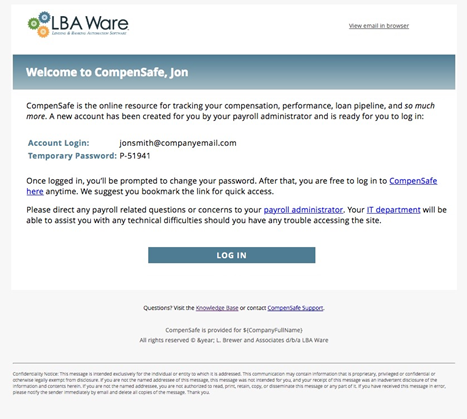
1.New nCino Incentive Compensation User
Email Subject: Welcome to nCino Incentive Compensation
Trigger/Email Description: Email sent to a new nCino Incentive Compensation user when:
- The employee’s account has the “Allow Login and “Active checkboxes checked in nCino Incentive Compensation,
- The employee has not yet logged into nCino Incentive Compensation,
- The employee's account was created within the past 12 months,
- The employee's email address matches the company parameter domain email requirements (allowable .com address),
- The company is active and fully launched in nCino Incentive Compensation, and
- The employee has at least one of the following true in nCino Incentive Compensation:
- Assigned to a non-zero Compensation Schedule and/or,
- Assigned to an Allocation Rule that is not only assigned for "Referring Individual" (RI) and/or,
- Assigned Override Schedule, and/or,
- Assigned access level 3, 4, or 5 (Sub Branch Manager, Branch Manager, Regional Manager, or Executive).
The email will be sent every 7 days for up to 3 times. The temporary password provided in the email will expire if not used in 7 days from sent date.
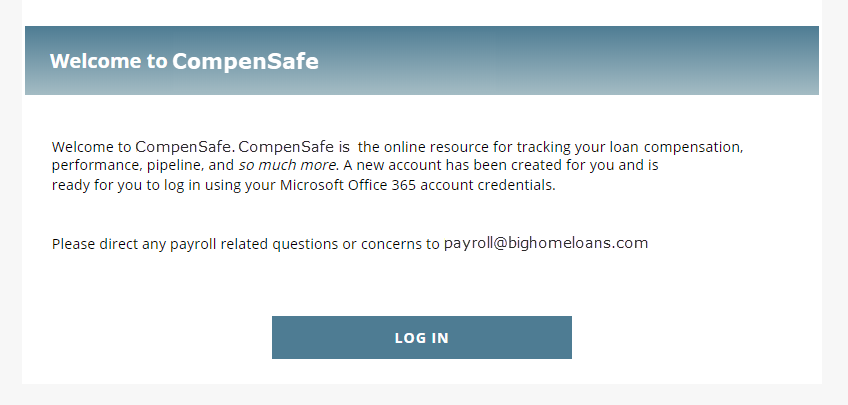
If your nCino Incentive Compensation implementation uses SSO, the Welcome Email will instead look like the following:
2. Password Reset
Email Subject: Reset password request
Trigger/Email Description: Sent to an employee when they click “Forgot Password? on the nCino Incentive Compensation login page. The email provides the user with a link to a password reset page. By default, this link is set to expire in 24 hours. This timeframe can be configured by company.
3. Password Expires Soon
Email Subject: Your password expires in 2 days
Trigger/Email Description: Automatically sent to users two days prior to when their password is set to expire.
4. Password Changed
Email Subject: Your nCino Incentive Compensation password has been changed
Trigger/Email Description: Sent to users after they change their temporary password and create a new one.
5. Account Request
Email Subject: New nCino Incentive Compensation account request
Trigger/Email Description: Email is sent to the payroll/system admin when an employee requests a nCino Incentive Compensation account from the nCino Incentive Compensation login page and the email address provided by the employee is a valid company email domain per the company parameters. A notification email is not sent if the provided email domain is not valid.
6. Account Inactivation
Email Subject: Account inactivation warning
Trigger/Email Description: nCino Incentive Compensation automatically inactivates employee’s nCino Incentive Compensation accounts when their LOS accounts have been inactive for a predetermined number of days. This grace period varies by company and is configured per the company parameters settings in nCino Incentive Compensation. nCino Incentive Compensation sends this email to the payroll and/or system admin when the employee(s) nCino Incentive Compensation accounts are scheduled to be inactivated in 48 hours from the end of the grace period.
7. Employee Branch Change
Email Subject: Employee branch changes
Trigger/Email Description: This email is sent to the payroll and/or system admin when nCino Incentive Compensation detects changes to the employee(s) assigned branch in the LOS. No actions are required since nCino Incentive Compensation automatically updates the employee(s) system profile to reflect the changes.
Action required emails
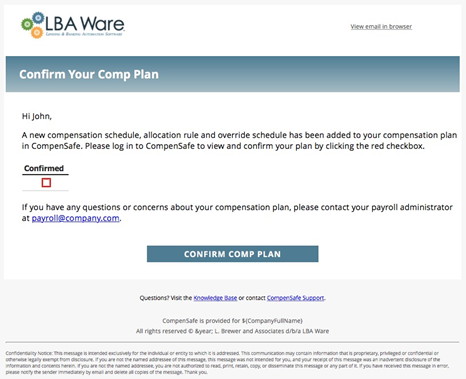
1. Updated Compensation Plan
Email Subject: Your compensation plan has been updated in nCino Incentive Compensation
Trigger/Email Description: This email is sent to active employees when a compensation schedule, allocation rule, override schedule, or document is added or updated to their Comp Plan and has an active start date in nCino Incentive Compensation.
Employees will receive this email as a reminder once a week for 30 days or until the plan changes are confirmed.
2. Compensation Schedule Audit
Email Subject: Employee(s) without active compensation schedule
Trigger/Email Description: nCino Incentive Compensation sends out this audit email once a week to payroll admins to report employee(s) without an active compensation schedule assigned but assigned a job title mapped to a nCino Incentive Compensation position with Comp Plan selected. Employee(s) will be included in the report until their nCino Incentive Compensation account is fixed. For purposes of this email, the system is only looking at compensation schedules (not allocation rules or override schedules). Our recommended fix is to change the employee(s) job title to one that doesn’t require a comp plan or add a “Zero Pay Plan compensation schedule to the employee(s) comp plan.
3. Late Pay Audit
Email Subject: Late pay transaction audit report
Trigger/Email Description: A late pay transaction is when a loan has been locked down for payroll but a change has been made that alters an assigned employee’s payout amount. nCino Incentive Compensation will send this email one time for each occurrence. Possible changes that trigger a late pay transaction include:
- The comp plan for an employee assigned to the loan is changed,
- Changes are made to the loan record in the LOS, causing the compensation amount to differ, or
- The payroll admin adds a manual payroll adjustment with back-dated changes in nCino Incentive Compensation.
4. Change in Loan Status
Email Subject: Please review this loan’s change in status
Trigger/Email Description: nCino Incentive Compensation sends this email to the payroll and/or system admin when nCino Incentive Compensation detects a completed loan has reverted back to a pipeline loan status. A reminder email will get sent once a week until the loan is fixed in nCino Incentive Compensation.
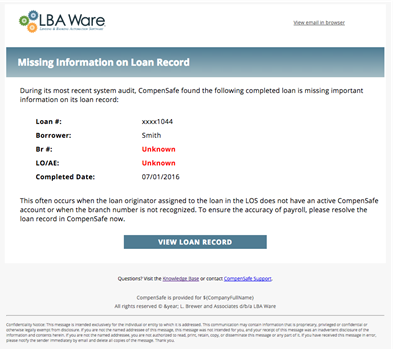
5. Missing Information on Loan Record
Email Subject: Important information missing from loan record
Trigger/Email Description: This audit email is sent out if a completed loan does not have an assigned LO/AE or branch. A reminder email will be sent every day until the error is fixed in nCino Incentive Compensation.
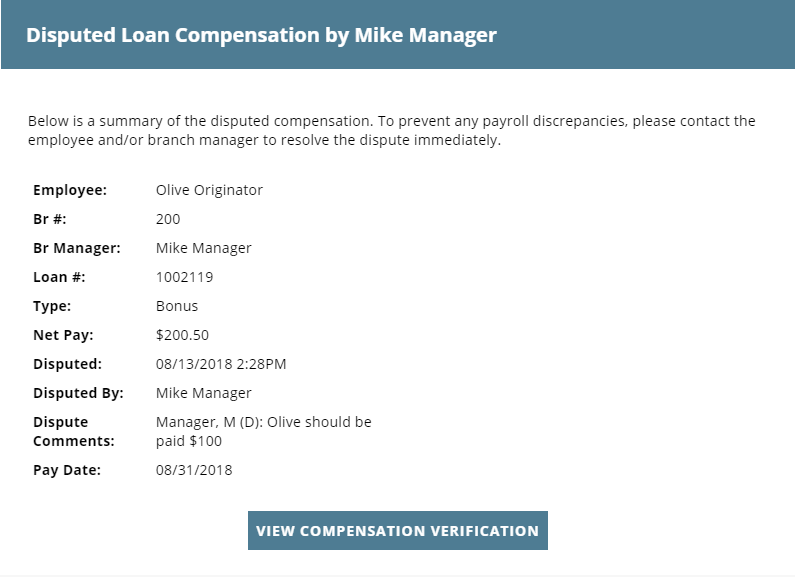
6. Disputed compensation
Email Subject: Disputed compensation for [Employee First Initial. Employee Last Name]
Trigger/Email Description: This email is sent to the payroll/system administrator when an employee has disputed pay on the Verify Pay page. This email will only be sent once per disputed transaction.
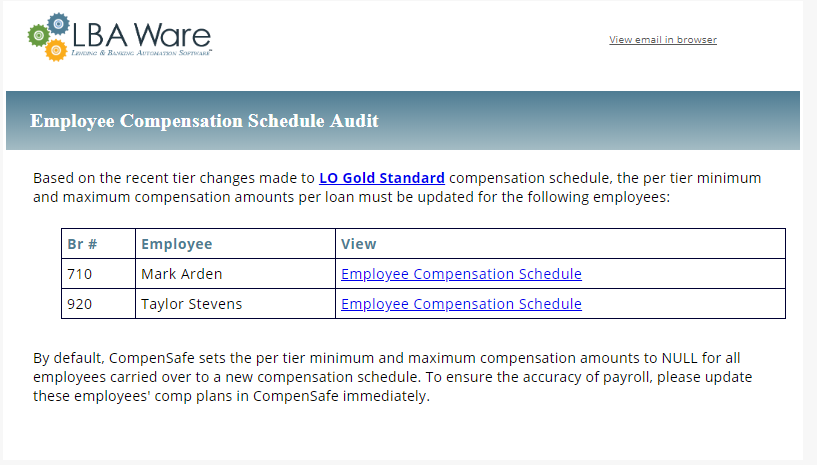
7. Compensation Schedule Tier Audit
Email Subject: Schedule tier change
Trigger/Email Description: This email is sent to the payroll/system admin when the tiers are updated on a compensation schedule that has a minimum and maximum per tier. This email will only be sent once per schedule tier change.
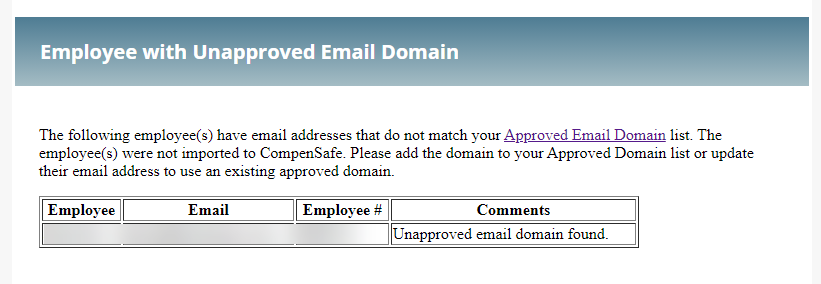
8. Employee with Unapproved Email Domain
Email Subject: Employee with Unapproved Email Domain
Trigger/Email Description: This email is sent to the payroll/system admin when employees are brought in that do not have an email domain on the list of Company Owned Domains.
Confirmation Emails
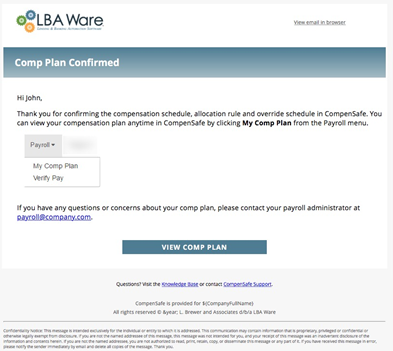
1. Comp Plan Confirmed
Email Subject: Compensation plan confirmation
Trigger/Email Description: Email is sent to employees within 24 hours of the employee confirming changes made to their compensation plan and/or a new document uploaded to their account in nCino Incentive Compensation.
2. Compensation Recalculated
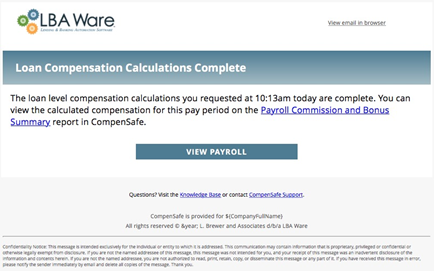
Email Subject: Loan level compensation calculations complete
Trigger/Email Description: Email gets sent to the payroll and/or system admin that requests the recalculation of the current pay period’s loan level compensation once the process is complete.
3. Overrides Recalculated
Email Subject: Override calculations complete
Trigger/Email Description: Email gets sent to the payroll and/or system admin that requests the recalculation of overrides for the current pay period once the process is complete.
4. PTB Complete
Email Subject: Push the Button process complete
Trigger/Email Description: Email gets sent to the payroll and/or system admin that requests nCino Incentive Compensation net unpaid draws from the current pay period once the process is complete.
5. Draws Uploaded
Email Subject: Draw transactions file upload complete
Trigger/Email Description: Confirmation email sent to the payroll and/or system admin after nCino Incentive Compensation successfully processes a CSV file of draw transactions loaded into the system.
Error Emails
1. Adjustment Upload Error
Email Subject: ERROR: Adjustment file upload failed
Trigger/Email Description: Email gets sent to the payroll and/or system admin if the CSV file of credit and/or debit payroll adjustments loaded to nCino Incentive Compensation failed to process completely. The email provides a list of the reason(s) why the adjustments file was rejected. If a CSV file fails, all adjustments are rejected and will have to be added again in a new CSV file.
2. Duplicate Employee Numbers
Email Subject: ERROR: Duplicate employee numbers found
Trigger/Email Description: Audit email that gets sent to the payroll and/or system admin when nCino Incentive Compensation detects duplicate employee numbers assigned to multiple employees.
3. Duplicate Employee Emails
Email Subject: ERROR: Duplicate user account emails found
Trigger/Email Description: Audit email sent to the payroll and/or system admin when nCino Incentive Compensation detects duplicate email addresses used for multiple employees.
4. Invalid Referral Sources
Email Subject: ERROR: Invalid referral source(s) found in LOS
Trigger/Email Description: Custom audit email sent on Mondays to the payroll and/or system admin when nCino Incentive Compensation finds referral source errors on loans during integration with Encompass. This audit checks the following items and will report an error if any are found:
- If Referral Source is LO Referral, then the LO Referral field can't be blank and can't be the same person as the originating LO.
- If Referral Source is Employee Referral, then the Employee Referral field can't be blank and can't be the same person as the originating LO.
- If Referral Source is Self-Sourced, then LO Referral and Employee Referral fields must be blank.
- If Referral Source is Lead Generated, then LO Referral and Employee Referral fields must be blank.
- If Referral Source is Employee Loan, then LO Referral and Employee Referral fields must be blank.
5. Lock down request complete
Email Subject: Lock down request complete
Trigger/Email Description: Email sent to the requesting system administrator after the current payroll period has been successfully locked down. This email also sends to the payroll email address on file when nCino Incentive Compensation automatically locks down the payroll period on the pay date.
Informational Emails
1. Loan Period Complete
Email Subject: Completed loan period
Trigger/Email Description: Sent the morning after the loan period stop date. Sent to employees in a nCino Incentive Compensation with an Access Level of Sub-Branch, Master Branch, or Regional as well as employees who are assigned as Branch Managers.
These emails are not based on production, and will send to the above users after each loan period.
For instance, if a loan period stop date is 9/21, then branch managers will receive this email on 9/22, notifying them the loan period is complete and a new one has begun.
2. Loan Completed
Email Subject: You completed a new loan
Trigger/Email Description: Sent to the LO for Retail/ Brokered loans and to the AE for Wholesale/Correspondent loans tied to a loan once that loan reaches the Completed Date status in nCino Incentive Compensation. The email lists the payroll date for the loan’s compensation and provides link to view the completed loan record.
3. LO Best Production Month
Email Subject: Congratulations! [Month] was your best production month
Trigger/Email Description: Sent to employees on the 6th of each month if the previous calendar month was their best production month. A company parameter can be enabled to collect and send best month information to an executive’s email address.
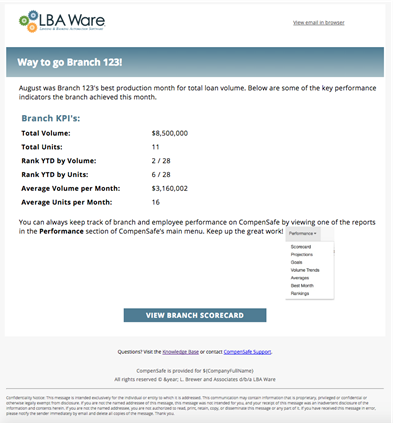
4. Branch Best Production Month
Email Subject: Congratulations! [Month] was Branch [123]’s best production month
Trigger/Email Description: Sent to branch managers on the 6th of each month if the previous calendar month was the best production month.
5. New Loan Product
Email Subject: New loan product found
Trigger/Email Description: Weekly email that’s sent to the payroll and/or system admin if nCino Incentive Compensation detects a new loan product in the LOS. nCino Incentive Compensation uses certain logic to automatically assign LOS loan products to nCino Incentive Compensation loan products. The loan product can be reassigned manually by a payroll and/or system admin from the System Admin menu in nCino Incentive Compensation.
6. New Loan Status
Email Subject: New loan status found
Trigger/Email Description: Weekly email that’s sent to the payroll and/or system admin if nCino Incentive Compensation detects a new loan status in the LOS. nCino Incentive Compensation uses certain logic to automatically assign LOS loan statuses to nCino Incentive Compensation loan statuses. The loan status can be reassigned manually by a payroll and/or system admin from the System Admin menu in nCino Incentive Compensation.
7. Compensation for Payroll Period
Email Subject: View your compensation for the payroll period
Trigger/Email Description: This is not an automated system email, but rather an email that branch managers can send to their branch employees by going to the Branch Payroll menu in nCino Incentive Compensation. The email alerts employees that new loan compensations have been posted to nCino Incentive Compensation and need to be verified. The branch manager has the ability to change the content of the email before sending. This option is only available to users with access level 2 (sub-branch manager status) or above.
8. Monday Morning Metrics
Email Subject: Monday morning metrics
Trigger/Email Description: This email is sent every Monday morning to all loan originators and branch managers providing them with production related KPI’s and pipeline information.
NOTE: Monday Morning Metrics will not send to or include employees that have no loans completed in the current YTD.
9. Initial Loans Completed
Email Subject: [First name Last name] completed 4 loans
Trigger/Email Description: Custom email utilized to notify the payroll and/or system admin once employees complete their first four loans. The email is only triggered when:
- The employee is active,
- The employee has completed all 4 loans within 30 days, and
- The employee has max tier amount of 0.
10.Branch change in nCino Incentive Compensation
Email Subject: Branch change in nCino Incentive Compensation
Trigger/Email Description: Audit email sent to payroll/system administrator each morning listing any changes made to branch records in nCino Incentive Compensation. The email lists the changes made, when they were made, and who made the changes, and lists any override schedules tied to the branch(s). Changes reported:
- New branch record created
- Branch record inactivated
- A branch changed from a Sub-Branch to a Master Branch
- A branch changed from a Master Branch to a Sub-Branch
- A branch moved to a different Master Branch
- A branch moved to a different Region
- Branch manager assigned changed
This email is only sent out if changes have been made to branch records in nCino Incentive Compensation within 24-hour period. Changes are only reported once
11. Employee Changes in nCino Incentive Compensation
Email Subject: Employee Changes in nCino Incentive Compensation
Trigger/Email Description: Audit email sent to payroll/system administrator each morning listing any changes made to employee records in nCino Incentive Compensation. The email provides a list of each change made, when it was made, and who made the change
Changes reported:
• Branch access removed or granted
• Region access removed or granted
• Access level change
• New account created
• Account status change to active or inactive
• Allow logon enabled or disabled
This email is only sent out if changes have been made to employee records in nCino Incentive Compensation within 24-hour period. Changes are only reported once.
12. The Loan Period is Complete
Email Subject: The loan period is complete
Trigger/Email Description: This email is sent one day after the Payroll Period Stop Date to all active employees who have compensation in the applicable payroll period informing them that their Pay Date is approaching and to view their Payroll Snapshot.
13. Unpaid Draw Balance
Email Subject: Unpaid Draw Balance
Trigger/Email Description: This email is sent one day after the Payroll Period Stop Date to all those with a positive draw balance in the current payroll period with a link to view their draw balance.
14. Employees with Unpaid Draw Balance
Email Subject: Employees with Unpaid Draw Balance
Trigger/Email Description: This email is set to all with an Access Level for Compensation equal to Master Branch and/or sub-branch for their branch employees one day after the Payroll Period Stop Date including employees with a draw balance.
15. Compensation Plan Changes
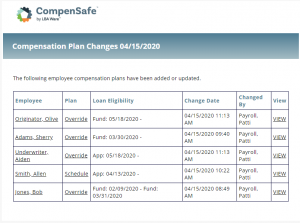
Email Subject: Compensation Plan Changes
Trigger/Email Description: This email is sent to the email listed in the company parameter
Email Compliance. This email is sent once every 24 hours and includes all compensation schedule, allocation, and override additions or updates for employees.
Reminder Emails
1. Compensation Verifications
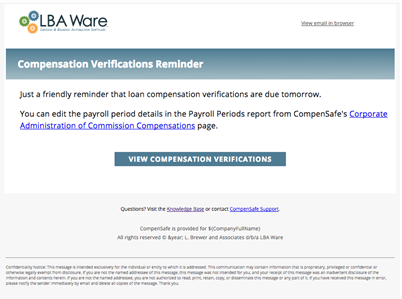
Email Subject: Compensation verifications are due tomorrow
Trigger/Email Description: Reminder email sent to payroll and/or system admins the day before the payroll period verification due date.
2. LO Projections
Email Subject: Time to submit your [Month] projections
Trigger/Email Description: For companies utilizing employee projections in nCino Incentive Compensation, this email is sent to all loan originators on the 22nd of the month reminding them to submit their monthly production projections.
3. Branch Projections
Email Subject: Time to review [Month] projections
Trigger/Email Description: For companies utilizing employee projections in nCino Incentive Compensation, this email is sent to branch managers on the 25th of the month reminding them to review their branch employee’s projections and to submit the branch projections. The email is only sent out to active branch managers of retail and joint venture branches with at least 1 active LO assigned to the branch.