Integration Log Overview
The Integration Log provides an overview of recent integration activity sorted by type and date. This makes it easier to ensure that information is being brought into integration as expected.
Minimum Compensation Access Level Required: Executive
Access the Report
To access this report,
- From the nCino Incentive Compensation menu, click Report ▼.
- In that dropdown, click All.
- Click the System Admin category header.
- Click the Integration Log report.
OR
- From the nCino Incentive Compensation menu, click the Gear icon.
- In the dropdown, click System Admin.
- Click the Integration header.
- Click the Integration Log report.
Read the Report
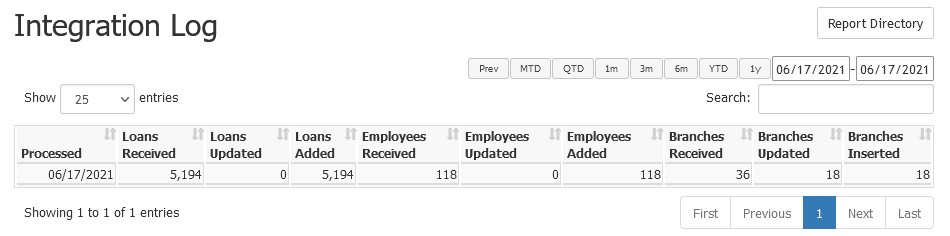
This report includes the following columns:
- Processed: Date the data was received and processed from integration
- Loans Received: Number of loans received
- Loans Updated: Number of loans updated
- Loans Added: Number of new loans added
- Employees Received: Number of employees received
- Employees Updated: Number of employees updated
- Employees Added: Number of new employees added
- Branches Received: Number of branches received
- Branches Updated: Number of branches updated
- Branches Inserted: Number of new branches added
Exporting the Report
To export this page, click the export icon.

This export includes the same columns available in the online version.
Notes About Integration
The total number of records we receive and the sum of records added or updated will not always equal each other. This is because a number of things can cause records to not be considered for updating or inserting, such as:
- Loan record is canceled, denied, or withdrawn (CDW) and does not already exist in nCino Incentive Compensation.
- Loan record does not have a loan number.
- Loan record is in a region or branch that is on your company’s region or branch exclusion lists.
- Employee record does not have an employee number.
- Employee record does not have an email address.
- Employee does not have a unique employee number or email address.
- Branch does not have a branch number.