Pull Through by LO Report
The Pull Through by LO report provides users with an overview of the pull through and fall out of individual LOs within the chosen time frame.
Minimum Compensation Access Level Required: Own Production
NOTE: Features referenced in this article are no longer included in nCino Incentive Compensation. Enhanced versions of these features are included in nCino, Inc.’s turnkey Business Intelligence and Reporting platform: nCino Mortgage Analytics. You can find more information about nCino Mortgage Analytics or schedule a demo on our web site.
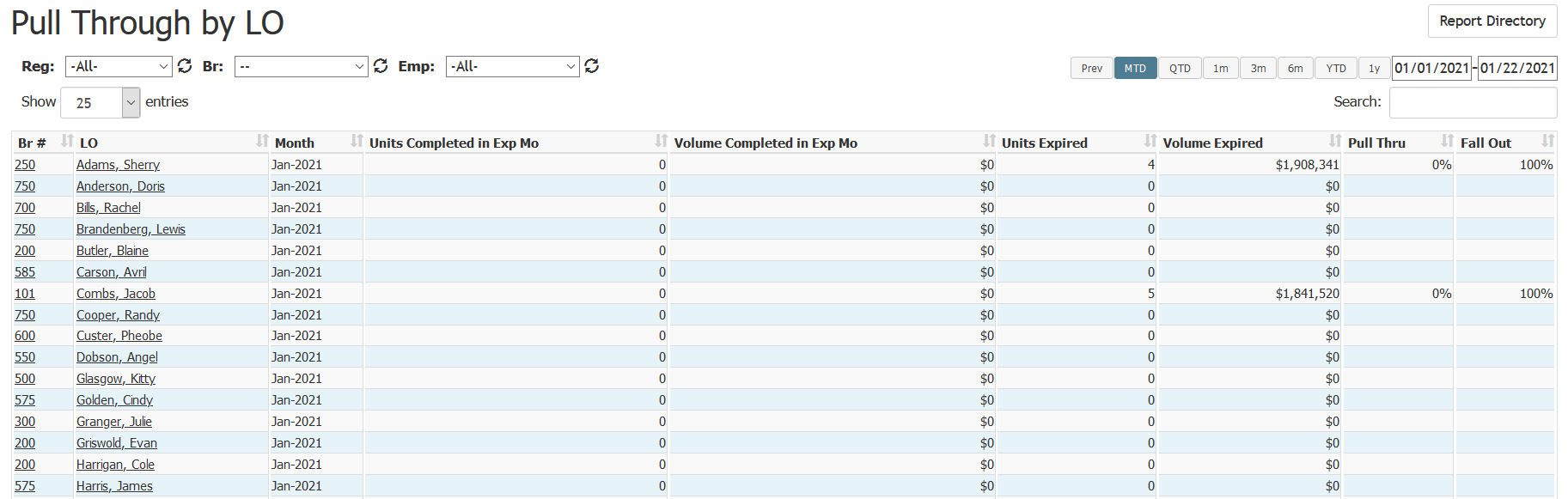
This report includes the following columns:
- Br #: Branch number of the employee. Click this to go to that branch’s details page
- LO: Name of the employee. Click this to go to that employee’s details page
- Month: Month being reported
- Units Completed in Exp Mo: Number of units completed in that month
- Volume Completed in Exp Mo: Loan volume completed in that month
- Units Expired: Number of loans expired in that month
- Volume Expired: Total loan volume expired in that month
- Pull Thru: Percentage of loans in the LO’s pipeline that completed in that month
- Fall Out: Percentage of loans in the LO’s pipeline that were cancelled, denied, or withdrawn in that month

See also: