Send Email Notification to Branch Employees Tool
Branch Managers have access to the “Send Email Notification to Branch Employees” tool, which allows for quick and easy communication with all branch employees. This article outlines how to use the tool as well as the options available.
Accessing the Tool
To access the Send Email Notification to Branch Employees tool,
-
From the nCino Incentive Compensation menu, click "Payroll ▼".
-
Click "Br Payroll Menu".
-
Under the “Payroll Process” header, click “Send Email Notification to Branch Employees“
Using the Tool
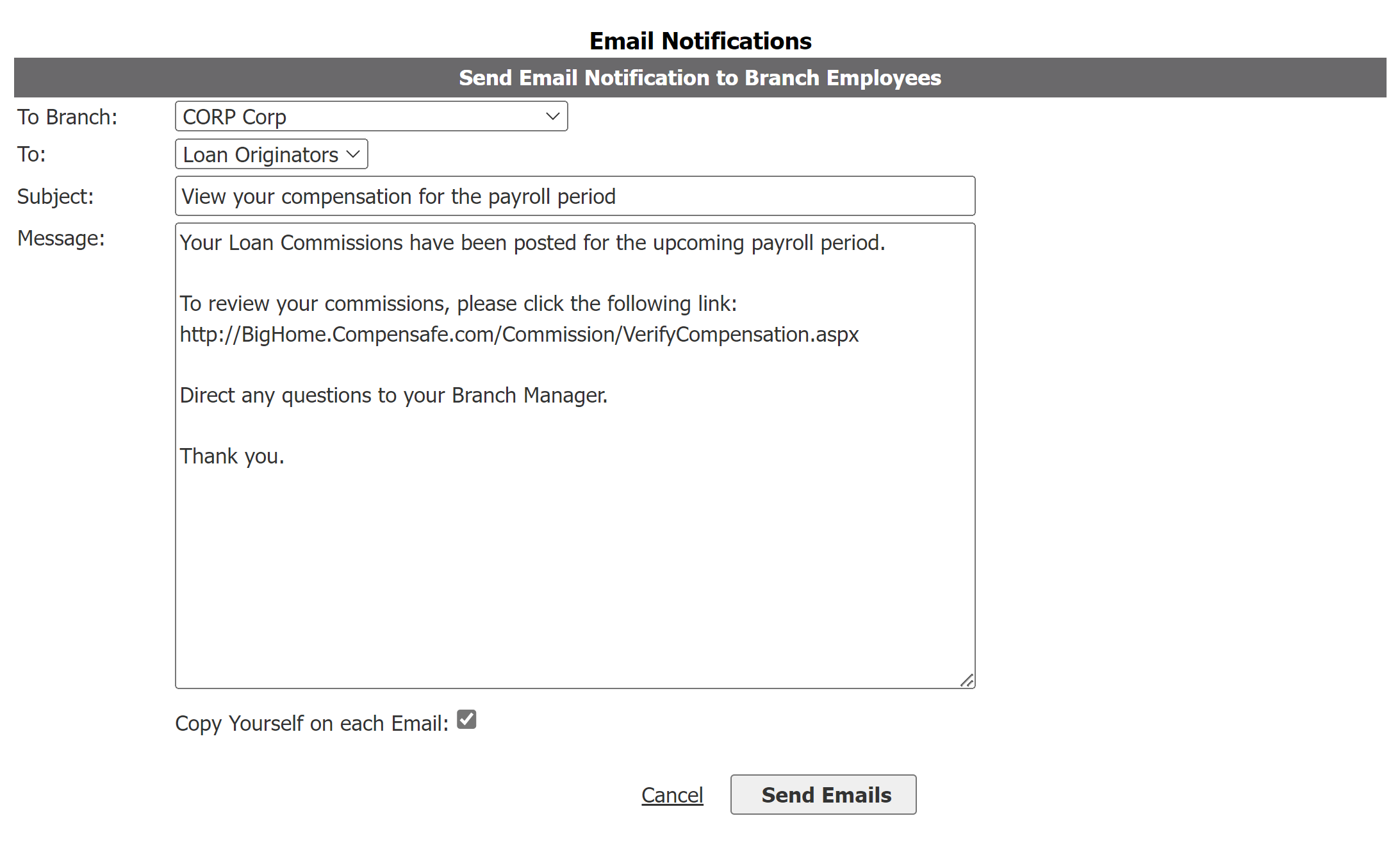
This tool has the following sections:
-
To Branch: Used to select which branch to send emails to.
-
"-All-" sends emails to employees in all branches.
-
Selecting a single branch will only send emails to employees in that branch.
-
-
To: Used to select which employees of the branch will receive the email.
-
"Loan Originators" sends emails to employees with the Loan Originator nCino Incentive Compensation Position.
-
"Processors" sends emails to employees with the Processor nCino Incentive Compensation Position.
-
"Managers" sends emails to employees where the following are true:
-
They are assigned as branch manager to an active branch.
-
They have a nCino Incentive Compensation Position that is a type of manager OR have Access Level of Sub-Branch (AL-2) or higher.
-
-
"All Users" sends emails to all employees, regardless of position.
-
-
Subject: Text field. Used to enter the subject line of the email.
-
Message: Text field. Used to enter the message in the body of the email.
-
Copy Yourself on each Email: If this is selected, you will receive a copy of all emails sent. Note that this could be a large number of emails if you are sending to a large group of employees.
"To" Field Logic Details
This section describes in detail how the "To" field selects which employees will be sent the email when a certain position is chosen.
-
Loan Originators
-
Must be an active employee.
-
Must be allowed to log in.
-
Must belong to a branch or sub-branch.
-
Must have one of the following nCino Incentive Compensation positions:
-
Account Executive
-
Area Manager – Producing
-
Branch Manager – Producing
-
Loan Originator
-
Sale Manager – Producing
-
-
-
Processors
-
Must be an active employee.
-
Must be allowed to log in.
-
Must belong to a branch or sub-branch.
-
Must have one of the following nCino Incentive Compensation positions:
-
Loan Originator Assistant
-
Processor
-
-
-
Managers (must match one of the following)
-
Must be an active employee.
-
Must be allowed to log in.
-
Must belong to a branch or sub-branch.
-
Home branch is active.
-
Must have an access level of sub-branch or higher.
OR
-
Must be an active employee.
-
Must be allowed to log in.
-
Must belong to a branch or sub-branch.
-
Home branch is active.
-
Must have one of the following nCino Incentive Compensation positions.
-
Area Manager – Non-Producing
-
Area Manager – Producing
-
Branch Manager – Non-Producing
-
Branch Manager – Producing
-
Division Manager
-
Region Manager
-
-
-
All Users (must match one of the following)
-
Must be an active employee.
-
Must be allowed to log in.
-
Must belong to a branch or sub-branch.
-
Home branch is active.
-
Must have an assigned schedule, allocation, or incentive plan.
OR
-
Must be an active employee.
-
Must be allowed to log in.
-
Must belong to a branch or sub-branch.
-
Home branch is active.
-
Must have Access Level of Own Production or higher.
-