Understand the "Exclude from" or "Include in" Min/Max Cap Allocation Option
One of the options for Allocation Rules is to establish whether or not the Allocation Rule is included in or excluded from the Min & Max Caps.
The "Include in Min & Max Cap" or "Exclude in Min & Max Cap" selection on the Allocation Rule determines the TIMING of when the Allocation amount is calculated versus when the Minimum or Maximum Cap calculation is checked for the LO.
The LO's commission is calculated as a running balance; starting with their base Commission Schedule and then applying all applicable allocation rules in order. If the LO's min or max cap must be applied (ie the Loan Amount and base commission level is such that the LO's minimum cap is above their calculated commission or the LO's maximum cap is below their calculated commission), then the timing of when the Allocation rules are run is important as it affects the bottom line commission for the LO.
Example: 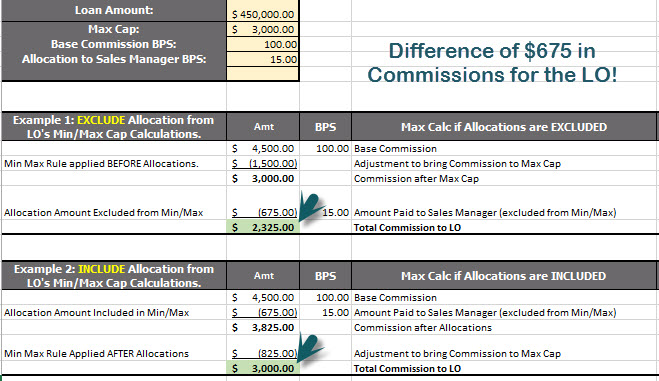
It is easier to explain if you review the example above that shows the affect of a 15 BPS Shared Split Allocation paid from the LO to the Sales Manager on the loan.In this example, the LO's max is set at $3,000 and his 100 BPS Commission hits this max because he closes a $450,000 loan (100 BPS of $450,000=$4,500).
If the Sales Manager’s Allocation Rule is set to be Excluded from the Min/Max Cap Calculations, then the Sales Manager’s 15 BPS Adjustment is done AFTER the LO’s Max Cap adjustment is applied. So the LO’s commission is adjusted to $3,000 (his max) and THEN the 15 BPS is subtracted, leaving the LO with $2,325 in Commissions.
If the Sales Managers’s Allocation Rule is set to be Included in the Min/Max Cap Calculations, then the Sales Manager’s 15 BPS Adjustment is done BEFORE the LO’s Max Cap Adjustment. The Lo’s Commission is 4,500 minus the 15 BPS and then it is adjusted further to the $3,000 max amount. The LO’s final commission in this case is $3,000.
You can see that the Include In / Exclude From Max & Min Caps is an option that can make a significant difference in the net Commission paid to the LO. If you have questions, please contact us at https://incentivehelp.ncino.com/hc/en-us.
Minimum Access Level = Executive Administrator