Branch Details
The Branch Details report includes information about the branches in your company.
Minimum Compensation Access Level Required: Executive
Accessing the Report
To access this report,
- From the nCino Incentive Compensation menu, click “Report ▼ .
- Click “All“.
- Click the “Directory header.
- Click the “Branch Details report.
Reading the Report
This report includes the following filters:
- Branch Status:
- Active: Displays active branches.
- Inactive: Displays inactive branches.
- All: Displays both active and inactive branches.
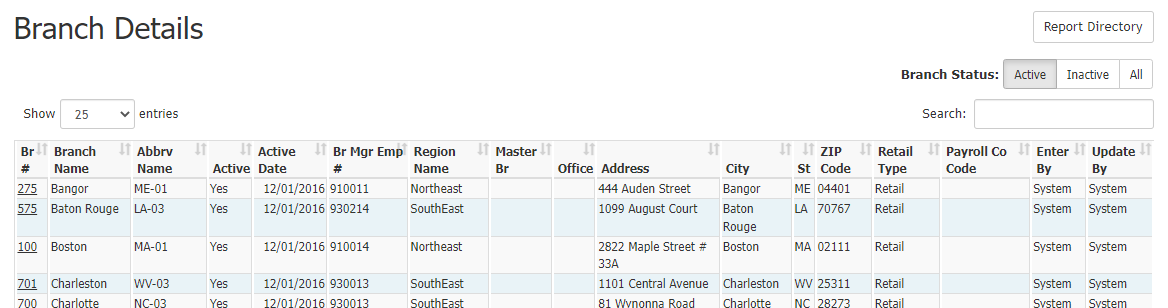
This report includes the following columns:
- Br #: Branch number. Click to view the branch’s individual details page.
- Branch Name: Full name of the branch.
- Abbrv Name: Abbreviation of the branch.
- Active: Branch status.
- Active Date: Branch activation date.
- Br Mgr Emp #: Branch manager’s employee number.
- Region Name: Full name of branch’s region.
- Master Br: Master branch number.
- Office: Phone number.
- Address: Street address.
- City: City.
- St: State.
- ZIP Code: ZIP Code.
- Retail Type: Channel type.
- Payroll Co Code: Company code used in payroll exports.
- Enter By: User who entered the branch data.
- Update By: User who last updated the branch data.
Exporting the Report
To export this page, click the export icon.

This export includes all columns present in the online version, as well as the following additional columns:
- Inactive Date: Date the branch was inactivated, if present.
- Address 2: Second line of the street address.
- Payroll Company Code: Company code used in payroll exports (identical to “Payroll Co Code online).
- GL Branch/Company Code: General ledger branch/company code.
- GL Cost Center Code: General Ledger cost center code.
- Dept Code Loan Originators: Department code for loan originators.
- Dept Code Loan Originators Assistants: Department code for loan originator assistants.
- Payroll Commission Pay Code: Commission pay code used in payroll exports.
See also: