Company Directory
The Company Directory lists all employees, branches, and regions in your company.
Access the Directory
To access the Company Directory, click the book icon ( ) in the nCino Incentive Compensation menu.
Read the Directory
Users can select which section to view by clicking the corresponding button at the top of the page.
Region Section
This section includes the following filter:
-
Region Status: Used to filter regions based on their active or inactive status.

This section contains the following columns:
-
Region: Full name of the region. Click to view region details.
-
Short Name: Region short name.
-
Reg #: Region number. Can include digits and letters.
-
RVP: Regional vice president. Sometimes called "Region Manager". Click to view employee details.
-
# Branches: Number of branches in the region.
-
# Staff: Number of employees in the region.
-
# Lns YTD: Number of loans completed in the region for the current calendar year to date.
-
Edit: Link to edit the region details.
Branch Section
This section includes the following filters:
-
Region: Used to filter which branches are shown based on the region of the branch.
-
Status: Used to filter branches based on their active status.
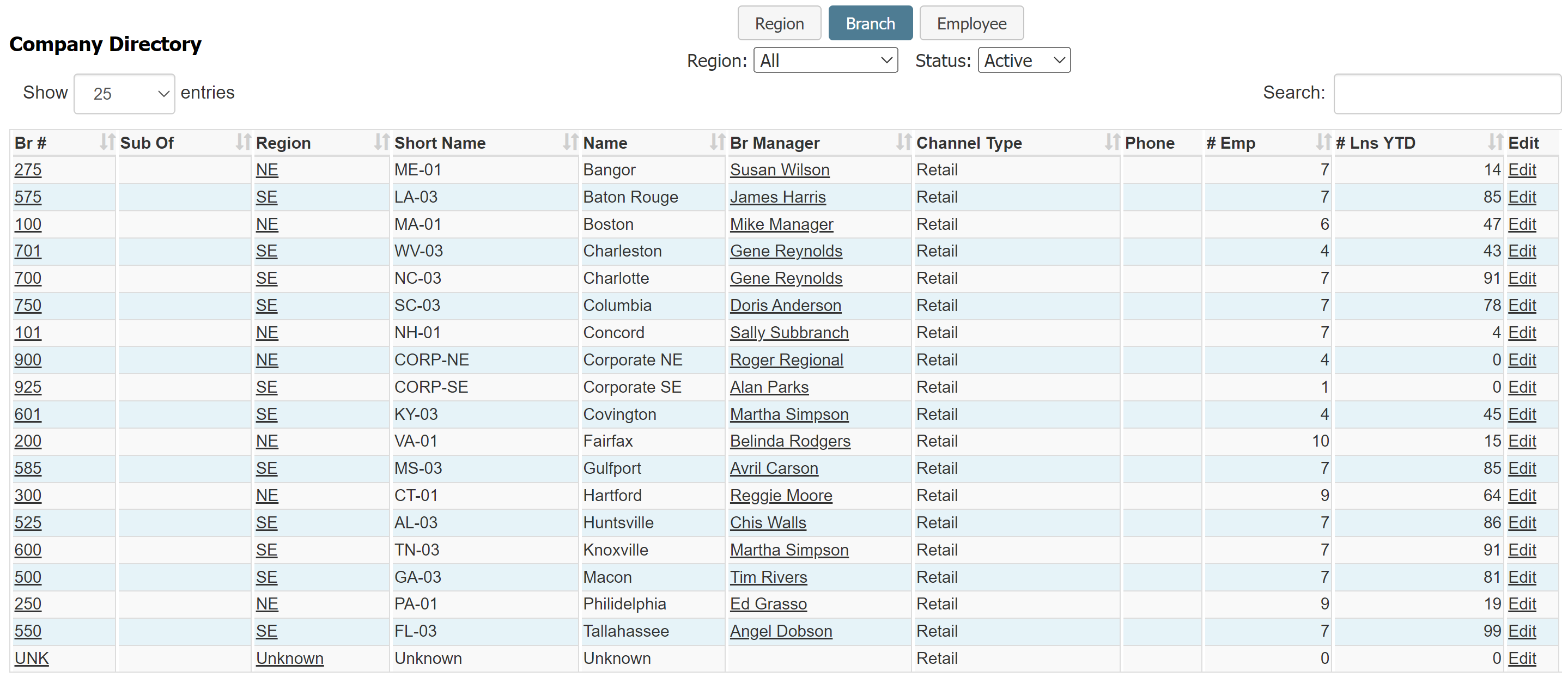
This section contains the following columns:
-
Br #: Branch number. Click to view branch details.
-
Sub Of: Branch that this branch reports to, if any.
-
Region: Region number for the region this branch is in.
-
Short Name: Branch short name.
-
Name: Branch name.
-
Br Manager: Branch manager. Click to view employee details.
-
Channel Type: Loan channel the branch uses.
-
Phone: Branch office phone number.
-
# Emp: Number of employees in the branch.
-
# Lns YTD: Number of loans completed in the branch for the current calendar year to date.
-
Edit: Link to edit the branch details.
Employee Section
This section includes the following filters:
-
Branch: Used to filter employees based on their home branch.
-
Status: Used to filter employees based on their active status.
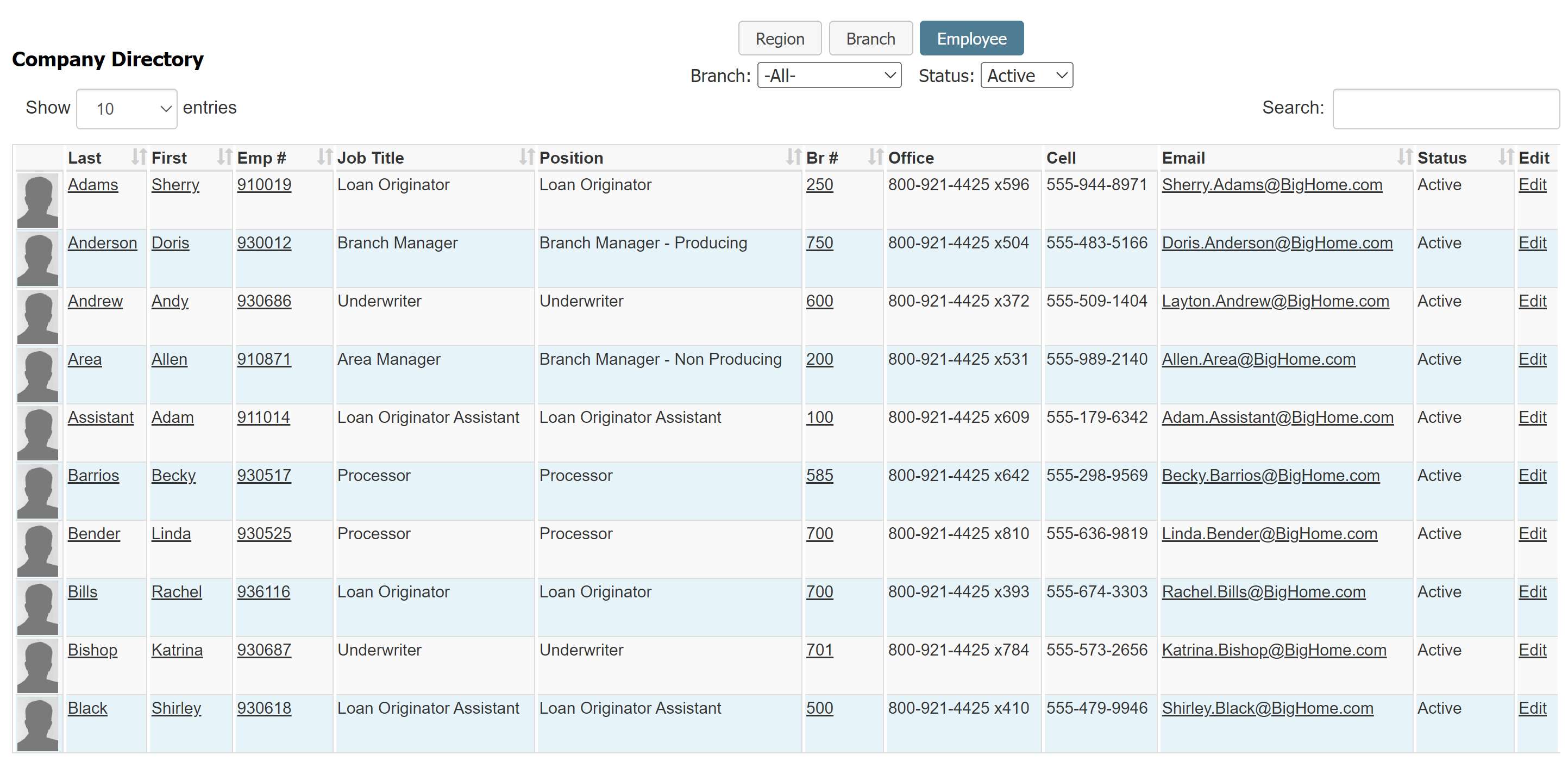
This section contains the following columns:
-
[Image]: Employee's uploaded profile picture. If they have not uploaded a picture, the placeholder will display instead.
-
Last: Employee last name. Click to view employee details.
-
First: Employee first name. Click to view employee details.
-
Emp #: Unique employee number. Click to view employee details.
-
Job Title: Employee job title.
-
Position: Employee position that corresponds with their job title. Specific to nCino Incentive Compensation.
-
Br #: Branch number for the employee's home branch. Click to view branch details.
-
Office: Employee's office phone number.
-
Cell: Employee's cell phone number.
-
Email: Employee's email address.
-
Status: Employee's active status.
-
Edit: Link to edit the employee details.
Export the Directory
To export this page, click the export icon.

Exports vary depending on the section selected.
Region Section
The region export contains all information in the online version.
Branch Section
The branch export contains all information in the online version, as well as the following:
-
Alt Br #: Alternate branch number.
Employee Section
The employee export contains information in the online version, with the following changes:
-
Employee: Employee's full name. Replaces "Last" and "First" from the online version.
-
Address: Employee's branch address.
-
City: Employee's branch city.
-
St: Employee's branch state abbreviation.
-
ALT Email: Alternate email address.
Position is not included in the Employee section export.
See Also: