Note: Schedules and Allocations were retired in March 2025. For more information, refer to Schedule and Allocation Retirement Next Steps.
Compensation Schedule Overview by Employee Report
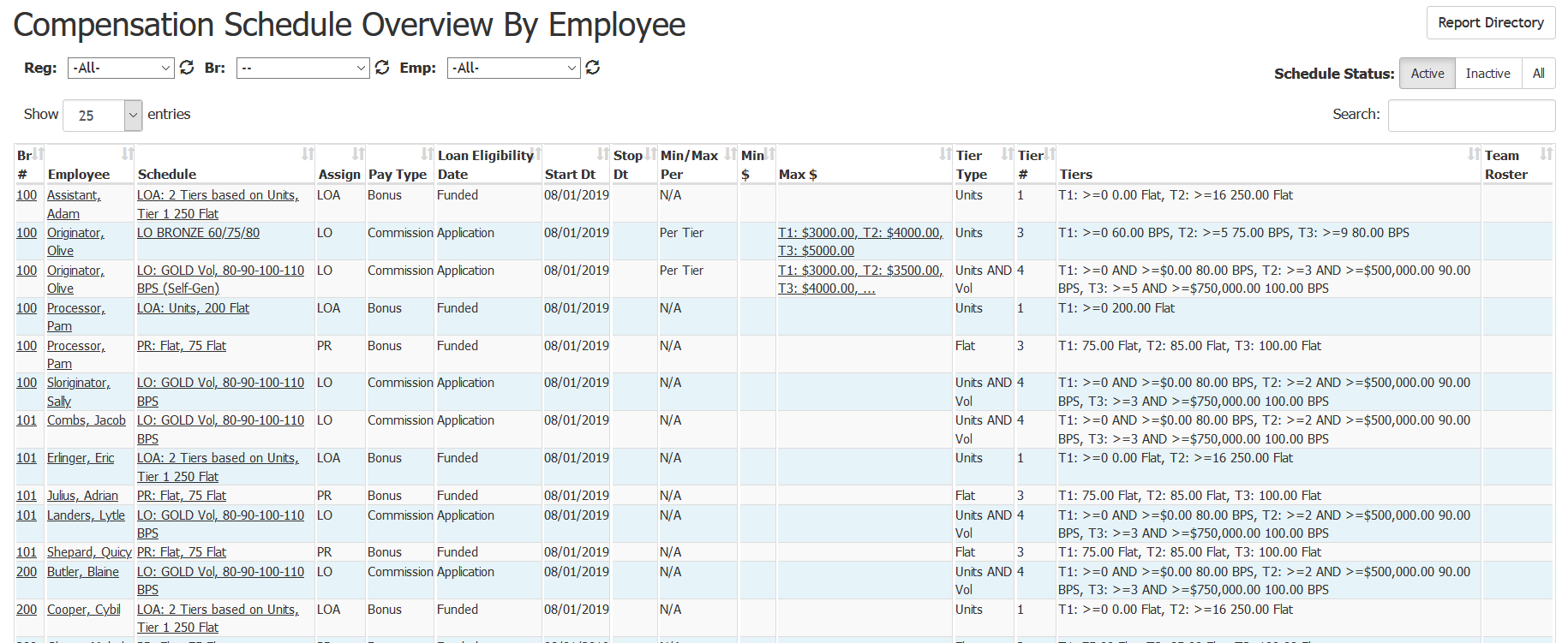
The Compensation Schedule Overview by Employee Report provides a list of all employees who have a compensation schedule assigned to them. This list includes some insight into when the plan begins, any minimum or maximum limits and type of pay the employee will receive.
Minimum Compensation Access Level Required: Own Production
- Region, Branch, and Employee Filtering Tool: Used to filter the information on the report. For information on using this tool, refer to How do I filter reports?.
- This report includes schedule status selector buttons. These buttons on the top right allow you to choose which schedules are visible in the report. You can have only active schedules, only inactive schedules, or both at once.
NOTE: The amount of information visible on this report depends on your Access Level.
- Br#: Employee s branch number. Click to view branch details.
- Employee: The name of the employee. Click to view employee details.
- Schedule: The name of the schedule. Click to view schedule details.
- Assign: Employee s assignment on the loan.
- Pay Type: Commission or bonus.
- Loan Eligibility Date: A loan must meet a certain milestone (e.g. “Funded ) on or after this date in order to apply to this schedule s calculations.
- Start Dt: The date this schedule starts for this employee..
- Min/Max Per: Whether the Min/Max is per tier, or for all tiers.
- Min $: The minimum dollar amount per tier or for all tiers (see Min/Max Per). If there are separate values per tier, click to view a list of all values.
- Max $: The maximum dollar amount per tier or for all tiers (see Min/Max Per). If there are separate values per tier, click to view a list of all values.
- Tier Type: How the tiers of the schedule are determined (by volume, units, both volume and units, or a flat amount).
- Tier #: Total number of tiers in the schedule.
- Tiers: A brief summary of the tiers and their conditions.
- Team Roster: Lists the name of the team members whose volume and/or units are being used for tier determination for the individual s pay.
To export this page, click the export icon at the top right.

The export contains all of the columns present in the online version and the following additional columns:
- Emp #: Employee number of the current employee.
- St: State of residence for the employee.
- Tier (1 3 & last): Brief description of the tier s payout.
- Entered: Date when the schedule was entered.
- By: Author of the schedule.
- Emp Notification: Date the employee was notified of the new schedule.
- Emp Confirmation: Date the employee confirmed the schedule.
- Last Updated: Date the schedule was last updated.
- Updated By: User who last update the schedule.