Employee Details Report
The Employee Details report provides an overview of details for all employees in your company's nCino Incentive Compensation site. This allows you to quickly evaluate employee profiles.
Minimum Compensation Access Level Required: Executive
Access the Report
To access this report,
- From the nCino Incentive Compensation menu, click Report ▼.
- Click All.
- Click the Directory header.
- Click the Employee Details report.
Read the Report
This report includes the following filter option:
- Employee Status: Used to select what status the employees included in the report have.
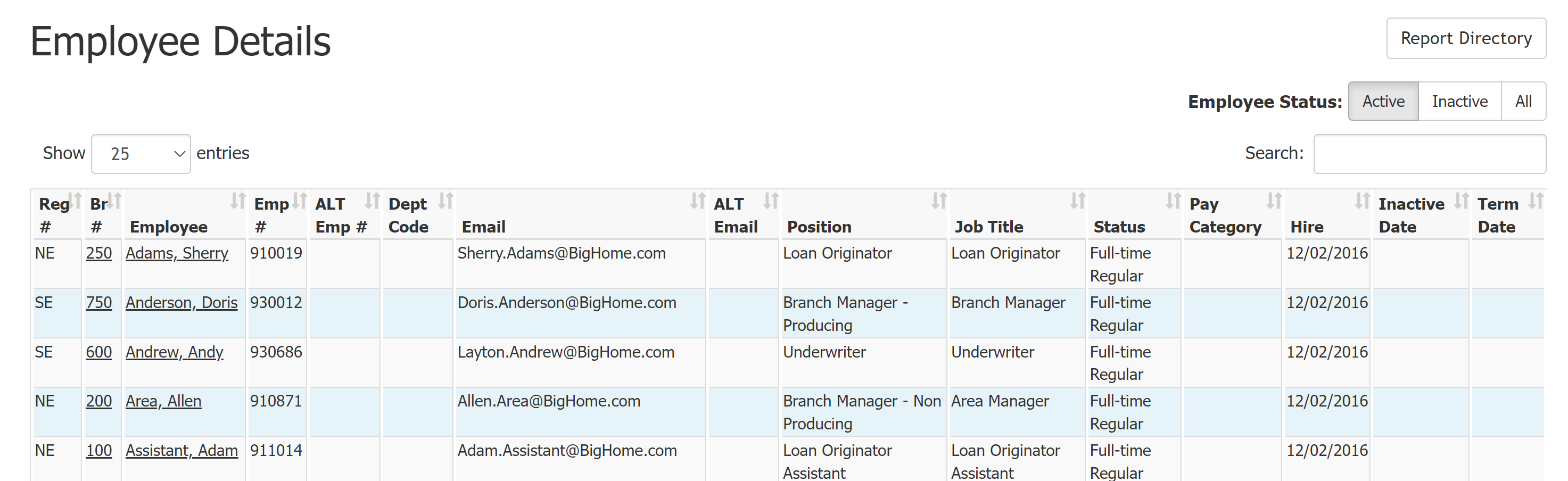
This report includes the following columns:
-
Reg #: Region number.
-
Br #: Branch number. Click to view branch details.
-
Employee: Employee name. Click to view employee details.
-
Emp #: Employee number.
-
ALT Emp #: Alternate employee number.
-
Dept Code: Department code.
-
Email: Primary Employee email address.
-
ALT Email: Alternate employee email address.
-
Position: Employee position in nCino Incentive Compensation.
-
Job Title: Employee job title.
-
Status: Employment status.
-
Pay Category: Whether the employee is paid salary or hourly.
-
Hire: Hire date.
-
Inactive Date: Date employee was inactivated.
-
Term Date: Date employee was terminated.
Export the Report
To export this page, click the export icon.

The export includes all data available in the online version of the report as well as the following:
-
Last Name: Employee's last name.
-
First Name: Employee's first name.
-
NMLS: Employee NMLS number.
-
FLSA Status: Employee FLSA status.
-
Dept Code: Department code for the department the employee works in.
-
Office: Office phone number.
-
Cell: Cell phone number.
-
Fax: Fax number.
-
Reports To: Person who this employee reports to.
-
Reports To Emp #: Employee number of the person this employee reports to.
-
Address: Address of the employee's office.
-
Address 2: Second line of address.
-
City: City where employee's office is located.
-
State: Abbreviation of the state where the office is located.
-
ZIP Code: Office ZIP Code.
-
Active: Indicates if user is currently active.
-
Allow Login: Indicates if user is currently allowed to log in.
See also: