Loan Record Details Page
The Loan Record Details page is the central page for the details surrounding an individual loan.
Minimum Compensation Access Level: Own Production
Accessing a Loan Details Page
A loan's Details page can be accessed by clicking the loan number in almost any location in nCino Incentive Compensation that it is present.
However, if you are looking for a specific loan, you can use the Search feature as follows:
- In the nCino Incentive Compensation menu, click the Magnifying Glass Icon(
 )
) - In the screen that appears, enter your search term (loan number, borrower name, LO name, etc), and click the corresponding Search Loans for [Loan Number] button.
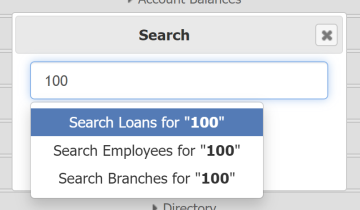
- This will take you to the search results screen. From here, you will be able to click the Loan Number that corresponds to your loan.
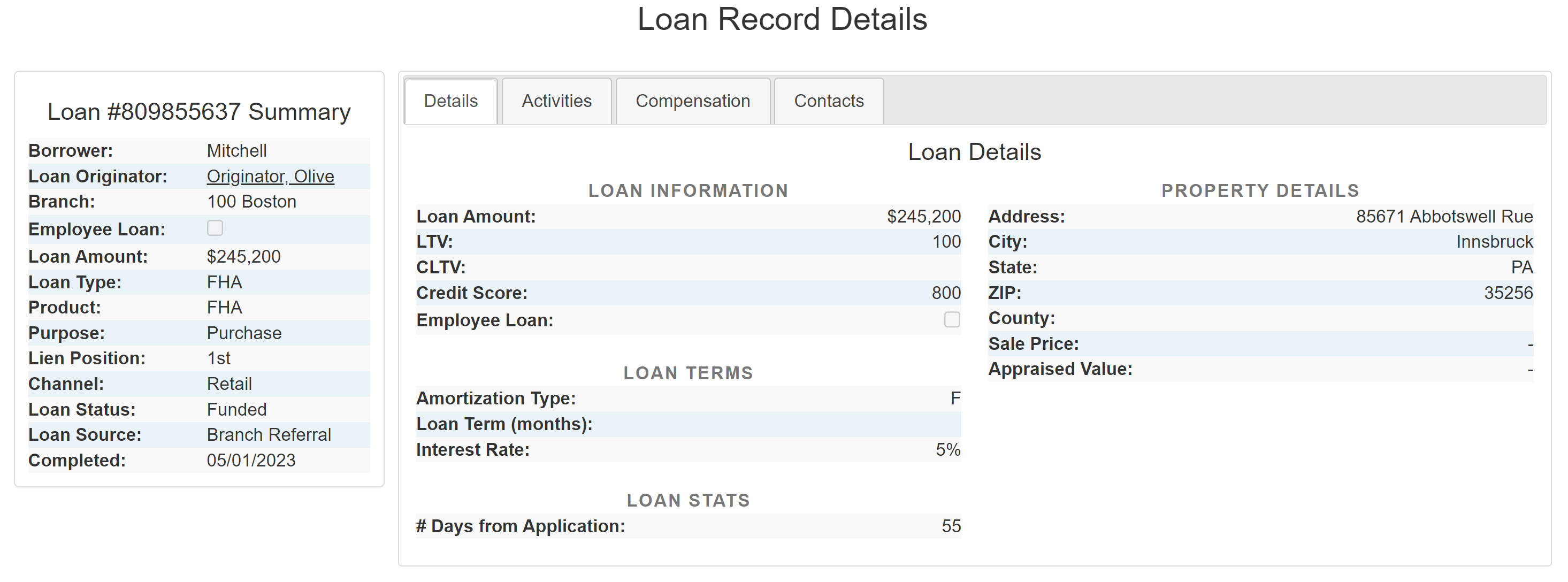
Summary & Details Tab
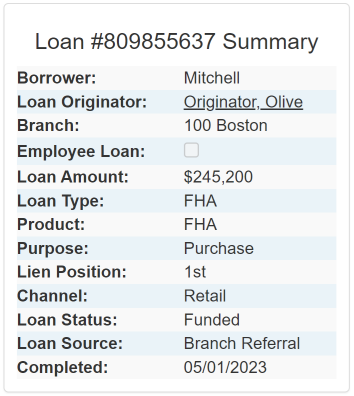
The Loan Summary pane is visible at all times on the left side of the Loan Details screen, and includes key information about the loan. This information is as follows:
- Borrower: Last name of the borrower.
- Loan Originator: Full name of the loan originator. Click to go to their employee details page.
- Branch: Branch the loan was posted in.
- Employee Loan: Checkbox indicating if the loan is an employee loan.
- Loan Amount: Volume of the loan.
- Loan Type: Type of loan.
- Product: Type of mortgage program of the loan.
- Purpose: Loan purpose. (e.g. Purchase, Refinance, Construction).
- Lien Position: Lien position on the loan.
- Channel: Channel the loan originates in. (e.g. retail, wholesale, correspondent, brokered).
- Loan Status: Status of the loan in the pipeline.
- Loan Source: Referral source of the loan.
- Lock Status: Status of the loan’s interest rate lock.
Details Tab
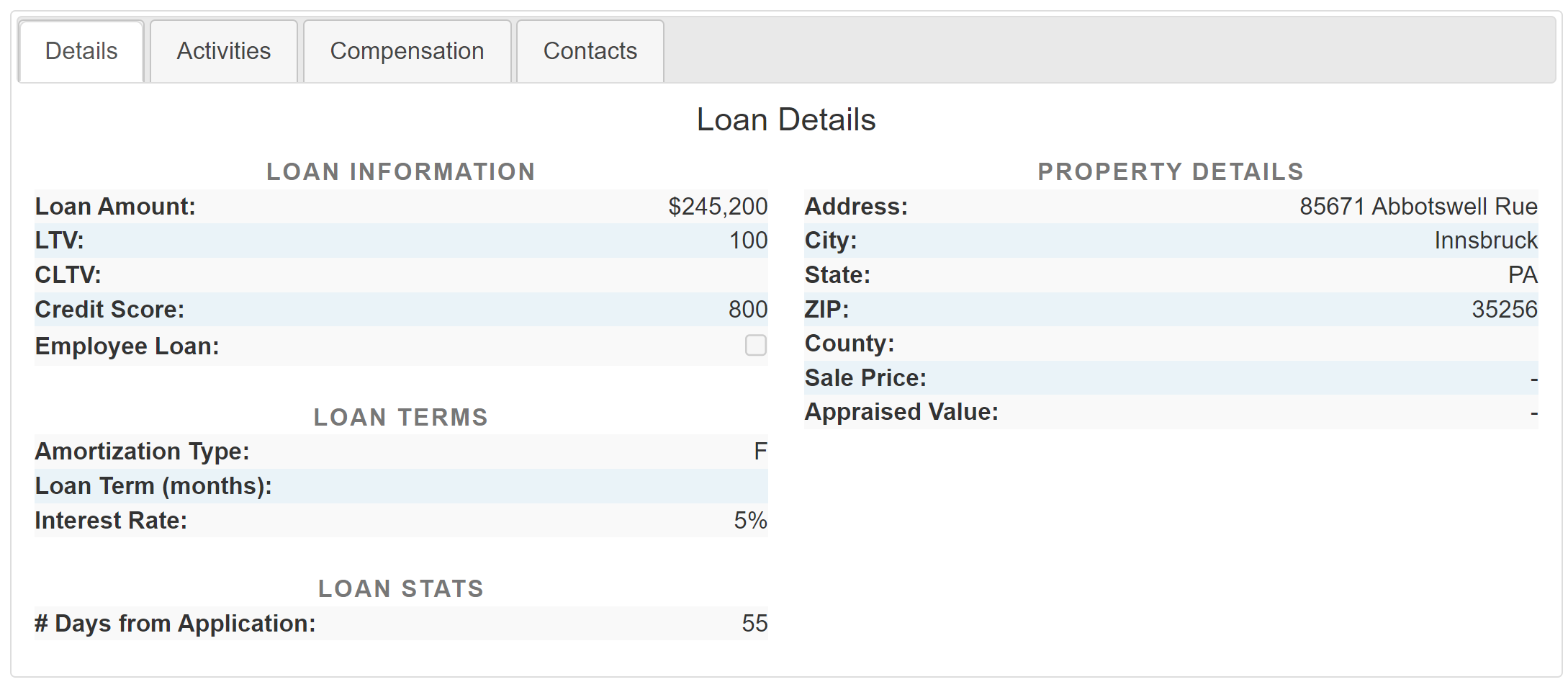
The Details Tab provides additional information about the loan. This information includes:
- Loan Information
- Loan Amount: Volume of the loan.
- LTV: Loan-to-Value ratio.
- CLTV: Combined Loan-to-Value ratio.
- Credit Score: Credit score of the borrower.
- Employee Loan: Checkbox indicating if the borrower is an employee.
- Loan Terms
- Amortization Type: How the loan’s payments are determined.
- Loan Term (months): Length of the loan’s term in months.
- Interest Rate: Locked interest rate for the loan.
- Loan Stats
- # Days from Application: Number of days since the application date.
- Property Details
- Address: Address of the property.
- City: City the property is in.
- State: State the property is in.
- ZIP: The property’s ZIP Code.
- County: County the property is in.
- Sale Price: Actual sale price of the property.
- Appraised Price: Appraised price of the property.
Activities Tab
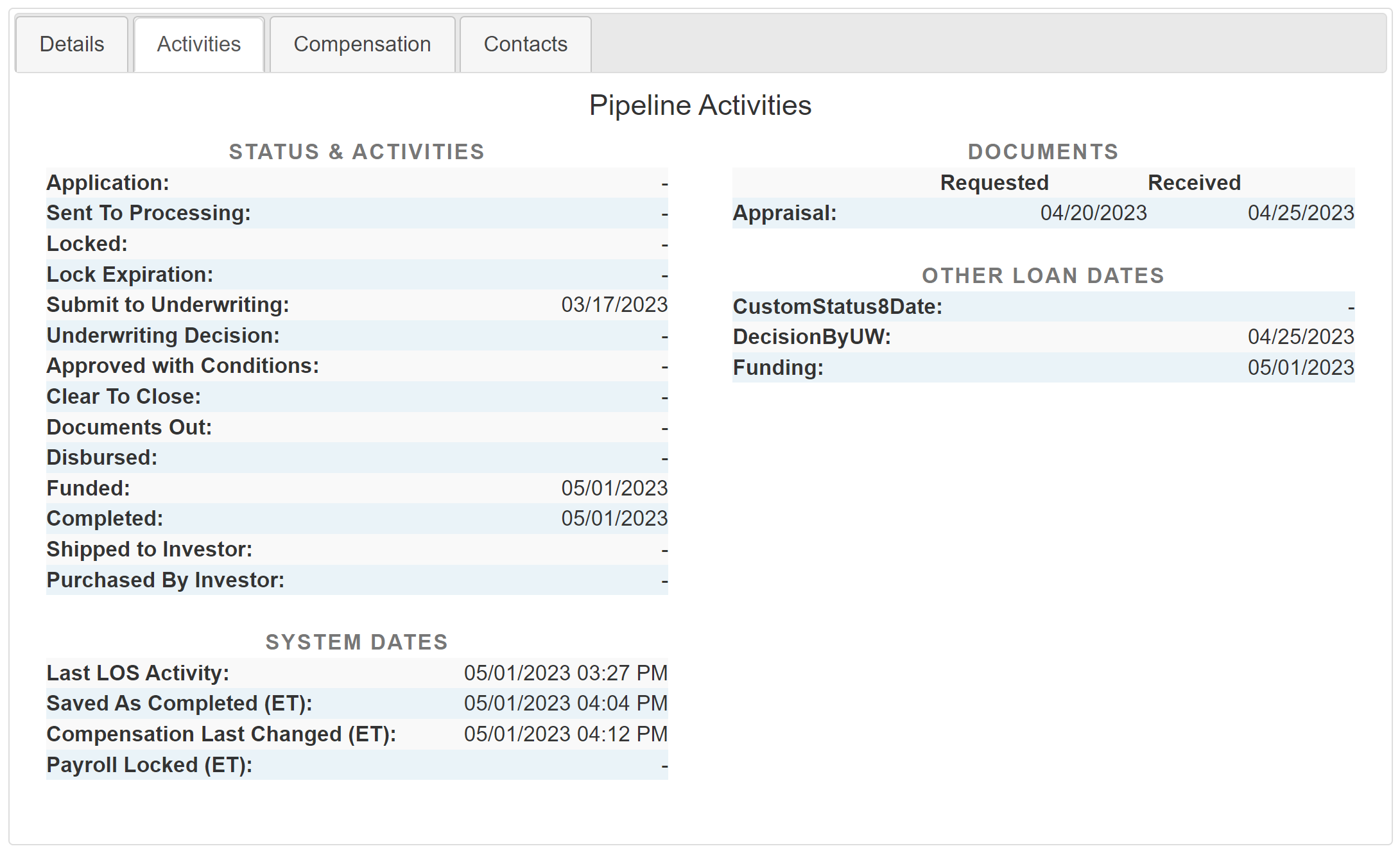
The Pipeline Activities Tab charts the loan's progress through the pipeline, and provides information about when it was updated in nCino Incentive Compensation. This includes:
- Status & Activities
- Application: Date the full application was received.
- Sent To Processing: Date the application was sent to processing.
- Locked: Date the interest rate was locked.
- Lock Expiration: Date the interest rate lock will expire.
- Submit to Underwriting: Date the loan file was submitted to the underwriter.
- Underwriting Decision: Date the underwriter approved of the loan.
- Approved with Conditions: Date the underwriter approved of the loan. Missing documents must be provided by the borrower.
- Clear to Close: Date when final approval by the underwriter is received.
- Closing Submitted: Date the closing was submitted.
- Documents Out: Date the closing documents are ordered to be sent to attorney / settlement agent.
- Closing Date: Date the loan is considered closed.
- Disbursed: Date the loan funds are disbursed.
- Funded: Date when all docs have been executed and loan conditions are met, and title company receives funds for disbursement.
- Completed: Date the loan meets the company’s “complete criteria.
- Shipped to Investor: Date the loan was shipped to the investor.
- Purchased by Investor: Date the loan has been purchased by an investor and/or settled.
- System Dates
- Last LOS Activity: Time nCino Incentive Compensation last saw this loan being updated.
- Saved as Completed (ET): Date the loan was saved as completed (Eastern Time).
- Compensation Last Changed (ET): Date the compensation on this loan last changed (Eastern Time).
- Payroll Locked(ET): Date this loan was locked as part of a payroll period.
- Documents
- Describes when certain documents are requested and received. Which documents are tracked is determined by your LOS and integration setup.
- Other Loan Dates
- Other loan milestone dates can be tracked based on your LOS and integration setup.
Compensation Tab
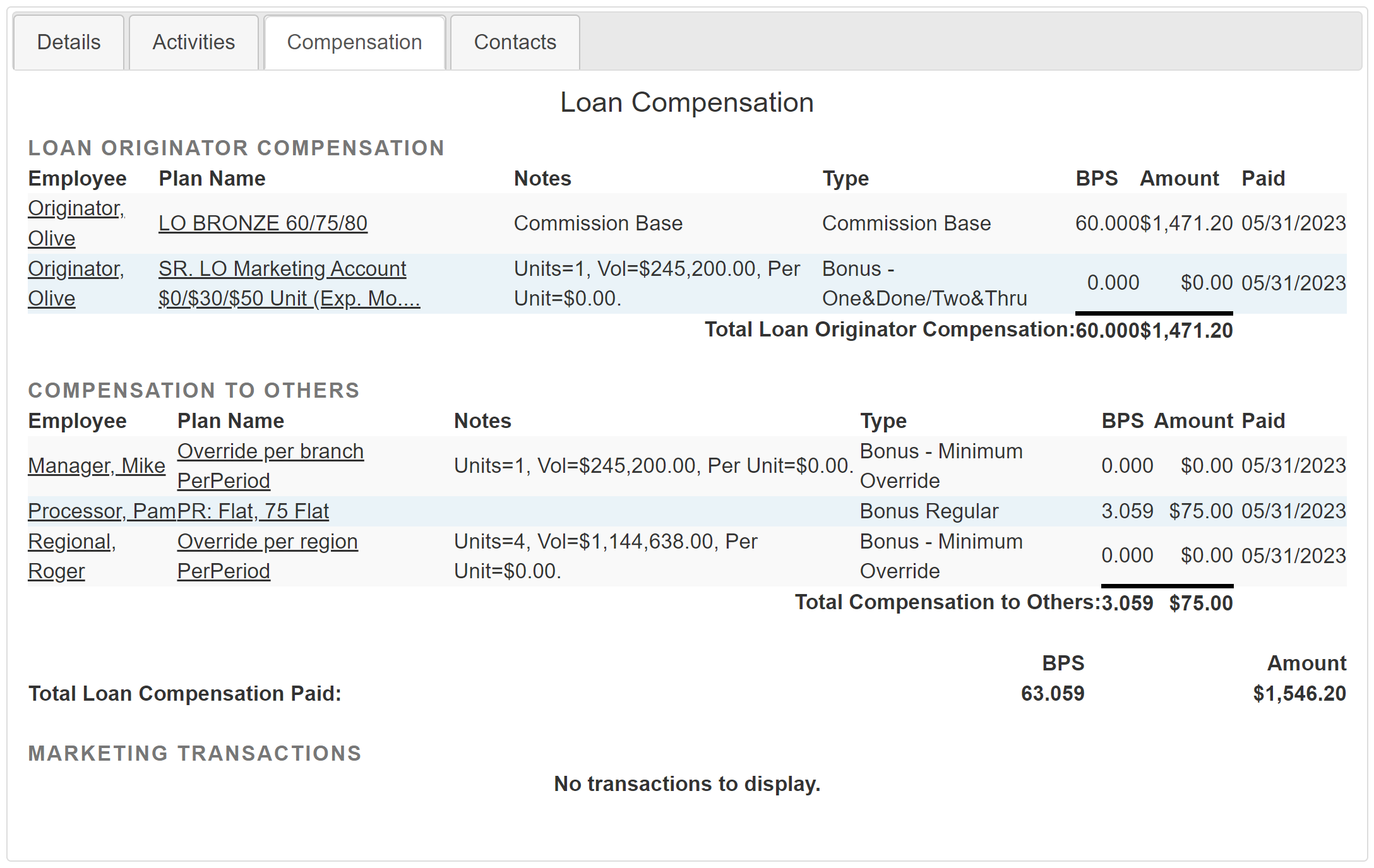
The Loan Compensation Tab provides a breakdown of all the pay received on the loan. Its sections include:
- Loan Originator Compensation: All compensation credited and debited to the LO as a result of this loan .
- Compensation to Others: All compensation credited and debited to non-LOs as a result of this loan.
- Marketing Transaction: Transactions made to marketing accounts as a result of this loan.
- Changes in Compensation After Period Locked (if applicable): If compensation on this loan has changed following its lockdown period, there will be a link to the "Changes in Compensation After Period Locked" report. For more information on the report, see the Knowledge Base Article here: Changes in Compensation After Period Locked
NOTE: In cases where the user assigned to the Loan Originator position on a loan is actually an Account Executive, transactions that result in 0 pay will not appear.
Contacts Tab
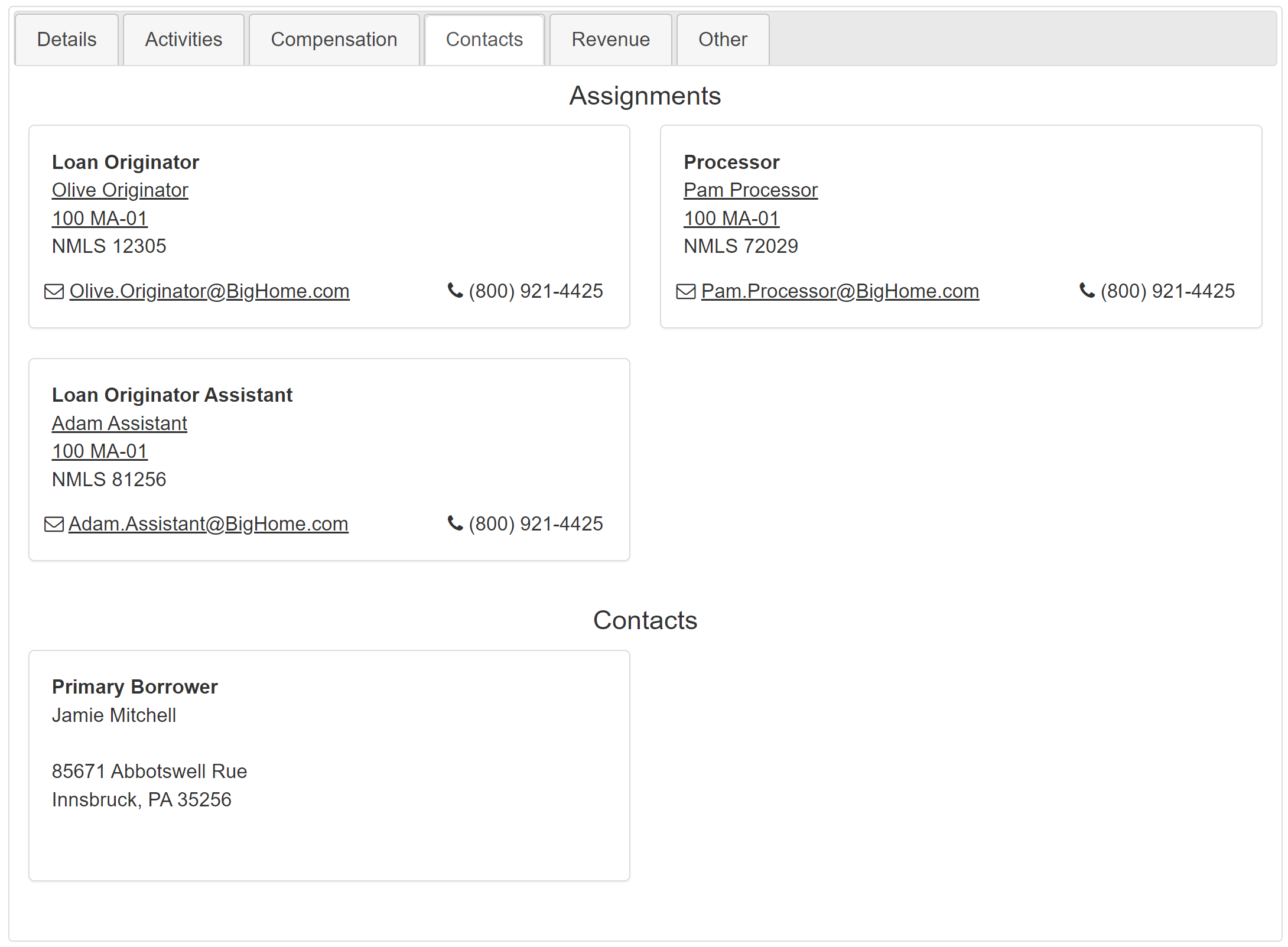
The Contacts tab includes information about both the employees assigned to the loan, as well as the borrowers and related individuals. This is split into the following sections:
- Assignments: Employees Assigned to the loan. Related information includes the following:
- Loan Assignment: Employee’s assignments on the loan.
- Full Name: Employee’s full name.
- Branch: Employee’s home branch.
- NMLS Number: Employee’s NMLS (Nationwide Multistate Licensing System) number.
- Email Address: Employee’s email address.
- Phone Number: Employee’s phone number.
- Loan Assignment: Employee’s assignments on the loan.
- Contacts: Borrowers and related parties who aren’t employees. Information includes the following:
- Assignment: Contact’s assignment on the loan.
- Full Name: Full name of the contact.
- Company: Company the contact is representing, if applicable.
- Address: Contact’s address.
- Email Address: Contact’s email address.
- Phone Number: Contact's phone number.
- Assignment: Contact’s assignment on the loan.
Other Possible Tabs
NOTE: If you are interested in using any of the features described below, please reach out to https://incentivehelp.ncino.com/hc/en-us.
Depending on your company's setup, you may have additional tabs as a part of your Loan Details page. These can include, but are not limited to the following:
- Investor: Information about the investor(s) on the loan.
- Servicing: Contact information for the loan servicers.
- Revenue: Breakdown of the revenue on the loan and how it compares to set goals.
- Other: This can include metrics and other information.
See also: