Payroll Summary
This report summarizes commission and bonuses on all loans completed and funded within a pay period.
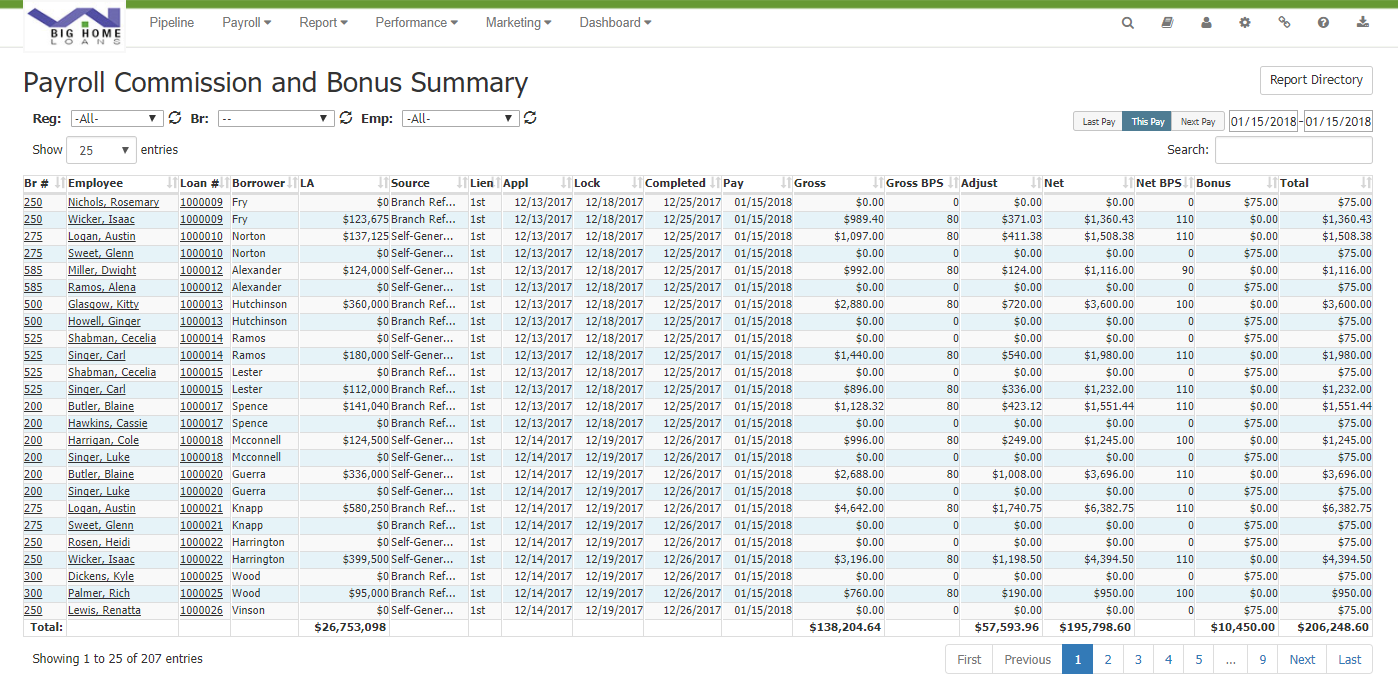
The Payroll Summary will automatically default to compensation to be paid for this payroll period. To view your compensation for a different payroll period,
- Click Last Pay to view the Payroll Summary for the last payroll period. Dates are based on funded date.
- Click Next Pay to view the Payroll Summary for the next payroll period. Dates are based on funded date.
- Click the first date box to select the start date of the period you would like to view. Click the second date box to select the end date of the payroll period you would like to view.
To view the Closed Loan Details page,
- Click the hyperlinked loan number
To go to the Employee Profile page,
- Click the Employee name
- Br: Branch number assigned through loan origination system
- Employee: Employee assigned to loan
- Loan #: Loan number
- Borrower: Borrower name
- LA: Loan amount of loan
- Source: Referral source of loan, for example, external, internal, or marketing.
- Lien: Type of lien position on the loan.
- Appl: Date of application milestone
- Lock: Date the loan’s interest rate is locked.
- Completed: Date the loan became compensation payable.
- Gross: Gross commission expressed in a dollar amount.
- Gross BPS: Gross commission earned expressed as basis points
- Adjust: Dollar amount of adjustments made to loan. Adjustments can be from tier bumps or from manual adjustments to the loan in the system.
- Net: Total commission after all allocations and deductions have been applied, expressed as a dollar amount.
- Net BPS: Total commission after all allocations and adjustments have been applied, expressed as basis points
- Bonus: A form of compensation and the payment type paid from the loan.
- Total: Total amount of compensation earned
See also: