Pull Through by Investor Report
The Pull Through by Investor report provides users with an overview of the pull through and fall out of individual Investors within the chosen time frame.
Minimum Compensation Access Level Required: Own Production
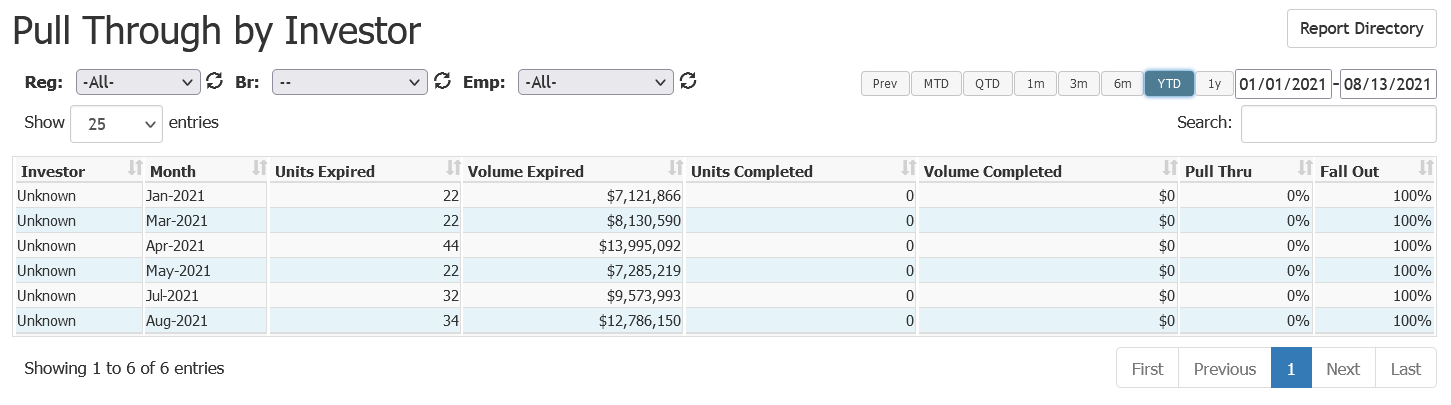
This report includes the following columns:
- Investor: Name of the investor
- Month: Month being reported
- Units Expired: Number of units expired in the month
- Volume Expired: Loan volume that expired in the month
- Units Completed: Number of units completed in the expired month
- Volume Completed: Loan volume completed in expired month
- Pull Thru: Percentage of loans in the investor’s pipeline that completed in that month
- Fall Out: Percentage of loans in the investor’s pipeline that were cancelled, denied, or withdrawn in that month

See also: