Relationship Management Tool
The Relationship Management tool allows nCino Incentive Compensation admins to enable relationships types, and control their visibility.
Minimum Compensation Access Level required: Executive
Access the Tool
To access the Relationship Management tool from the nCino Incentive Compensation menu, click:
-
The Gear Icon (
 )
) -
System Admin
-
The Company Profile header
-
Relationship Management
Use the Tool
The Relationship Management tool is a table where each row is a certain relationship type and its matching reciprocal relationship type.
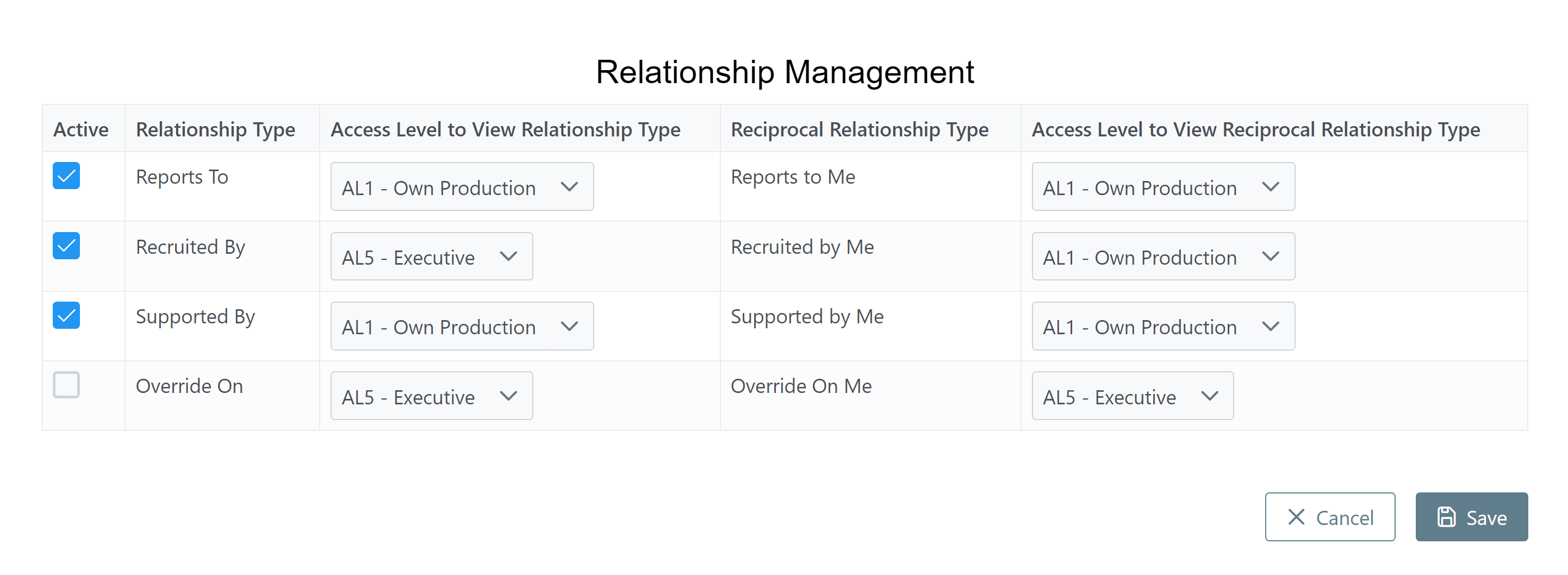
This tool includes the following columns:
-
Active: When checked, the relationship type is active. Click the checkbox to toggle the active status. Admins can assign active relationship types to employees.
-
Relationship Type: Name of the relationship type for the row.
-
Access Level to View Relationship Type: Minimum access level required for a user to view the details of their relationships that are this relationship type. In the example image, a user would not be able to view "Recruited By" relationships unless they have an Executive access level.
-
Reciprocal Relationship Type: Name of the corresponding relationship type. This represents the other party of the relationship type in the same row.
-
Access Level to View Reciprocal Relationship Type: Minimum access level required for a user to view the details of their relationships of this reciprocal relationship type. In the example image, a user would be able to view "Recruited by Me" relationships if they have an Own Production access level or higher.
See Also: