Understand Lockdown with Multiple Payroll Calendars
If your company is using multiple payment calendars, it is vital to know how locking down one or both of the calendars affects pay.
The goal of this article is to clarify how this system works for a default and a non-default pay calendar.
There are two main type of payroll calendars that companies use, and these are generally referred to as Primary (default) and Secondary (non-default).
Primary Payroll Calendar
- Often used for the majority of transactions
- Affects both transactions and loan updates
- Once locked down, loan records of completed loans within the pay period AND loan transactions from that pay period will be locked
Secondary Payroll Calendar
- Often used for bonuses or draws
- Affects only transactions
- Once locked down, ONLY transactions in that period will be locked.
The lockdown process for both of these payroll periods is similar, but it is vital to know the consequences of each.
To access the payroll lockdown tool:
- Click Payroll
- Click Corp Payroll Menu
- Under the “Corporate Payroll header, click Request Lock Down Payroll.
- Using the Payroll drop-down menu, click the chosen Payroll Period.
- From here, you can either click Request Now to request a lockdown, or use the time selector at the bottom to schedule a future lockdown.
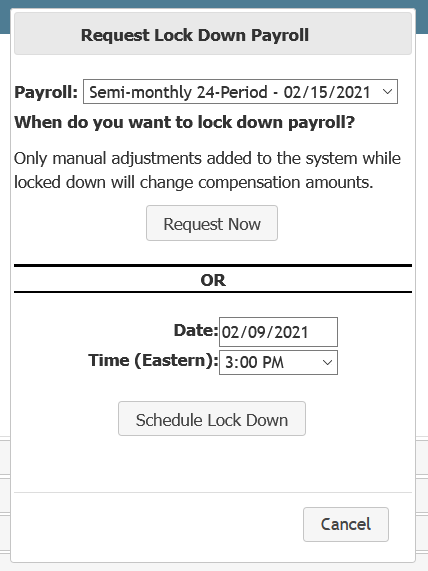
Here is what each type of payroll does, in detail:
Primary Payroll Lockdown
- Loan changes made in the LOS between the period's start and stop dates are posted and can no longer be updated.
- Transactions that are a part of the loans locked above are also locked, regardless of which pay calendar they are a part of.
Secondary Payroll Lockdown
- Loan changes made in the LOS after this period's stop date CAN still be updated.
- Transactions that pay on this pay date are locked, and can no longer be updated.
The following is an example loan and payment plan scenario. Then, we will describe the outcomes of different lockdown procedures based on that scenario.
Example Loan:
- Big Home Mortgage uses two payment calendars: Primary, and Secondary
- Loan #123 has two employees receiving payment, each on a separate payment calendar.
If Big Home Mortgage updates the Loan Amount of Loan #123 in their LOS, here is what would happen in nCino Incentive Compensation for a variety of scenarios:
- No Payroll is Locked Down:
- Loan Amount changes
- Pay on BOTH transactions is updated
- Loan Amount changes
- Secondary Payroll is Locked Down
- Loan Amount changes
- Pay changes ONLY for the primary payroll transaction
- Loan Amount changes
- Primary Payroll is Locked Down
- Update is NOT posted to nCino Incentive Compensation
- Loan Amount DOES NOT change
- Pay for both transactions DOES NOT change
- Update is NOT posted to nCino Incentive Compensation