Understand Tier Offsets
The tier offset feature is used in nCino Incentive Compensation to indicate that a number of units or an amount of volume is considered for tier determination but is not eligible for pay on a given plan.
Use Cases
The following are some examples where a tier offset is useful:
Unit Offset Use Cases
- A plan that pays on a different number of units per tier.
- A retroactive plan that only calculates units for tier bumps after a certain number of units have been reached.
Volume Offset Use Cases
- A plan that pays commission after the employee's base pay has been meet.
- An incentive plan that pays the employee after covering a recurring expense (i.e., desk rental).
Unit Offsets
Unit offset allows companies to pay on a different number of units per tier. Unit offset can also be used to create plans that are retroactive to a chosen number of units.
To create an incentive plan that uses a unit offset:
Your company must have the unit offset company parameter turned on. If you are interested in using this feature, please contact https://incentivehelp.ncino.com/hc/en-us.
- From the nCino Incentive Compensation menu, click Payroll -> + New Incentive Plan
- Fill the information in the Detail section as you would for any other incentive plan.
- In the Pay section, select the Units tier type and click the "Unit Offset" check box. The unit offset can be the same, or different for each tier.
- When entering the unit offset, enter the number of units the user must reach before qualifying for compensation within each tier level.
Unit Offset Examples
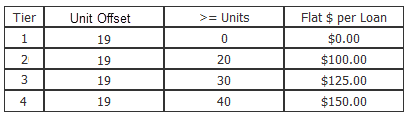
The examples below represent the calculations that nCino Incentive Compensation is performing to determine Olive Originator's commission. In these examples, she has an incentive plan with tiers that pay based on the number of units. This plan pays retroactively on its tiers. There is a unit offset of 19 units, meaning that the retroactive behavior only goes back as far as the 20th loan.
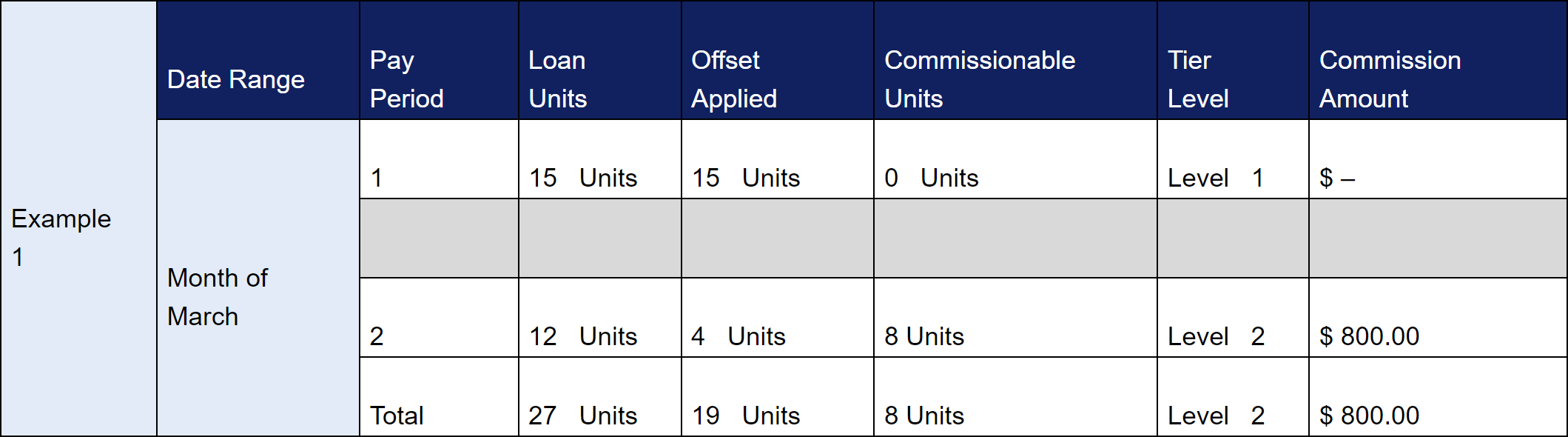
Unit Offset Example 1 - No Tier Bump
In the first pay period of March, Olive Originator had 15 units close. This was lower than the unit offset (19 units), she received no pay on this plan.
In second pay period, Olive had an additional 12 units close, bringing her to a total of 27 units in the month. The 27 total units meant that she was bumped up to Tier 2. After the unit offset was applied, there were 8 units that paid according to Tier 2. This meant she was paid $800 for the month of March on this plan.
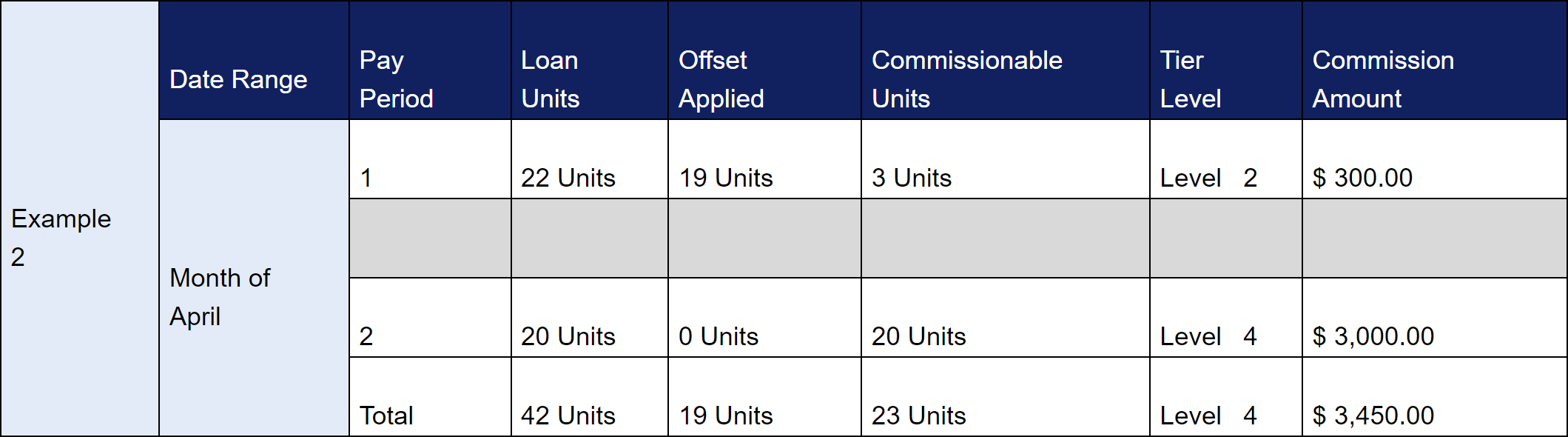
Unit Offset Example 2 - Tier Bump
In the first pay period of March, Olive Originator had 22 units close. Because this was higher than the unit offset (19 units), she received pay on the 3 remaining units at Tier 2.
In second pay period, Olive had an additional 20 units close, bringing her to a total of 42 units in the month. The 42 total units meant that she was bumped up to Tier 4. After the unit offset was applied, there were 22 units available for pay at Tier 4. The plan is retroactive back to the 20th unit, the three from the earlier pay period will receive a tier bump. The other 20 units will receive pay at Tier 4.
Volume Offsets
Volume offset plans behave as follows:
- Volume offset is for use with BPS payment plans.
- Tier determination is based on total volume (this includes the volume offset).
- Volume offset is based on the production period of a 1-month cycle.
- If the volume offset is not met in the production period, it is not carried over to the next period.
To create an incentive plan that uses a volume offset:
Your company must have the volume offset company parameter turned on. If you are interested in using this feature, please contact https://incentivehelp.ncino.com/hc/en-us.
- Determine the amount of volume required to meet the compensation threshold.
- Create a new incentive plan that uses BPS and includes a volume offset.
- For each tier:
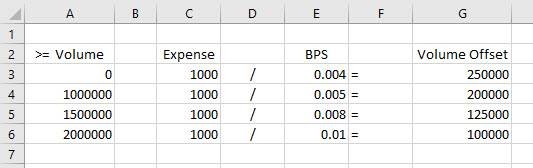
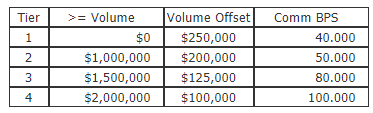
- Divide the compensation amount to be offset by the BPS (in decimal format) for the tier (see example in image below).
- Enter that amount in the volume offset field.
- Repeat this process for each tier. Note that the volume offset amount will be different for each tier.
Volume Offset Examples
Olive Originator has a $1,000 marketing expense that Big Home wants to recapture using the volume offset feature. This is how that plan's tiers are set up:
Volume Offset Example 1 - Volume Offset Not Met
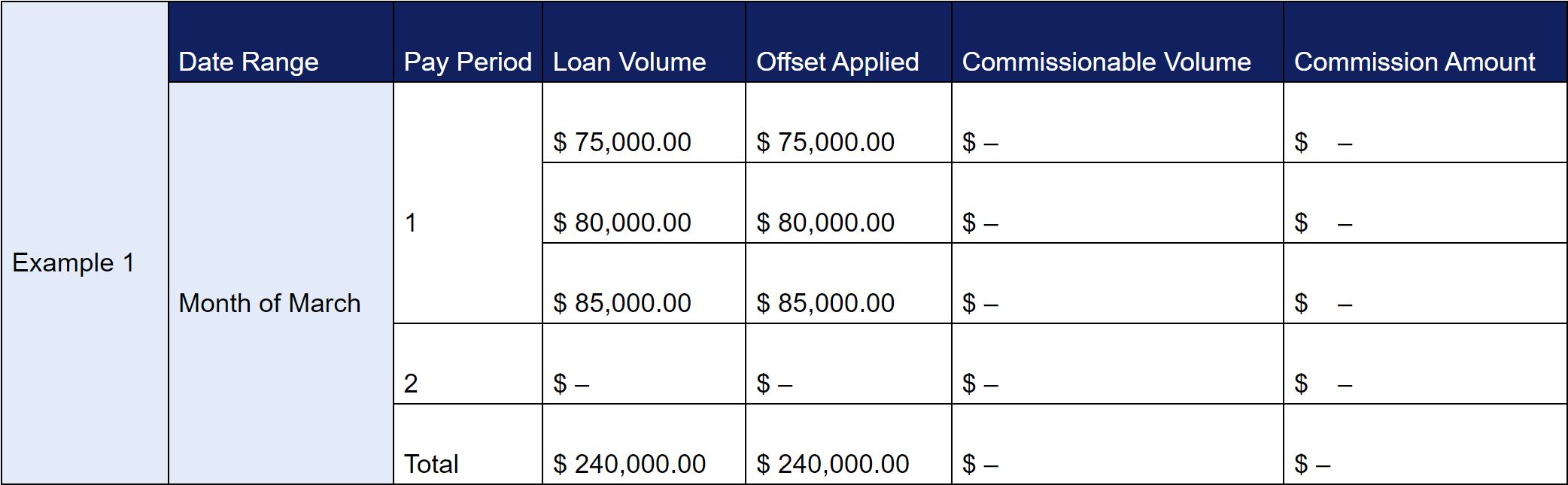
In the month of March, Olive only generates a total volume of $240,000 between the two pay periods. Because Olive did not meet the $250,000 volume offset, she will not receive compensation.
Instead, the plan will behave as though Big Home withholds the $960 from Olive, and the remaining $40 will be waived.
The chart below explains the calculations nCino Incentive Compensation is performing.
Volume Offset Example 2 - Volume Offset Met
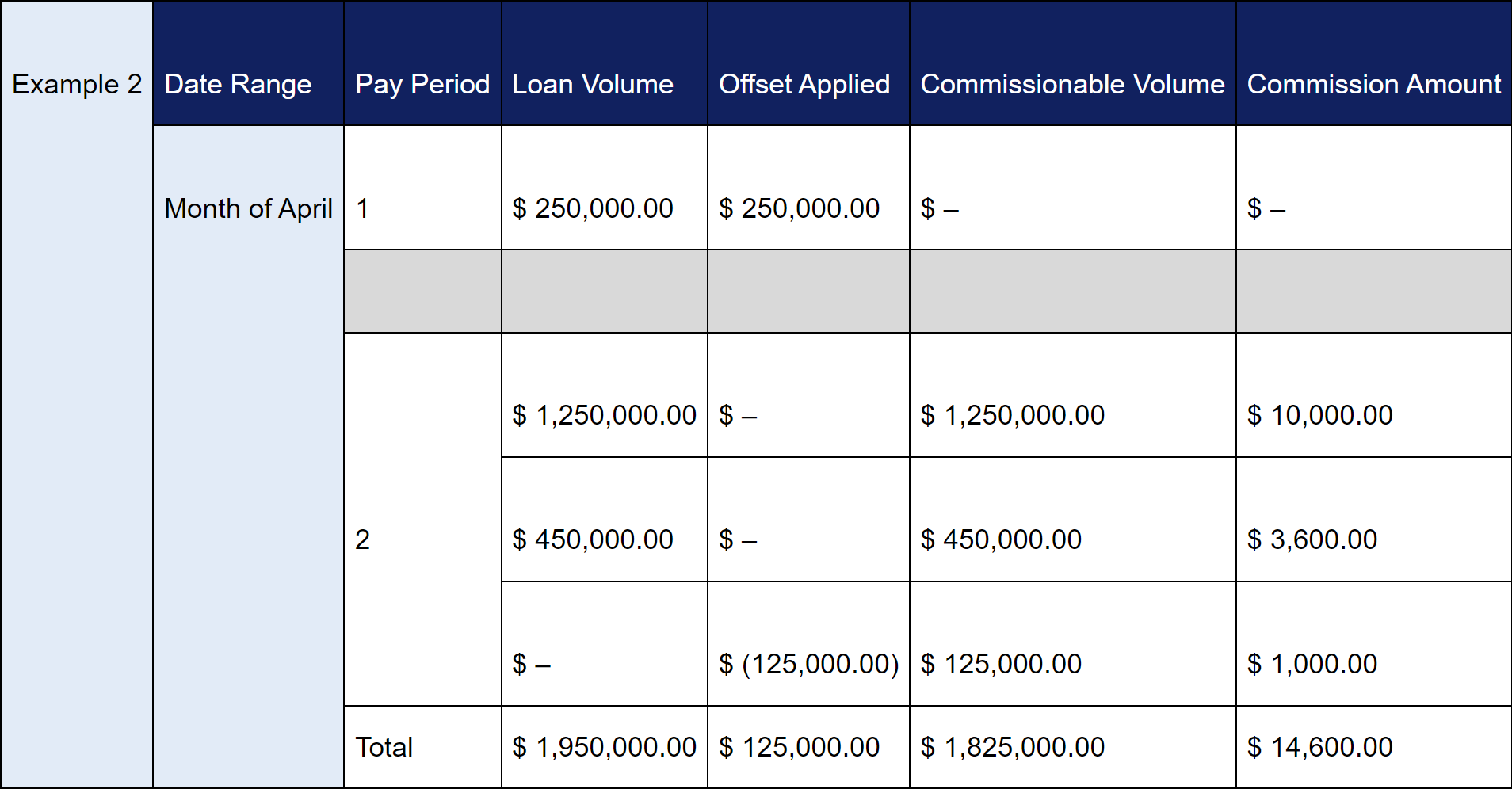
In the first pay period of April, Olive generates a volume of $250,000. This meets the volume offset exactly.
In the second pay period, her total volume has increased to $1,825,000. This total volume amount means that the plan will now calculate based on the third tier (50 BPS). This change of tiers also means that the volume offset decreases to $125,000. As shown below, the offset applied is reduced by the difference between the prior and the current offset.
The plan will withhold $1,000 while Olive is paid the remaining $14,600 in compensation.
The chart below explains the calculations nCino Incentive Compensation is performing.
Volume Offset Example 3 - Volume Offset with Max Cap
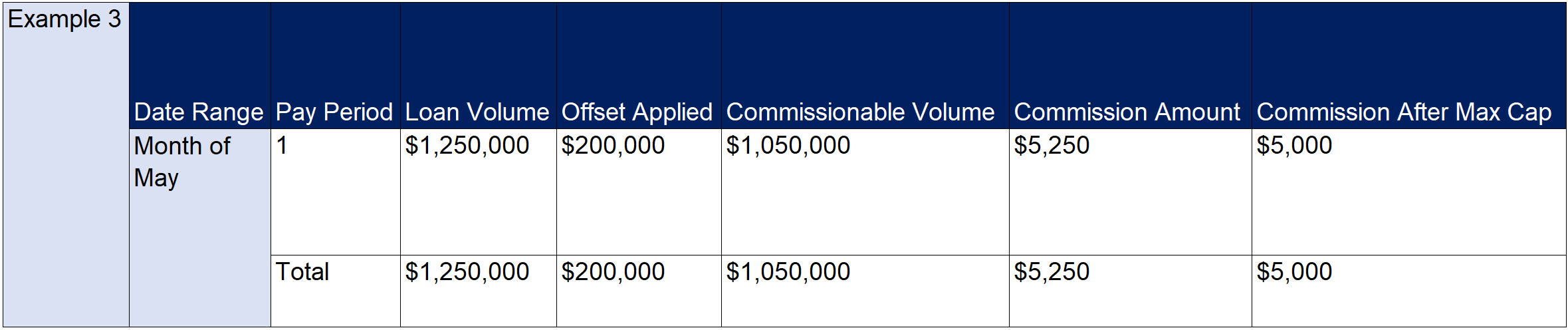
In the month of May, Olive generates a volume of $1,250,000. Next the offset of $200,000 is applied, leaving the commissionable volume at $1,050,000. This total volume means the plan will calculate based on the third tier (50 BPS). The volume is worth a commission of $5,250. In this example, the plan has a max cap of $5,000, therefore the plan will not pay more than $5,000.
The chart below explains the calculations nCino Incentive Compensation is performing.
See also: