Users with non-Company Email Domains Report
The Users with non-Company Email Domains report shows which employees have emails that do not use a designated company email domain. This information can help verify employee accounts are accurate and help with security.
Minimum Compensation Access Level Required: Executive
Access the Report
To access this report from the nCino Incentive Compensation menu, click:
- Report ▼
- All
- The System Audit header
- Users with non-Company Email Domains
Read the Report
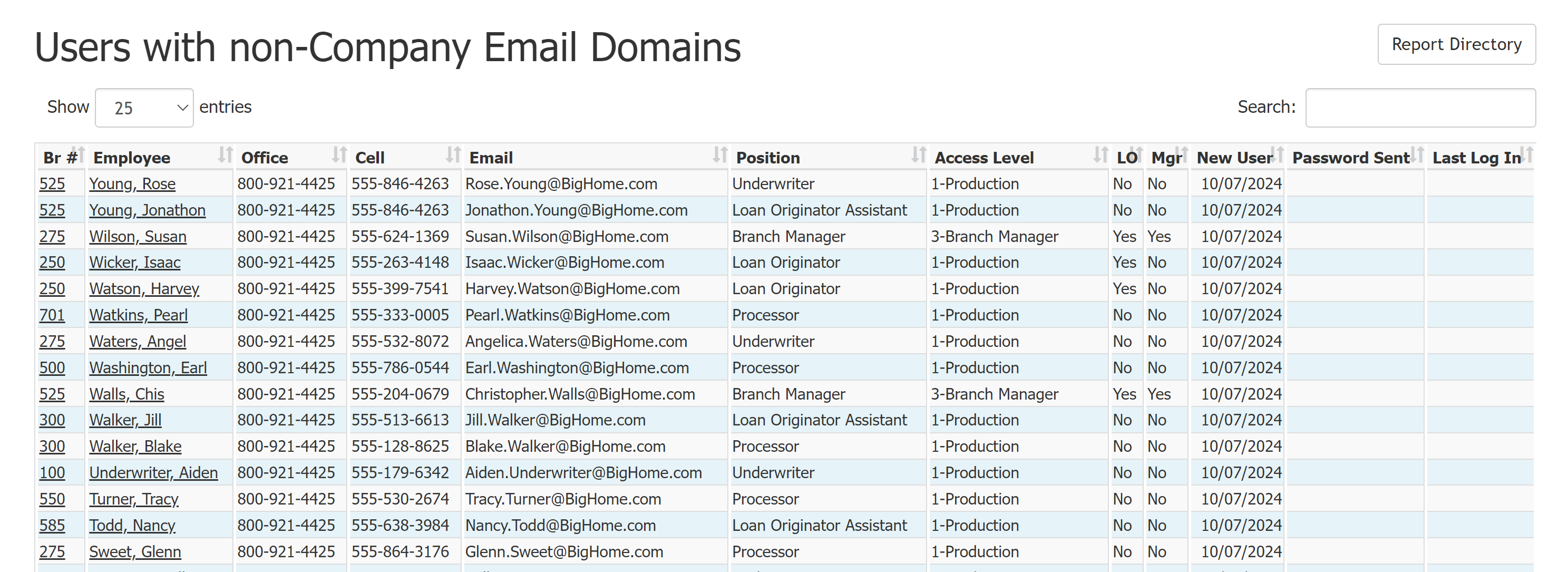
- Br #: Branch number of the employee. Click to view that branch’s details page.
- Employee: Full name of the employee. Click to view that employee’s details page.
- Office: Employee’s office phone number.
- Cell: Employee’s cell phone number.
- Email: Employee’s email address.
- Position: Employee’s Incentive Compensation position.
- Access Level: User’s compensation access level.
- LO: Indicates if the user is a loan originator.
- Mgr: Indicates if the user has a management position.
- New User: Date the user was entered into the system.
- Password Sent: Most recent date a password was sent to the user (if applicable).
- Last Log In: Date of most recent log in (if applicable).
Export the Report
To export this page, click the export icon.

The exported report includes all columns available in the online version and the following: Emp #: Employee number
See also: Manage Company Owned Domains