Auto Draws Report
The auto draws report is a list of all auto draws currently in nCino Incentive Compensation. This can be used to audit currently active auto draws, or to view past auto draw setups.
Minimum Compensation Access Level Required: Master Branch
Accessing the Report
To access this report,
- From the nCino Incentive Compensation menu, click "Payroll ▼".
- Click "Auto Draws".
OR
- From the nCino Incentive Compensation menu, click "Report ▼".
- Click "All".
- Click the "Payroll" header.
- Click the "Auto Draws" report.
Reading the Report
This report includes the following filters / display options:
-
Region, Branch, and Employee Filtering Tool: Used to filter the information on the report. For information on using this tool, refer to How do I filter reports?.
-
Additionally, the auto draws can be filtered based on whether or not they are currently active using the buttons on the top right.
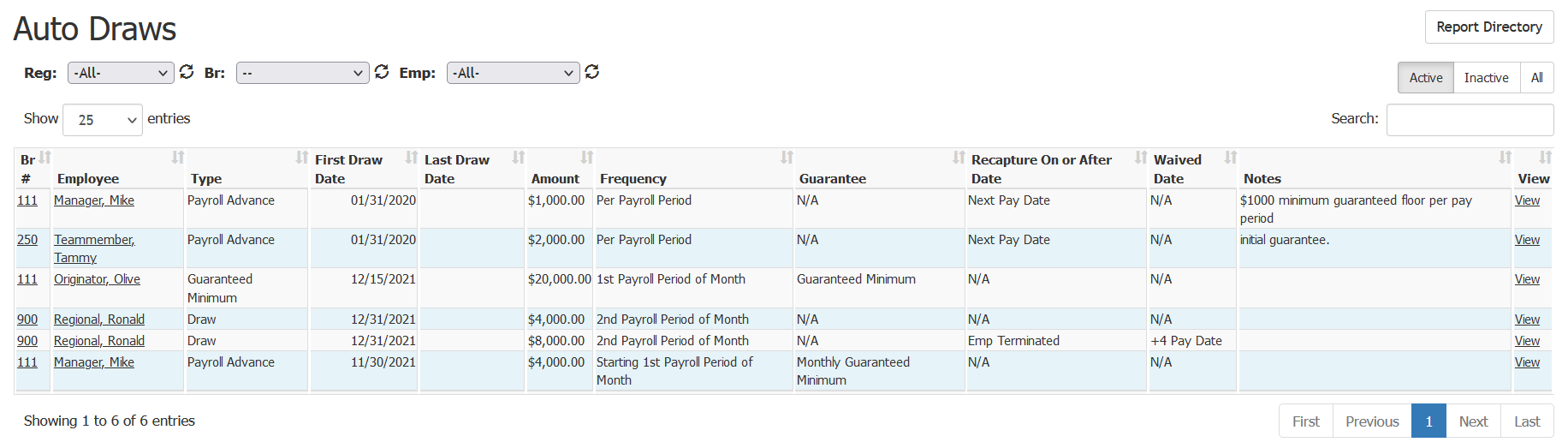
- Br #: Branch number of the employee’s home branch. Click to view its Branch Details page.
- Employee: Full name of the employee the auto draw is assigned to. Click to go to their Employee Details page.
- Type: Draw type of the draws created by this auto draw.
- First Draw Date: Date the first draw is created.
- Last Draw Date: Date the last draw is created.
- Amount: Amount of each draw.
- Frequency: Frequency each draw is created.
- Guarantee: Guarantee type of the draws.
- Recapture On or After Date: Date after which nCino Incentive Compensation will attempt to recapture from the amount from the employee’s pay.
- Waived Date: Date after which the draw amount will be waived and not attempt to recapture.
- Notes: Notes entered into the auto draw.
- View: Click to view the individual auto draw.
Exporting the Report
To export this page, click the export icon.

This export includes the following column(s) not present in the online version:
- Emp #: Employee number for the user the auto draw is assigned to.
See also: