Compensation Verifications Report
The Compensation Verifications report is a detailed view of compensation verification by employee and loan.
Minimum Compensation Access Level Required: Own Production
Access the Report
To access this report from the system menu, click:
- Report ▼
- All
- Payroll
- The Compensation Verifications report
Alternately, click Verification Details on the Verify Pay page

Read the Report
This report includes the following filters and display options:
-
Region, Branch, and Employee Filtering Tool: Used to filter the information on the report. For information on using this tool, refer to How do I filter reports?.
-
Payroll Period Selector: Used to select the payroll period shown on the report. For information on using this tool, refer to How do I use the date selectors?.
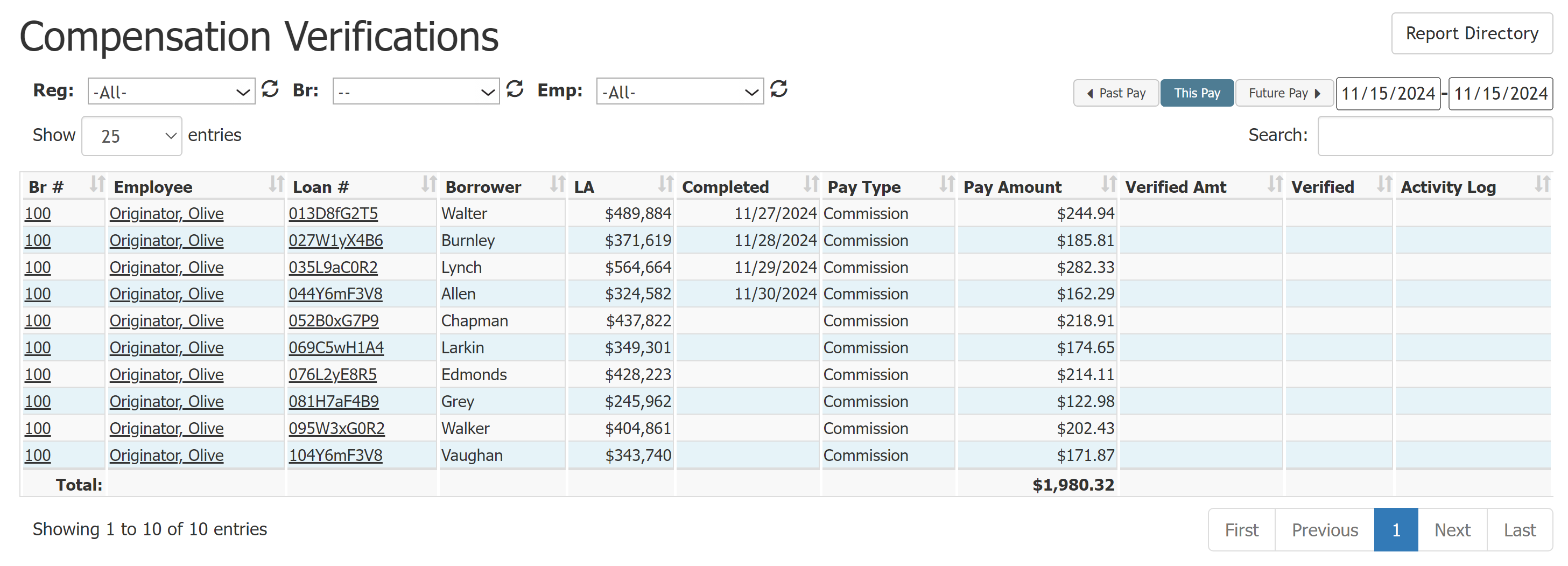
- Br #: Branch number the loan was posted in. Click to view branch details.
- Employee: Employee to receive compensation for the loan. Click to view employee details.
- Loan #: Loan number. Click to view loan details.
- Borrower: Borrower last name.
- LA: Loan amount.
- Completed: Completed date for the loan.
- Pay Type: Pay type for the compensation, either Commission, or Bonus.
- Pay Amount: Compensation amount for the employee on the loan.
- Verified Amt: Compensation amount verified.
- Verified: Date the employee verified compensation.
- Activity Log: A list of who verified (V) or disputed (D) the transaction. If an employee disputed the transaction, the included comment is visible here.
Export the Report
To export this page, click the export icon.

This export includes the following columns in addition to the ones that are in the online version:
- Emp #: Employee number of the employee that receives the compensation.
- Comments: Same as Activity Log in the online version.
See also: