Completed Loans by Broker and Investor
This report includes completed loans for the selected date range with the Broker and Investor. This report is only available to those with the Broker Account or Investor Source company parameter enabled.
Accessing the Report
To access this report,
- From the nCino Incentive Compensation menu, click "Report ▼".
- Click "All".
- Click the "Production" header.
- Click the "Completed Loans by Broker and Investor" report.
Reading the Report
This report includes the following filters / display options:
-
Region, Branch, and Employee Filtering Tool: Used to filter the information on the report. For information on using this tool, refer to How do I filter reports?.
-
Date Selector: Used to select the date range for the report. For more information on using this tool, refer to How do I use the date selectors?.
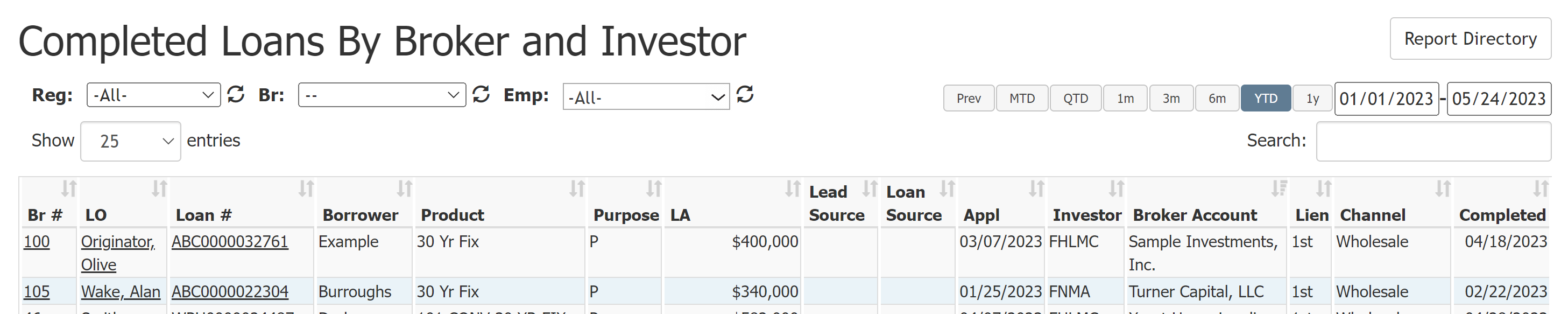
This report contains the following columns:
- Br #: Originating branch.
- LO: Loan Originator assigned to the loan.
- Loan #: Loan number.
- Borrower: Date entered as Term Date on Employee Details page.
- Product: Type of mortgage program of the loan.
- Purpose: Purpose of the loan. For example, purchase (P), refinance (R), construction (C), etc.
- LA: Loan amount.
- Lead Source: Primary referral source associated with the loan.
- Loan Source: Loan source on the loan.
- Appl: Application date associated with the loan.
- Investor: Investor associated to the loan. This field is not in the standard nCino Incentive Compensation integration and must be requested.
- Broker Account: Broker associated with the loan. This field is not in the standard nCino Incentive Compensation integration and must be requested.
- Lien: Type of lien position on the loan.
- Channel: The channel the loan originates in. Current channels include retail, wholesale, correspondent, and brokered.
- Completed: The compensation payable date associated with the loan.
NOTE: Loans on this report are only visible to those with access to the loan or are assigned to the loan.
Exporting the Report
To export this page, click the export icon.

The exported report contains the same columns that are in the online report.
See also: