Loans Completed Report
This report includes completed loans for the selected date range. A completed loan is a loan that is compensation payable based on the company's settings. This often corresponds with the Closed, Funded, or Disbursed Date milestones.
When a loan reaches this date, compensation is calculated and the loan no longer is in the LO's pipeline.
Accessing the Report
To access this report,
- From the nCino Incentive Compensation menu, click "Report ▼" .
- In that dropdown, click "Completed".
Reading the Report
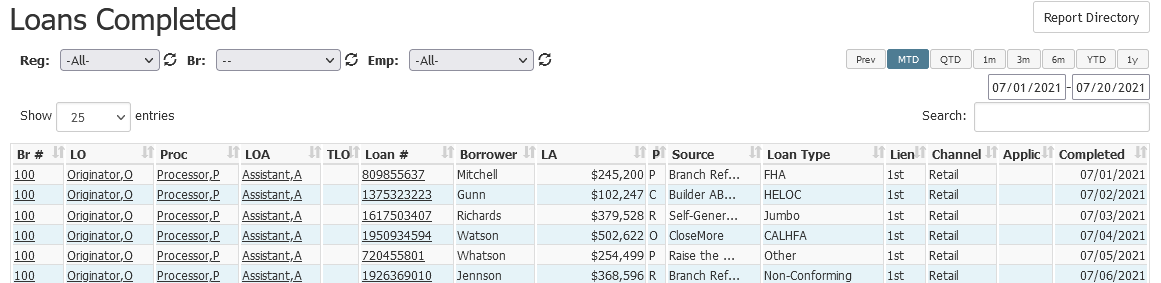
This report contains,
- Br #: Originating branch for the loan. Click to view the branch details page.
- LO: Loan Originator assigned to the loan. Click to view the employee details page.
- Proc: Processor assigned to the loan. Click to view the employee details page.
- LOA: Loan originator assistant assigned to the loan. Click to view the employee details page.
- TLO: Team loan originator assigned to the loan. Click to view the employee details page.
- Loan #: Loan number for the loan. Click to view the loan details page.
- Borrower: Last name of the borrower
- LA: Loan amount in dollars
- P: Purpose of the loan.
- For example, Purchase (P), Refinance (R), Construction (C), etc.
- Source: Primary loan source. Sometimes called referral source.
- Loan Type: Type of loan product.
- Lien: Lien position on the loan.
- Channel: The channel the loan originates in.
- Possible channels include but are not limited to: retail, wholesale, correspondent, and brokered.
- Applic: Application date on the loan.
- Completed: The compensation payable date associated with the loan.
NOTE: Loans on this report are only visible to those with access to the loan or are assigned to the loan.
Exporting the Report
To export this page, click the export icon.

This export includes the following columns in addition to the columns that are in the online version.
- Emp #: Employee number of the loan originator
- Employee Loan: Whether or not the loan is an employee loan
See also: