LO Productivity by Branch Report
The Loans Completed by Branch Report provides an overview of the production of each branch in the company. This is useful for tracking trends, and performance of each individual branch.
Minimum Compensation Access Level Required: Sub-Branch
Accessing the Report
To access this report,
- From the nCino Incentive Compensation menu, click "Report ▼".
- Click "All".
- Click "Production".
- Click the "LO Productivity by Branch" report.
Reading the Report
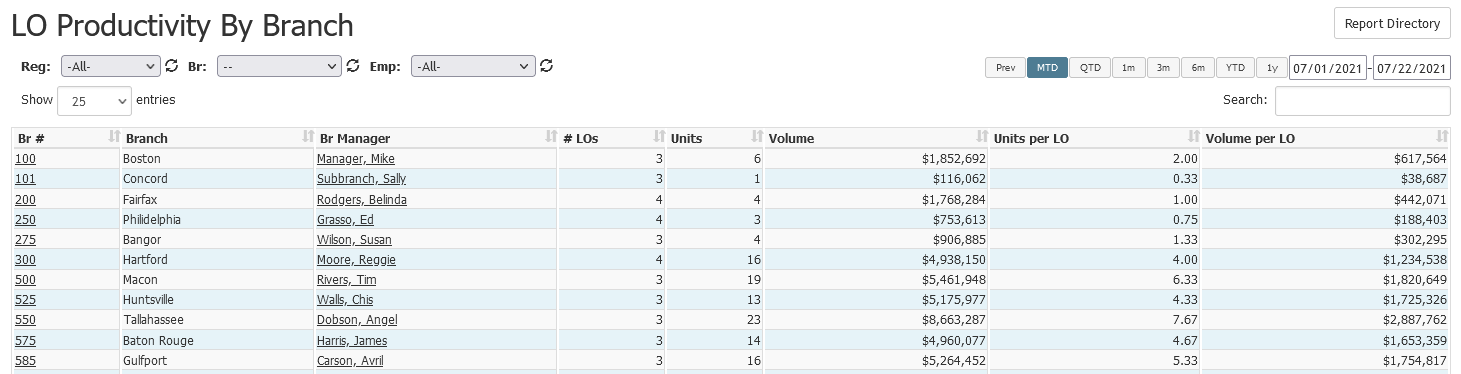
- Br #: Branch number of the branch. Click to view the branch details page.
- Branch: Name of the branch
- Br Manager: Name of the branch manager. Click to view their employee details page.
- # LOs: Number of LOs in the branch
- Units: Number of units completed in the time period.
- Volume: Total amount of the loans completed in the time period.
- Units per LO: Number of units completed divided by the number of LOs.
- Volume per LO: Volume divided by the number of LOs.
Exporting the Report
To export this page, click the export icon.

This export includes the following columns in addition to the columns in the online version:
- Br Mgr Emp #: Employee number of the branch manager
See also: