Loans Completed by Type or Purpose Report
The Loans Completed by Type or Purpose report allows the user to view information about the types of loans that completed in a certain time period. This is useful for determining loan trends and common product types.
Minimum Compensation Access Level Required: Own Production
Accessing the Report
To access this report,
- From the nCino Incentive Compensation menu, click "Report ▼ ".
- Click "All".
- Click "Production".
- Click the "Loans Completed by Type or Purpose" report.
Reading the Report
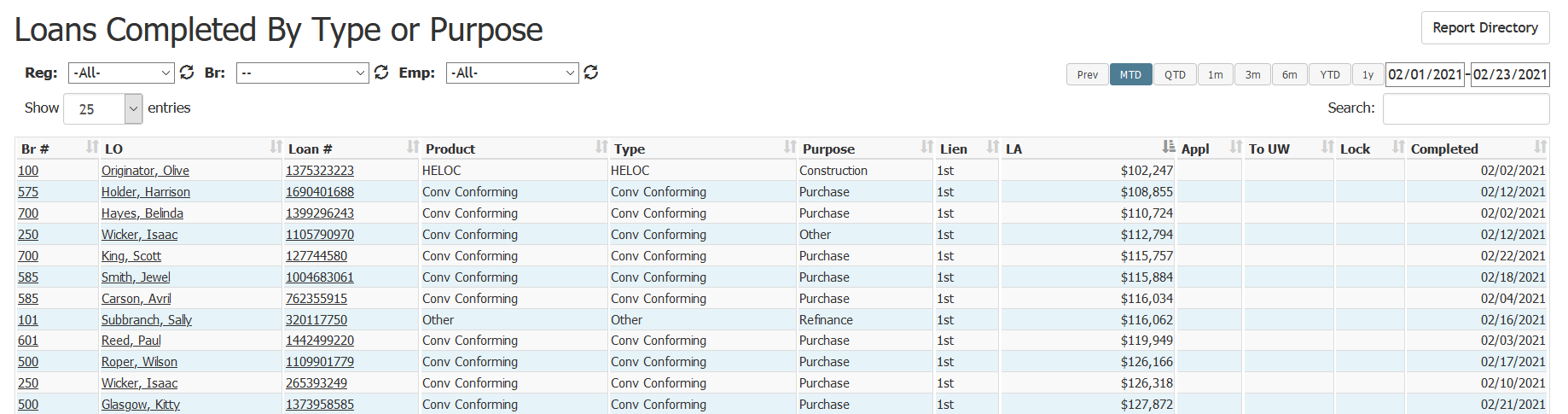
- Br #: Branch number the loan is assigned to. Click to view its branch details page
- LO: Loan originator on the loan. Click to view their employee details page
- Loan #: Loan number of the loan. Click to view the loan details page
- Product: The loan’s product name
- Type: The loan’s type
- Purpose: Name of the loan’s purpose
- Lien: The loan’s lien number
- LA: Loan amount in dollars
- Appl: Application date on the loan
- To UW: Date the loan was sent to the underwriter
- Lock: Date of the loan’s lock
- Completed: Date the loan was completed
Exporting the Report
To export this page, click the export icon.

This export includes the following column(s) present in the online version:
- Emp #: Employee number of the LO
See also: