Completed Loans by Property Location Report
The Completed Loans by Property Location Report provides an overview of the property locations of several individual loans.
Minimum Compensation Access Level Required: Sub-Branch
Accessing the Report
To access this report,
- From the nCino Incentive Compensation menu, click "Report ▼" .
- Click "All".
- Click "Production".
- Click the "Completed Loans by Property Location" report.
Reading the Report
This report includes the following filters / display options:
-
Region, Branch, and Employee Filtering Tool: Used to filter the information on the report. For information on using this tool, refer to How do I filter reports?.
-
Date Selector: Used to select the date range for the report. For more information on using this tool, refer to How do I use the date selectors?.
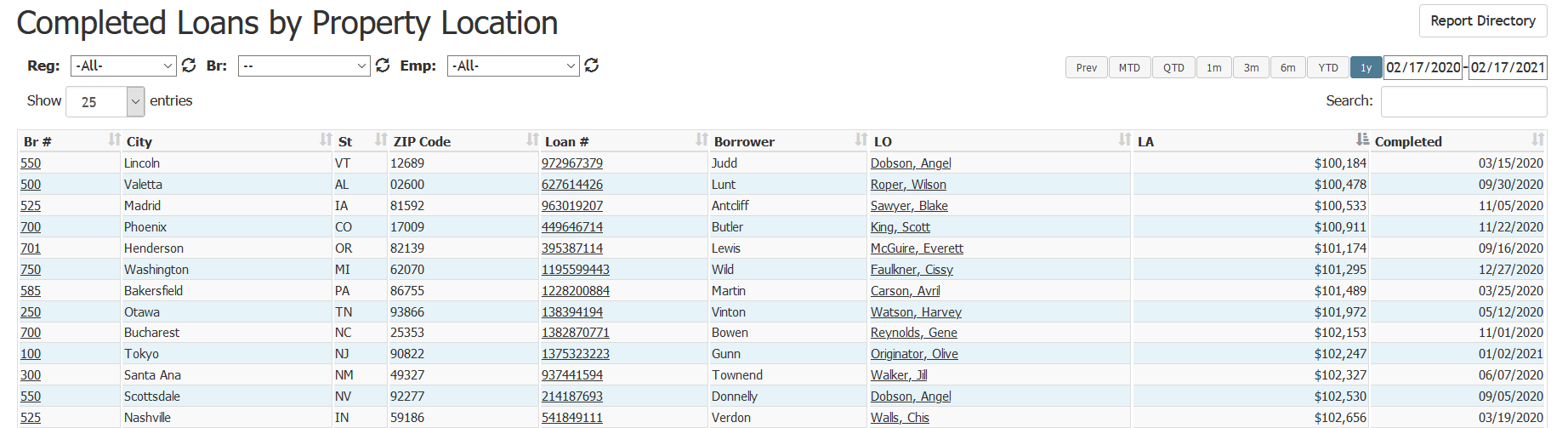
This report includes the following columns:
- Br #: Branch associated with the loan. Click to view the branch details
- City: City where the loan property is located
- St: State where the loan property is located
- ZIP Code: ZIP Code of the loan property
- Loan #: Loan number of the loan. Click to view the loan details
- Borrower: Last name of the borrower on the loan
- LO: Loan originator on the loan. Click to view their employee details page
- LA: Loan amount (volume) of the loan
- Completed: Date the loan was completed
Exporting the Report
To export this page, click the export icon.

This export includes the same columns present in the online version.
See also: