Completed Loans by Property City Summary Report
The Completed Loans by Property City Summary Report provides an overview of where loans were completed. This is a useful tool for helping to determine how to best allocate resources, and to what areas to best serve clients.
Minimum Compensation Access Level Required: Sub-Branch
Accessing the Report
To access this report,
- From the nCino Incentive Compensation menu, click "Report ▼" .
- Click "All".
- Click "Production".
- Click the "Completed Loans by Property City Summary" report
Reading the Report
This report includes the following filters / display options:
-
Region, Branch, and Employee Filtering Tool: Used to filter the information on the report. For information on using this tool, refer to How do I filter reports?.
-
Date Selector: Used to select the date range for the report. For more information on using this tool, refer to How do I use the date selectors?.
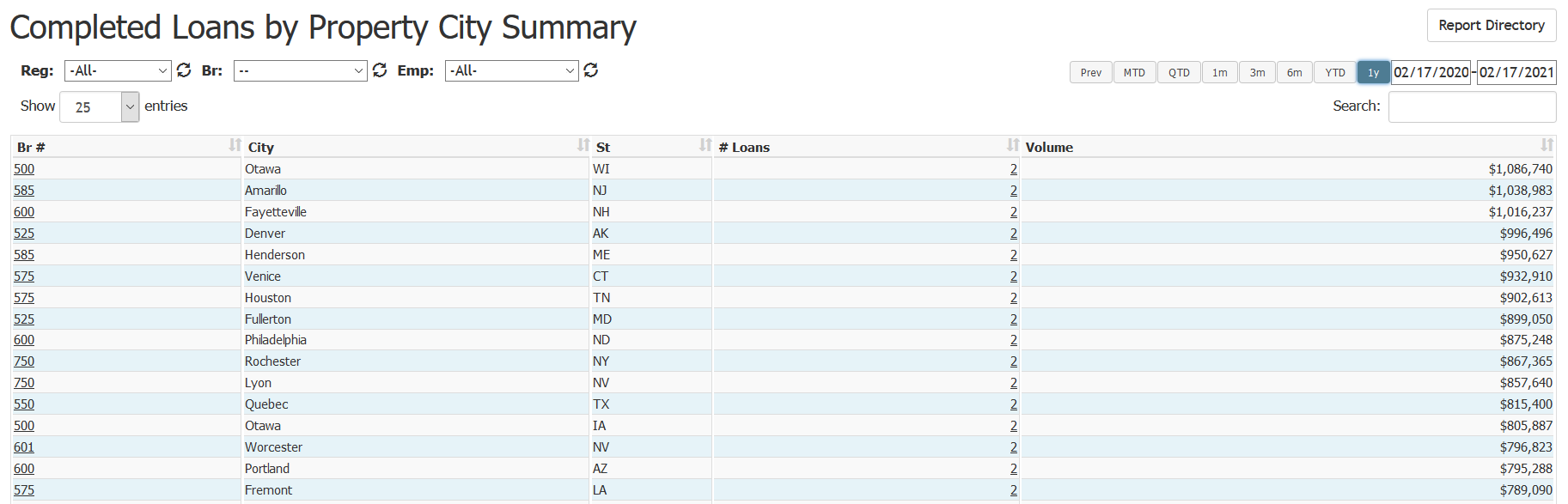
This report includes the following columns:
- Br #: Branch associated with the property city. Click to view the branch details
- City: City where the loan properties are located
- St: State where the loan properties are located
- # Loans: Number of loans completed in that property city
- Volume: Total volume of all loans completed in the property city
Exporting the Report
To export this page, click the export icon.
This export includes the same columns present in the online version.
See also: