Manage Assignment Groups
The Manage Assignment Groups tool allows you to:- Set the default term rule by assignment.
- Allow a new assignment to be added to a loan or updated on a loan after lockdown.
- Inactivate an assignment.
- Add an assignment group.
NOTE: Adding an assignment requires additional mapping. Please contact https://incentivehelp.ncino.com/hc/en-us for assistance.
Minimum Compensation Access Level Required: Executive
Accessing the Tool
To access this tool,
- From the nCino Incentive Compensation menu, click the Gear Icon
- Click "System Admin".
- Click "Loans".
- Click the "Manage Assignment Groups" link.
Description of the Tool
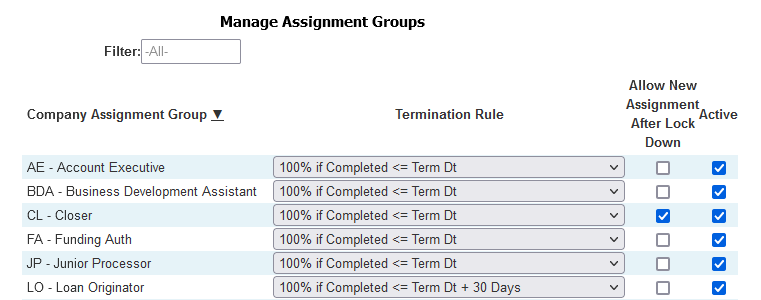
- Filter: Filter assignment groups by text
- Company Assignment Group: Assignment group abbreviation and full name
- Termination Rule: Default termination rule used for the assignment group
- Allow New Assignment After Lock Down: Whether or not the assignment can be added to a loan or updated on a loan after it is locked down
- Active: Whether or not the assignment group can be used on a new compensation plan
NOTE: Only active assignment groups will be available when editing plans.
To activate or add an assignment group, please contact https://incentivehelp.ncino.com/hc/en-us.