Employee Assignment Audit Report
The Employee Assignment Audit report identifies employees assigned to loans that cannot be matched to an employee in nCino Incentive Compensation for assignments per "Manage Assignment Groups". This may be due to a missing employee number, email, or nCino Incentive Compensation account. These can be corrected in the LOS or by creating a nCino Incentive Compensation account for the employee.
Minimum Compensation Access Level Required: Master Branch
Accessing the Report
To access this report,
- From the nCino Incentive Compensation menu, click "Report ▼".
- In the menu that appears, click "All".
- Click the "System Audit" category.
- Click the "Employee Assignment Audit" report.
Reading the Report
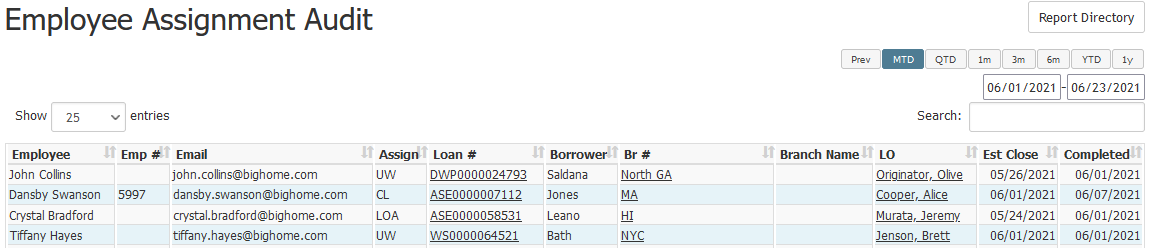
This report includes the following columns:
- Employee: Full name of the employee.
- Emp #: Employee number of the employee.
- Email: Employee’s email address.
- Assign: Employee’s assignment on the loan.
- Loan #: Loan number for the loan. Click to view its loan details page.
- Borrower: Last name of the borrower.
- Br #: Branch number the loan is assigned to. Click to view its branch details page.
- Branch Name: Full name of the branch.
- LO: Loan Originator on the loan. Click to view that employee’s details page.
- Est Close: Estimated closing date of the loan.
- Completed: Completed date of the loan.
Exporting the Report
To export this page, click the export icon.

This export includes same columns present in the online version.
See also: