Pending Manual Disbursement Requests Report
The Pending Manual Disbursements report is a tool to view and act on manual disbursements that are in the pending status.
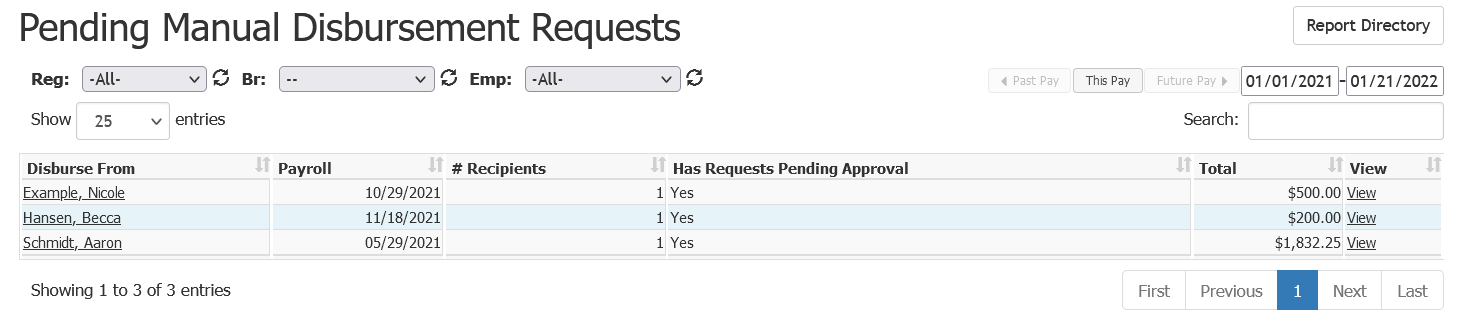
This report includes the following columns:
- Disburse From: Employee from whom the payment will be disbursed.
- Payroll: Original Pay date the disbursement was requested for.
- # Recipients: Number of employees being paid on the disbursements.
- Has Requests Pending Approval: Whether or not the requester has disbursement requests pending approval.
- Total: Total amount in dollars of the disbursements from that employee.
- View: Link to view details of the disbursements.
To export this page, click the export icon at the top right.
This export includes the following columns:
- EmpLfNameWithdrawal: Identical to online field "Disburse From".
- PayrollPayDateWithdrawal: Identical to online field "Payroll".
- RecipientCount: Identical to online field "# Recipients".
- HasPendingApproval: Similar to online field "Has Requests Pending Approval", but uses True/False instead of Yes/No.
- TotalDisburse: Identical to online field "Total".
- EmpWithdrawalId: Unique ID used to identify the employee’s withdrawal.
- PayrollWithdrawalId: Unique ID used to identify the specific payroll.
