Set Company Adjustment Types
The Adjustment Types tool allows company admins to set the adjustment types used for transactions throughout the system.
Minimum Compensation Access Level Required: Executive with Admin access
Access the Adjustment Types Tool
To access this tool from the nCino Incentive Compensation menu, click:
-
The gear icon (
 )
) -
System Admin
-
Company Profile
-
Adjustment Types
Read the Adjustment Types Tables
The Adjustment Types tables include these filters:
-
Filter by Pay Type: Use to select which pay type is visible.
-
Options: -All- (Default), Commission, Bonus, Marketing, Earnings Recapture, Override, Other
-
-
Filter by Adjustment Type: Use to select which adjustment type is visible.
-
Options: -All- (Default), [Available Adjustment Types]
-
-
Filter by Status: Use to select whether active or inactive adjustment types are visible.
-
Options: Active (Default), Inactive, -All-
-
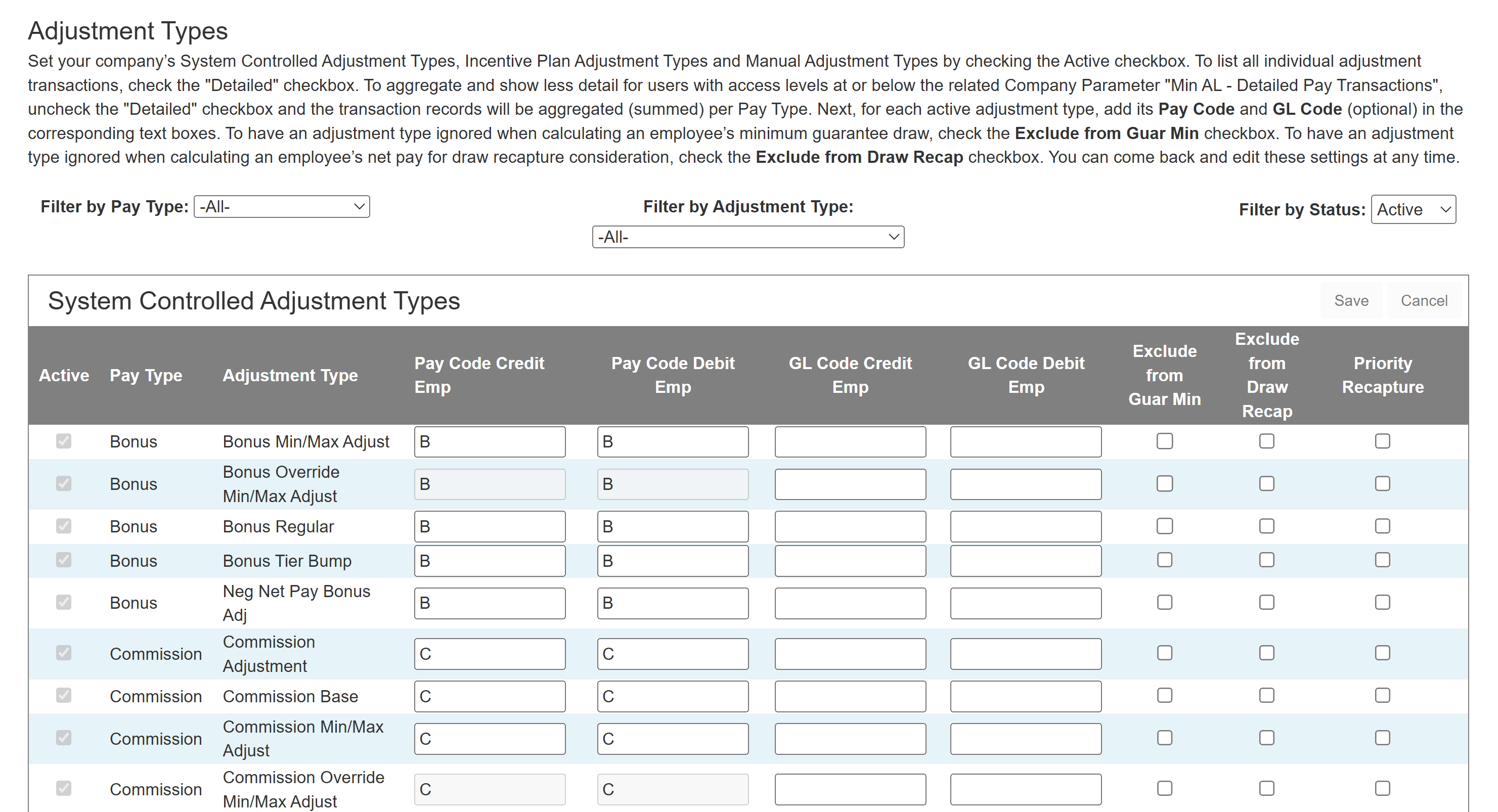
This tool includes three tables:
-
System Controlled Adjustment Types: Lists adjustment types exclusively used when the system creates or updates adjustments.
-
Incentive Plan Adjustment Types: Lists adjustment types that can be used on incentive plans.
-
Manual Adjustment Types: Lists adjustment types that can be use when creating manual adjustments.
Each table includes these columns:
-
Active: Use to select if an adjustment type is currently active. System Controlled Adjustment Types cannot be set inactive.
-
Pay Type: Pay type that this adjustment type corresponds to. Options include: Commission, Bonus, Marketing, Earnings Recapture, Override, Other.
-
Adjustment Type: Name of the adjustment type.
-
Pay Code Credit Emp: Pay code used when this adjustment type credits an employee.
-
Pay Code Debit Emp: Pay code used when this adjustment type debits an employee.
-
GL Code Credit Emp: General ledger code used when this adjustment type credits an employee.
-
GL Code Debit Emp: General ledger code used when this adjustment type credits an employee.
-
Exclude from Guar Min: Use to select if adjustments of this type should be excluded when calculating a user's pay for guaranteed minimum calculations.
-
Exclude from Draw Recap: Use to exclude an adjustment type from recapture when the system recaptures due to a draw.
-
Priority Recapture: Use to mark the adjustment type as a priority when the system recaptures. The system attempts to recapture priority adjustment types before non-priority adjustment types.
Add Adjustment Type
Admins can add new Incentive Plan and Manual Adjustment Types as follows:
-
In the Incentive Plan or Manual Adjustment Types section, click Add New.
-
Enter information about the adjustment type into the dialog box.
-
Click the Save button.
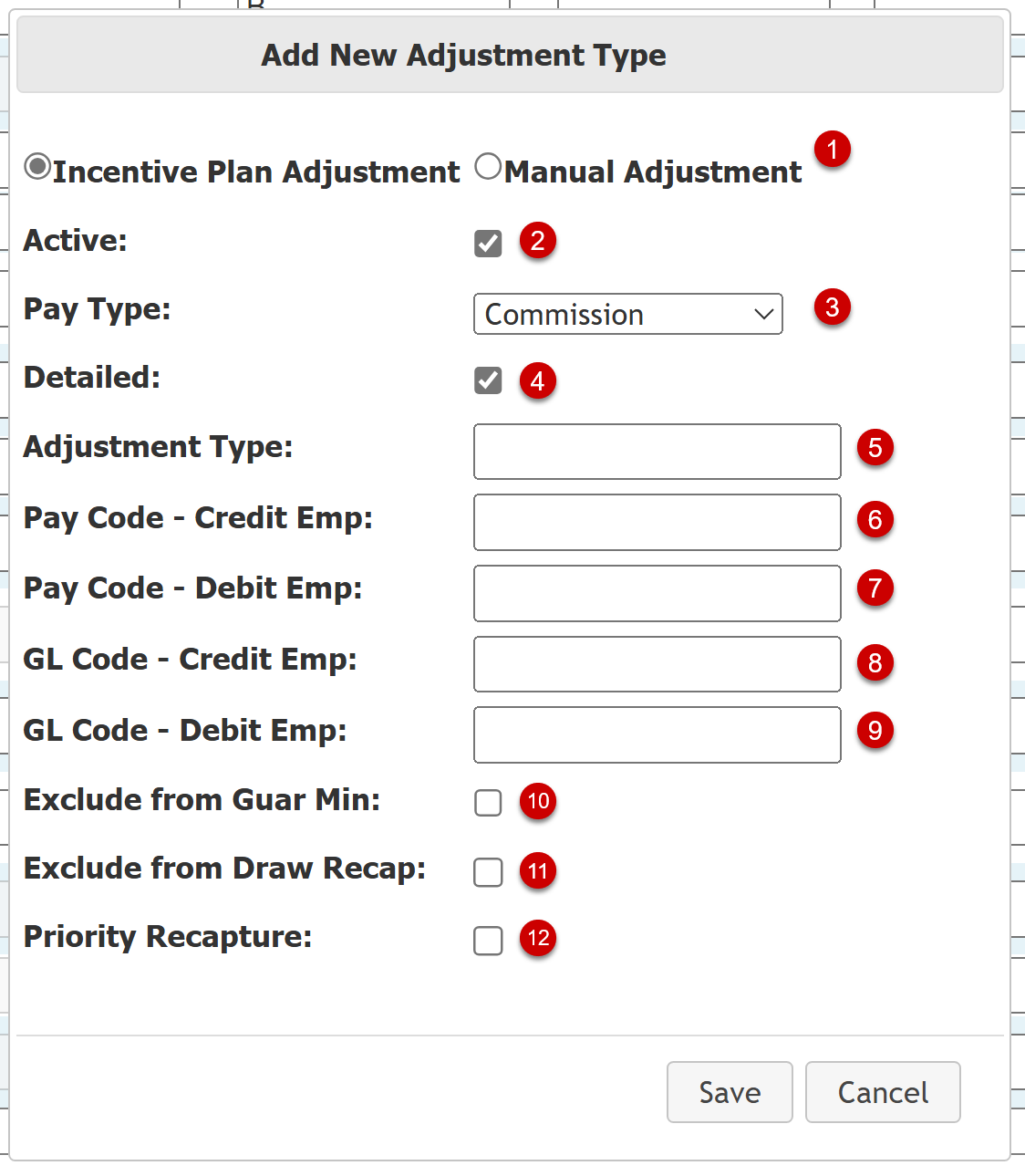
The Add New Adjustment Type dialog box includes these sections:
-
Adjustment Type Category (1): Whether the new adjustment type is for Incentive Plans or Manual Adjustments. Set automatically based on the section where you clicked Add New.
-
Active (2): Select if the adjustment is currently active.
-
Pay Type (3): Select the pay type that corresponds with this adjustment. Available options: Commission, Bonus, Marketing, Earnings Recapture, Override, Other.
-
Detailed (4): Select if the system should always show individual transactions that use this transaction. If not selected, the system aggregates transactions of this adjustment type for users with access levels below the "Min AL - Detailed Pay Transactions" company parameter.
-
Adjustment Type (5): Name for the adjustment type. Required.
-
Pay Code - Credit Emp (6): Payroll code the system uses when this adjustment credits an employee. Required.
-
Pay Code - Debit Emp (7): Payroll code the system uses when this adjustment debits an employee. Required.
-
GL Code - Credit Emp (8): General ledger code the system uses when this adjustment credits an employee.
-
GL Code - Debit Emp (9): General ledger code the system uses when this adjustment debits an employee.
-
Exclude from Guar Min (10): Select to exclude transactions with this adjustment type from guaranteed minimum calculations.
-
Exclude from Draw Recap (11): Select to exclude transactions with this adjustment type from draw recapture.
-
Priority Recapture (12): Select if the system should prioritize recapture from this adjustment type before non-priority adjustment types.
Edit Adjustment Type
Admins can edit certain fields for existing adjustment types directly in the table. To edit an adjustment type:
-
Use the check boxes and text fields in the row to edit the fields for an adjustment type.
-
Above the adjustment type table, click Save.
See Also: