Adjustment Types
All transactions in nCino Incentive Compensation correspond to an adjustment type in the system. Some adjustment types are only created by the system, and others are available for use in manual adjustments or incentive plans. This article details adjustment types and how nCino Incentive Compensation handles them.
Introduction
Every credit and debit posted in nCino Incentive Compensation corresponds to an adjustment type. This includes transactions created by incentive plans, draws, manual adjustments, and system adjustments created by nCino Incentive Compensation during calculation. You can view adjustment types on the Adjustment Types screen.
Adjustment types enable the following features:
-
Name different types of credit / debit transactions (has no impact on calculation)
-
Tie transactions to pay codes and general ledger codes on export files
-
Allows the user to exclude certain transactions from guaranteed minimum calculations
-
Allows the user to exclude certain transactions from draw recapture calculations
Access the Adjustment Types Screen
To access the Adjustment Types screen:
-
From the nCino Incentive Compensation menu, click the gear icon(
 ).
). -
Click System Admin.
-
From the System Admin menu page, click the Company Profile header.
-
Click Adjustment Types.
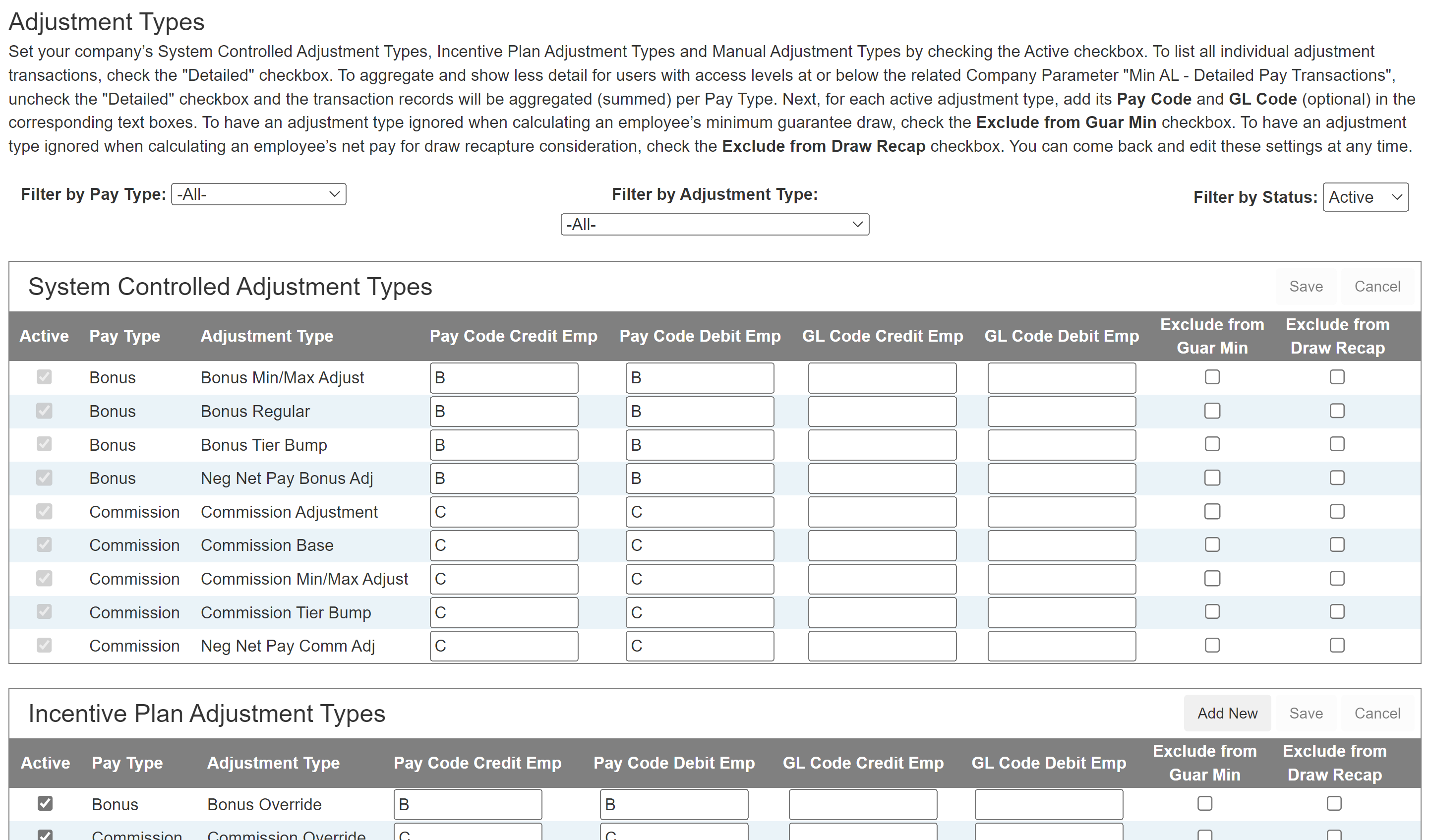
Adjustment Type Categories
Adjustment Types fit into categories based on where they are used in nCino Incentive Compensation.
-
System Controlled Adjustment Types
-
Core adjustment types within nCino Incentive Compensation. They cannot be inactivated.
-
-
Incentive Plan Adjustment Types
-
Admin-entered adjustment types for use with incentive plans.
-
-
Manual Adjustment Types
-
Admin-entered adjustment types for use with manual adjustments and draws.
-
Note: The System-Controlled Min/Max Adjust types are only shown on Payroll Transaction and Loan Details reports. For other purposes (such as payroll exports), minimum and maximum adjustments use their "parent" adjustment types.
Adjustment Type Examples
The following section shows how adjustment types with different settings behave during calculation.
Example: Payroll Export
This example provides a look at how typical adjustment types function in nCino Incentive Compensation.
Big Home Loans has the following Incentive Plan Adjustment Types.

Olive Originator has two incentive plans:
-
1 that pays using the Commission Plan adjustment type
-
2 that pay using the Bonus Plan adjustment type
Olive makes $500 in commissions and $100 from a Bonus Plan. However, due to another employee's Bonus Plan, she splits $50 from her commissions with her LOA. She would make $450 under the “C” code on the payroll export, because the $50 is netted against the $500. She would make $100 under the “B” pay code from her Bonus Plan.
The corresponding pay would show the following for Olive:
| Adjustment Type | Amount | Pay Code |
| Commission Plan | $450 | C |
| Bonus Plan | $100 | B |
If the payroll team wanted all Bonus Plans to net against other Bonus Plans, they would set the LOA's Bonus Plan's Pay Code Debit Emp to "B". If this were the case for the scenario above, Olive would be paid $500 under "C" and $50 under "B".
The corresponding pay would show the following for Olive:
| Adjustment Type | Amount | Pay Code |
| Commission Plan | $500 | C |
| Bonus Plan | $50 | B |
Example: Exclude from Guaranteed Minimums
This example provides a look at how nCino Incentive Compensation handles adjustment types that are excluded from guaranteed minimum calculations.
Bob has a minimum guarantee of $800. His net pay for the pay period is $1,000. However, he has an adjustment of $400 that's set to be ignored for guaranteed minimums. Therefore, nCino Incentive Compensation's guaranteed minimum calculations act as though he is only receiving a net pay of $600 and will create a draw transaction of $200 to bring him to his minimum.
Bob's compensation snapshot for the period would look like this:
| Compensation for Payroll | Draw Balance | ||
| Commission | $600 | Recoverable Draw Balance | $0.00 |
| Bonus (Ignored for minimum guarantee) | $400 | ||
| Net Pay | $1,000 | ||
| Minimum Guarantee Credit | $200 | Minimum Guarantee Recapture | $200 |
| Total Pay for Pay Period | $1,200 | New Draw Balance | $200 |
Example: Exclude from Draw Recapture
This example provides a look at how nCino Incentive Compensation handles adjustment types that are excluded from draw recapture calculations.
Sally has a recoverable draw balance of $1,000. Her net pay for the payroll period is $800. $250 of that net pay has an adjustment type that is ignored for draw recapture. Therefore, nCino Incentive Compensation debits $550 from Sally's net pay, leaving her with $250 in net pay for the pay period and $450 in a recoverable draw balance to be carried forward to the next pay period.
| Compensation for Payroll | Draw Balance | ||
| Commission | $550 | Recoverable Draw Balance | $1,000 |
| Bonus (Ignored for draw recapture) | $250 | ||
| Net Pay | $800 | ||
| Draw Recapture | $(550) | Draw Recapture | $(550) |
| Total Pay for Pay Period | $250 | New Draw Balance | $450 |
See Also: