Understand Auto Draws with Multiple Pay Calendars
Companies with multiple pay calendars have additional options when creating Auto Draws. This article outlines these options and how they behave.
Creating Auto Draws with Multiple Pay Calendars
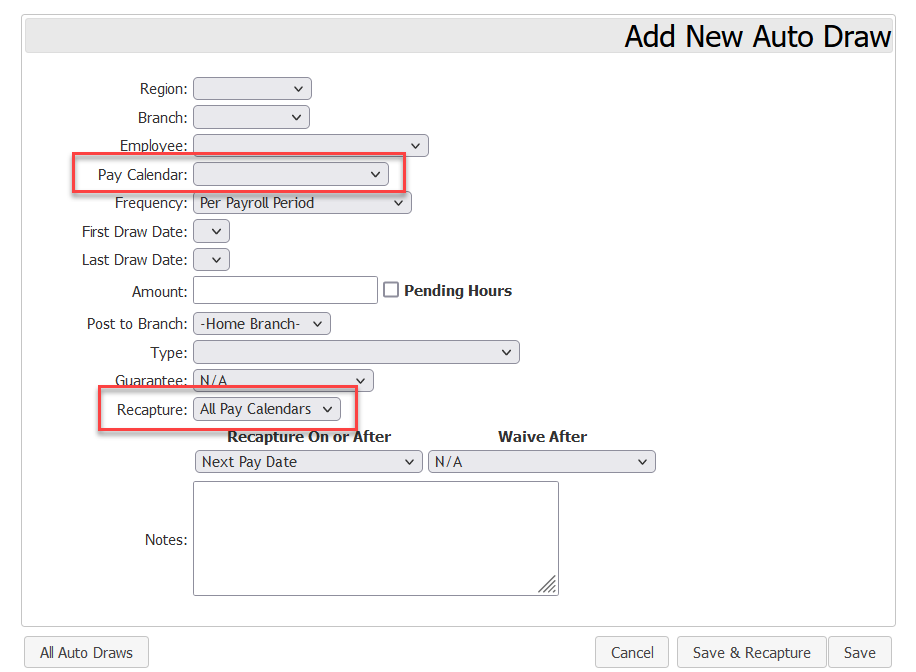
Users creating Auto Draws for companies using multiple pay calendars have the following additional options:
-
Pay Calendar: Dropdown menu to select which pay calendar the draws will be posted to.
-
Recapture
-
All Pay Calendars: Attempts to recapture / waive on each pay date, regardless of the pay calendar.
-
Per Pay Calendar: User can set behavior for each payroll calendar. Each calendar will be treated independently from the other(s).
-
Auto Draw Behavior
Auto Draws behave according to how the following options are set.
Pay Calendar & Frequency
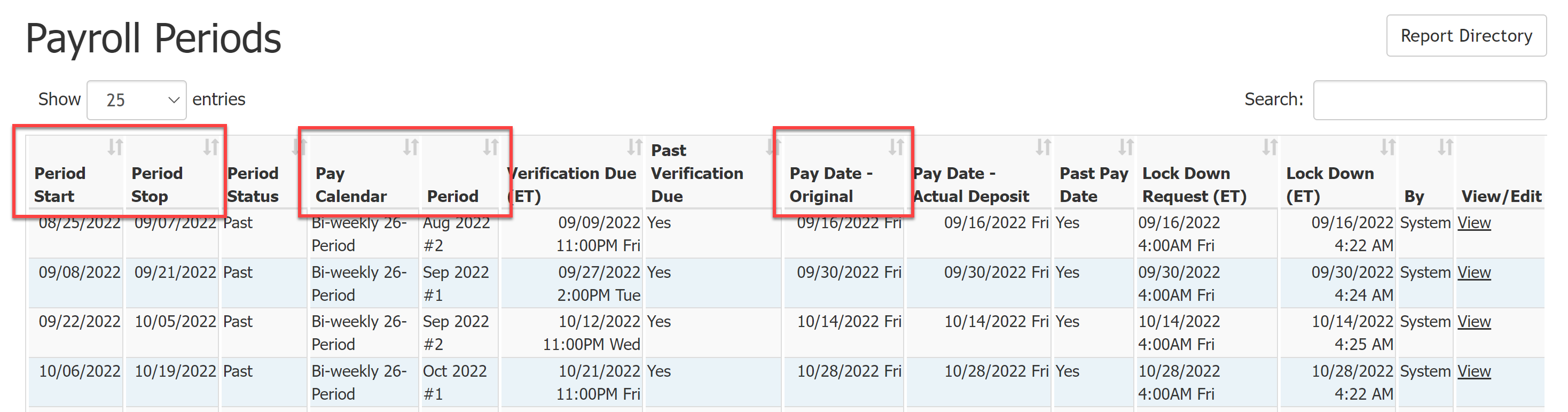
The specific date(s) that draws are created on are determined by a combination of the Pay Calendar settings and the Frequency on the auto draw.
The Pay Calendar settings used by Frequencies can be viewed on the Payroll Periods Report.
To verify when a chosen frequency will create draws, you can use the Auto Draw Timing Report.
The different frequencies behave as follows:
-
Per Payroll Period: Draws will be created each payroll period for the selected calendar.
-
1st Period with Start Date in Month: Draws will be created once a month, on the first period start date in the month.
-
2nd Period with Start Date in Month: Draws will be created once a month, on the second period start date in the month.
-
1st Period with Stop Date in Month: Draws will be created once a month, on the first period stop date in the month.
-
2nd Period with Stop Date in Month: Draws will be created once a month, on the second period stop date in the month.
-
1st Pay Date of the Month: Draws will be created once a month, on the first pay date in the month.
-
2nd Pay Date of the Month: Draws will be created once a month, on the second pay date of the month.
-
Last Pay Date of the Month: Draws will be created once a month, on the last pay date of the month.
-
On Emp Terminated: A draw will be created on the pay period upon the employee's termination.
-
NOTE: The employee MUST have an assigned termination date on their profile prior to creating this auto draw.
-
Recapture & Waive
Recapture & waive timings behave differently based on the following options.
-
All Pay Calendars: Recapture & waive timings will calculate on ALL pay dates, regardless of the calendar they are on.
-
Per Pay Calendar: Recapture and waive timings have separate settings for each pay calendar. Recapture and waive on different calendars behave independently.
Examples
Example 1 - Basic Setup
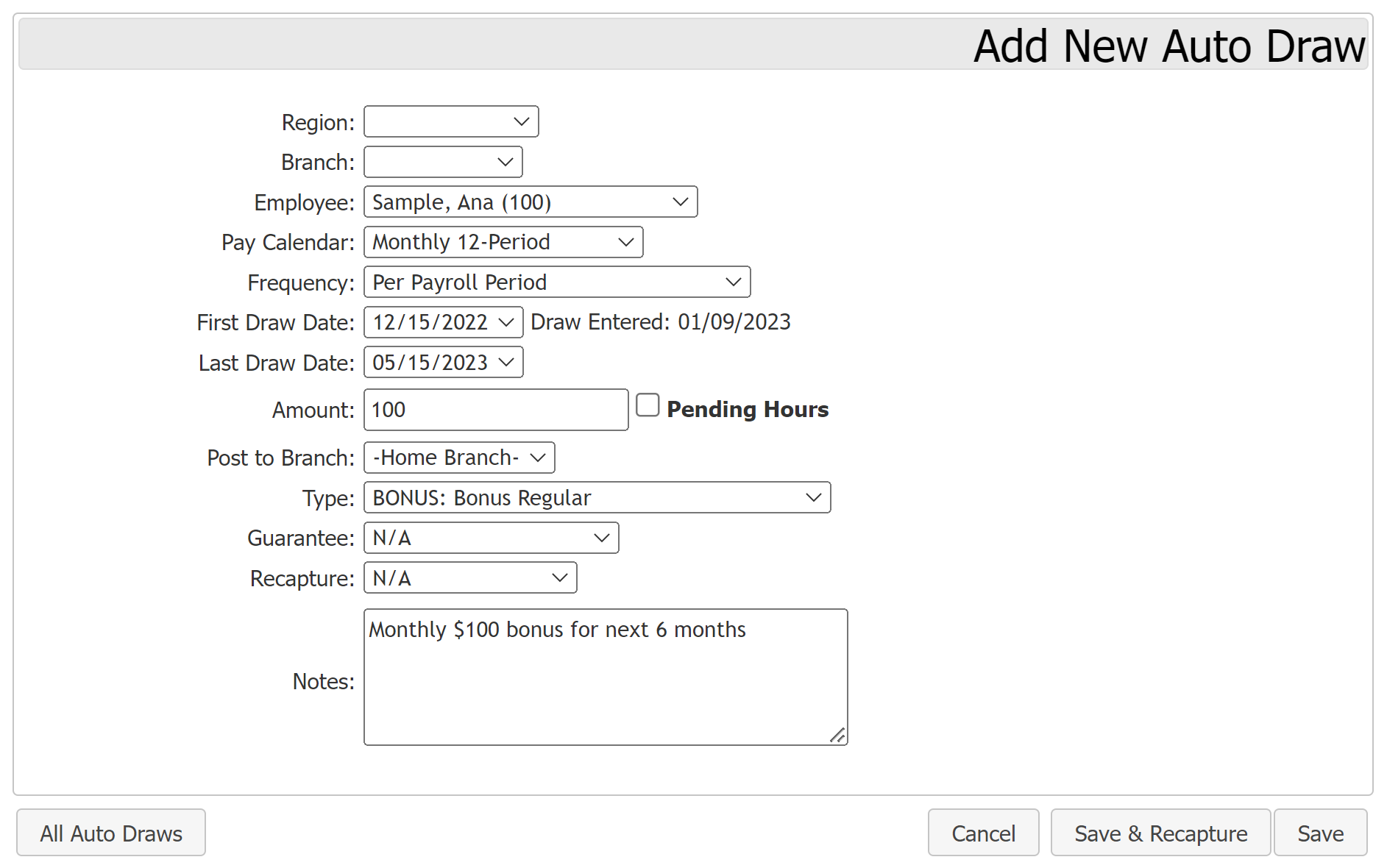
Ana is eligible for a monthly, non-recapturable $100 bonus each month for the next six months. In a company that has the following pay calendars: Semi-monthly 24 Period and Monthly 12 Period.
-
Pay Calendar: Monthly 12 Period
-
Frequency: Per Payroll Period
-
First Draw Date: 12/15/2022
-
Last Draw Date: 05/15/2023
-
Amount: $100
-
Post to Branch: – Home Branch –
-
Type: BONUS: Bonus Regular
-
Guarantee: N/A
-
Recapture: N/A
-
Notes: Monthly $100 bonus for next 6 months
This uses the Monthly 12 Period calendar, and pays per payroll period, it creates a draw transaction for each month in the selected date range.
Example 2 - Recapture on All
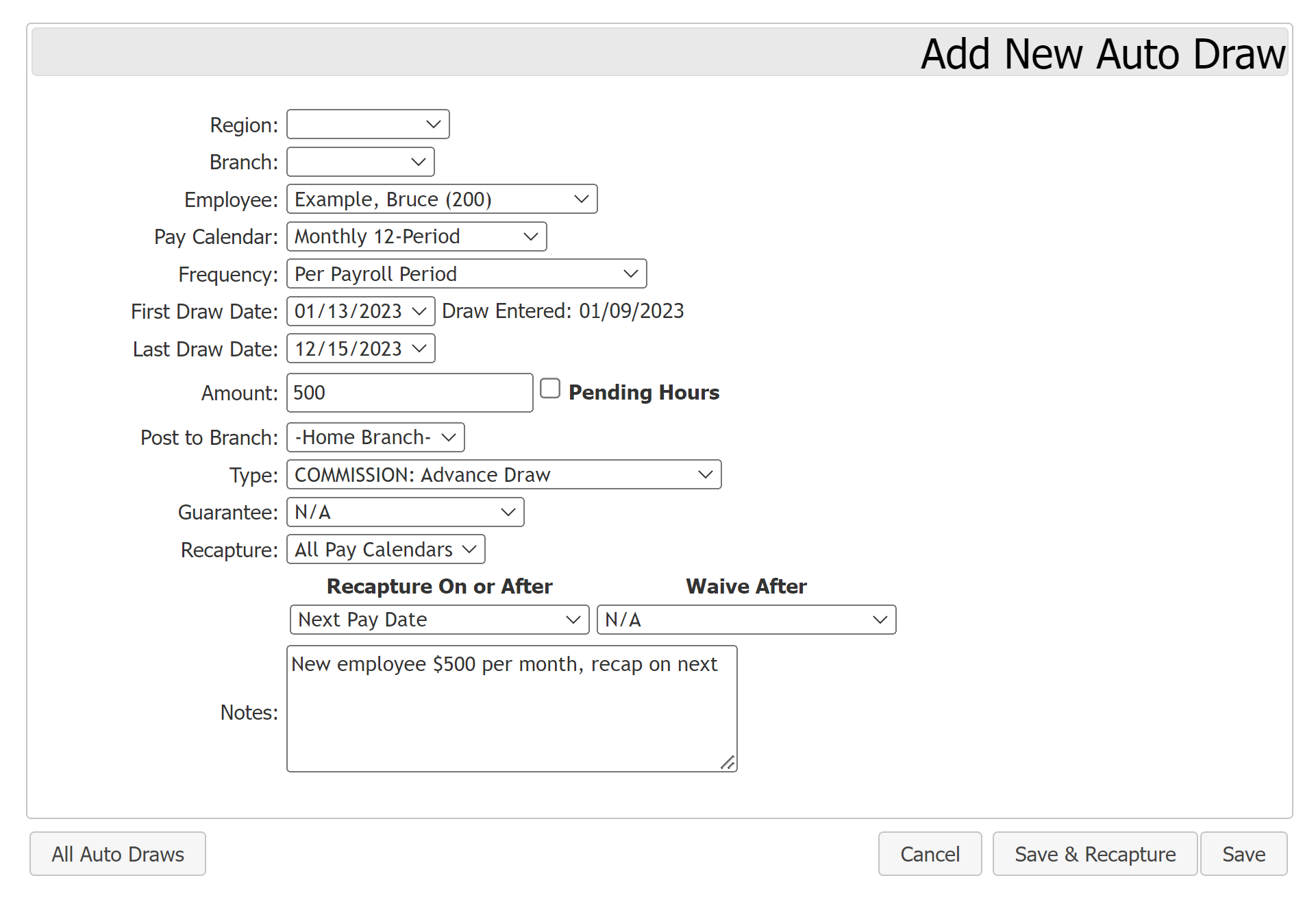
Bruce is new to the company and paid $500 a month for the first year. The company would like to recapture the draw on the pay date after the draw has posted, regardless of the pay calendar.
-
Pay Calendar: Bonus 12-Period
-
Frequency: Per Payroll Period
-
First Draw Date: 01/13/2023
-
Last Draw Date: 12/15/2023
-
Amount: 500
-
Post to Branch: – Home Branch –
-
Type: COMMISSION: Advance Draw
-
Guarantee: N/A
-
Recapture: All Pay Calendars
-
Recapture On or After: Next Pay Date
-
Waive After: N/A
-
Notes: New employee $500 per month, recap on next
This Auto Draw will work as follows:
-
On each pay date of the Monthly 12 Period calendar, a $500 draw will be created.
-
Each pay date that follows (regardless of the calendar), the draw will attempt to recapture from Bruce’s pay until it is fully recaptured.
Example 3 - Recapture Per Pay Calendar
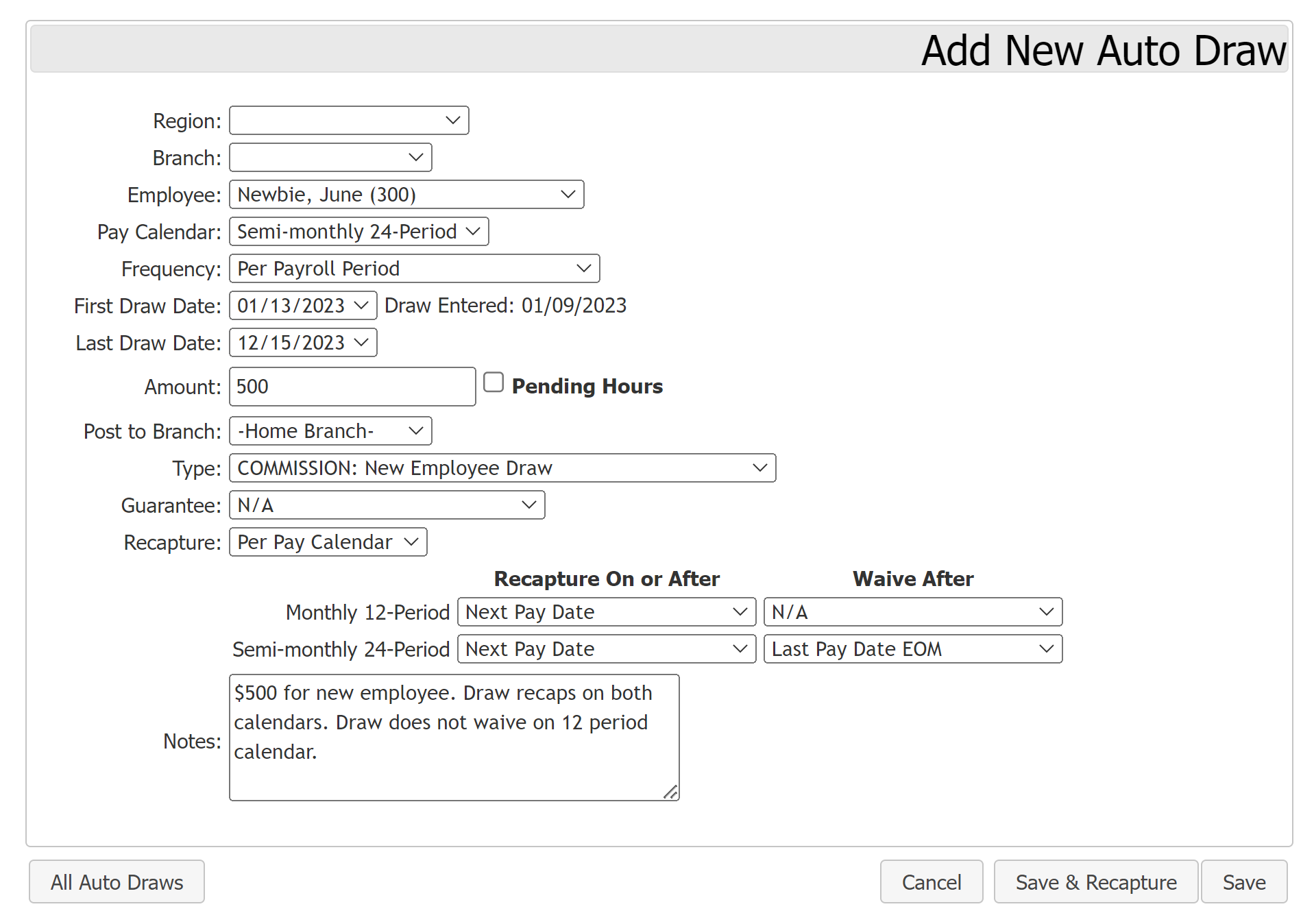
June is new to the company and paid $500 each pay period on the Semi-monthly 24 Period calendar for the first year. The draw will attempt to recapture on or after the next pay date and will waive on the Semi-monthly 24 Period calendar after the last pay date of the month. However, on the Monthly 12 Period calendar, the draw will attempt to recapture starting with the pay date corresponding with the next pay period and continue to recapture until all funds have been recaptured.
Using the above pay calendars described above:
-
Pay Calendar: Semi-monthly 24 Period
-
Frequency: Per Payroll Period
-
First Draw Date: 01/13/2023
-
Last Draw Date: 12/15/2023
-
Amount: 500
-
Post to Branch: – Home Branch –
-
Type: COMMISSION: New Employee Draw
-
Guarantee: N/A
-
Recapture: Per Pay Calendar
- (Monthly 12 Period) Recapture On or After: Next Pay Date
-
(Monthly 12 Period) Waive After: N/A
-
(Semi-monthly 24 Period) Recapture On or After: Next Pay Date
-
(Semi-monthly 24 Period) Waive After: Last Pay Date EOM
-
Notes: $500 for new employee. Draw recaps on both calendars. Draw does not waive on 12 period calendar.
The Auto Draw will work as follows:
-
Each pay date on the Semi-monthly 24 Period calendar, create a $500 draw transaction.
-
On the last pay period of the month for the Semi-monthly 24 Period calendar, attempt to recapture the draw.
-
On the last pay date of the month for the Semi-monthly 24 Period calendar, waive the previous draw amount for this calendar going forward.
-
For the Monthly 12 Period calendar's next pay date, attempt to recapture.
-
Continue recapture every pay period on the Monthly 12 Period calendar until draw is fully recaptured. Do not waive on that calendar.
Example 4 - Draw and Recapture on Different Pay Calendars
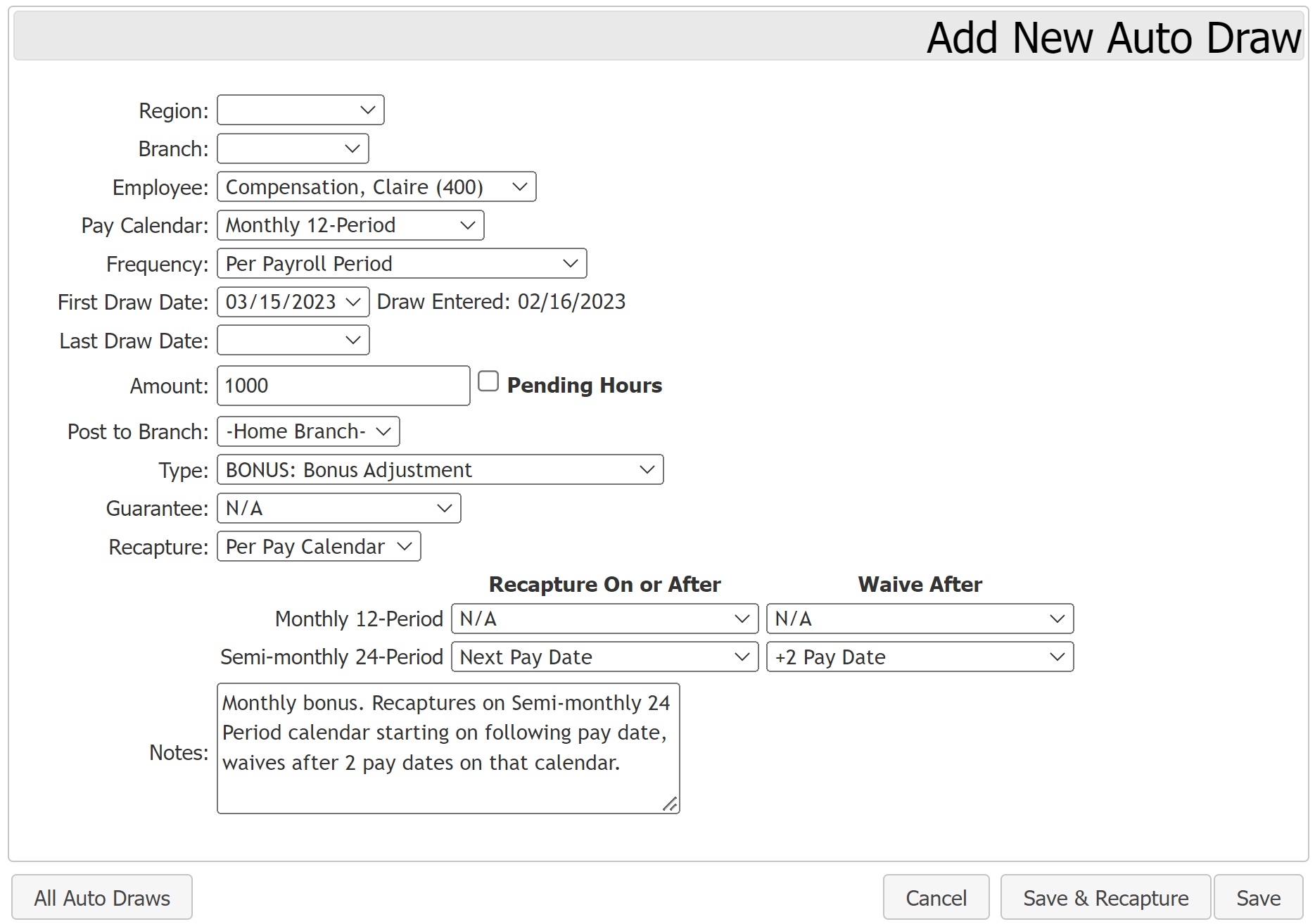
Claire receives a bonus of $1,000 per month on the Monthly 12 Period calendar. This bonus can be recaptured only on the Semi-monthly 24 Period calendar. The bonus will attempt to recapture starting the following pay period and will waive after two pay periods on that calendar.
Using the pay calendars described above:
-
Pay Calendar: Monthly 12 Period
-
Frequency: Per Payroll Period
-
First Draw Date: 03/15/2023
-
Last Draw Date: [Blank]
-
Amount: 1000
-
Post to Branch: – Home Branch –
-
Type: BONUS: Bonus Adjustment
-
Guarantee: N/A
-
Recapture: Per Pay Calendar
-
(Monthly 12 Period) Recapture On or After: N/A
-
(Monthly 12 Period) Waive After: N/A
-
(Semi-Monthly 24 Period) Recapture On or After: Next Pay Date
-
(Semi-Monthly 24 Period) Waive After: +2 Pay Date
-
-
Notes: Monthly bonus. Recaptures on Semi-monthly 24 Period calendar starting on following pay date, waives after 2 pay dates on that calendar.
The Auto Draw will work as follows:
-
Each month, create a $1000 draw transaction on the Monthly 12 Period calendar.
-
On the next pay date on the Semi-monthly 24 Period, the draw will attempt to recapture.
-
After 2 pay dates on the Semi-monthly 24 Period calendar, the draw will be waived.
See also: