Auto Draw Timing Report
The Auto Draw Timing report is a preview of how draws function given a certain creation date and waive / recapture timing.
Minimum Compensation Access Level Required: Executive
Access the Report
To access this report from the nCino Incentive Compensation menu, click:
- Report ▼
- All
- Payroll
- The Auto Draw Timing report
Read the Report
This report includes the following filters / display options:
- Pay Calendar Selector: Only visible for clients using multiple pay calendars. Used to filter the report based on pay calendar.
- Payroll Period Selector: Used to select the payroll period shown on the report. For information on using this tool, refer to How do I use the date selectors?.
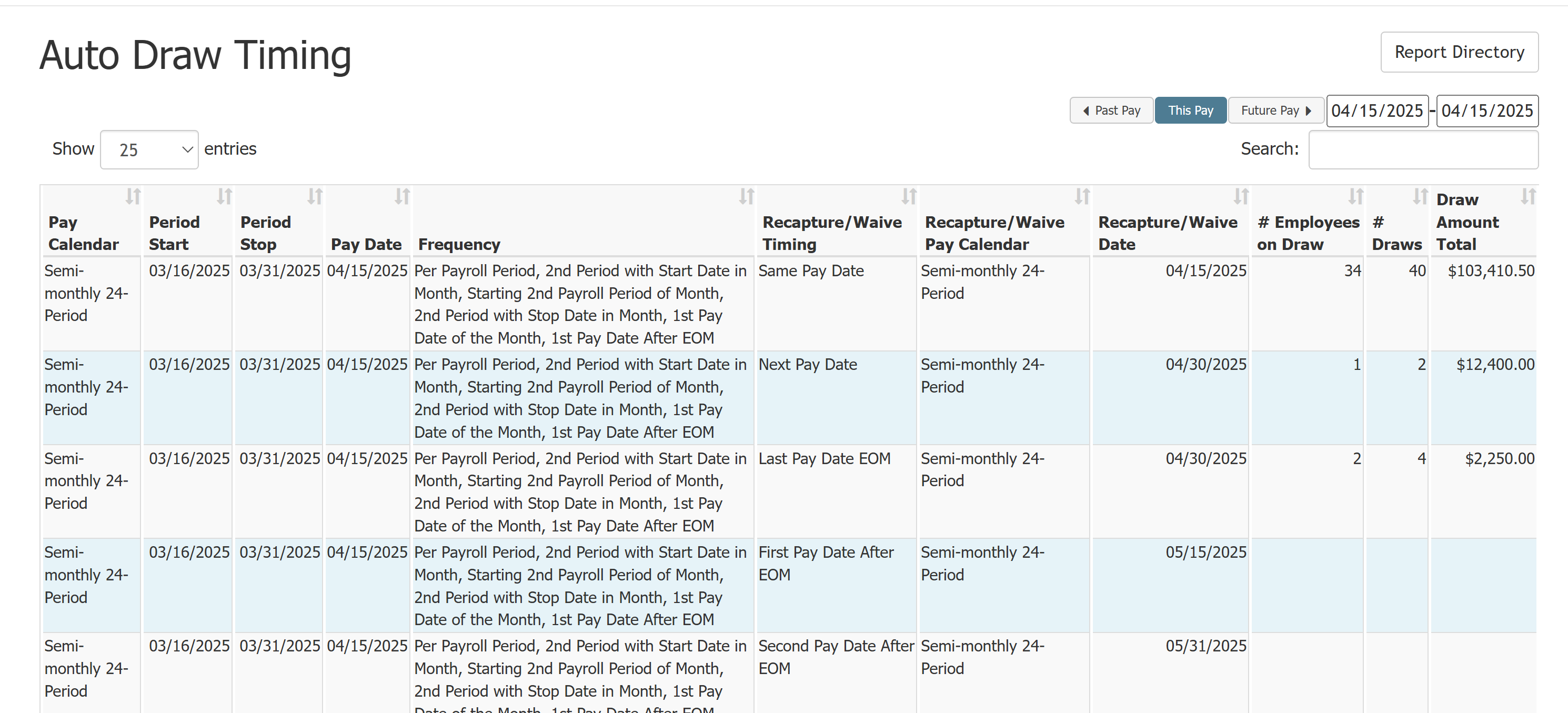
This report contains the following columns:
-
Pay Calendar: Pay calendar for the pay period.
-
Period Start: Pay period start date.
-
Period Stop: Pay period end date.
-
Pay Date: Pay date for the pay period.
-
Frequency: Auto draw frequencies that can pay this period.
-
Recapture/Waive Timing: Recapture or waived timing represented by this row.
-
Recapture/Waive Pay Calendar: Pay calendar this recapture or waive timing uses.
-
Note: If the auto draw is using the Pay Per Calendar recapture feature, the waive dates apply to each calendar separately. For example: An auto draw has separate recapture and waive dates on two pay calendars – Calendar 1 and Calendar 2. If a draw is waived on Calendar 1 but not yet on Calendar 2, it still attempts to recapture on Calendar 2 until it reaches the waive date set for that calendar.
-
-
Recapture/Waive Date: Calculated draw recapture or waive date.
-
# Employees on Draw: Number of employees with a draw that fits this timing.
-
# Draws: Number of draws that use this timing.
-
Draw Amount Total: Total dollar amount of draws that use this timing.
Export the Report
To export this page, click the export icon.

This export includes the same columns present in the online version.
See also: