Understand Incentive Plan Inactivation
Both incentive plans and incentive plan assignments are marked as either Active or Inactive. Understanding how this setting works, and how to use it is vital for proper incentive plan management.
This article details how to inactivate incentive plans, as well as incentive plan assignments (sometimes referred to as employee-level).
Incentive Plan Inactivation
Incentive plans can be inactivated in nCino Incentive Compensation. Inactivating an incentive plan will affect the following:
-
Inactivation date will be added to the plan. This only inactivates the plan, not any related assignments.
-
Plan will no longer be visible as an option to assign to employees.
-
Employees with this plan already assigned to them will still be compensated based on it. However, if the "Inactivate associated assignments" check box is marked during inactivation, employees with this plan will also have their assignments inactivated. Employee assignments can also be inactivated individually by entering an end date for them.
How to Inactivate Incentive Plans
From the incentive plan's page:
-
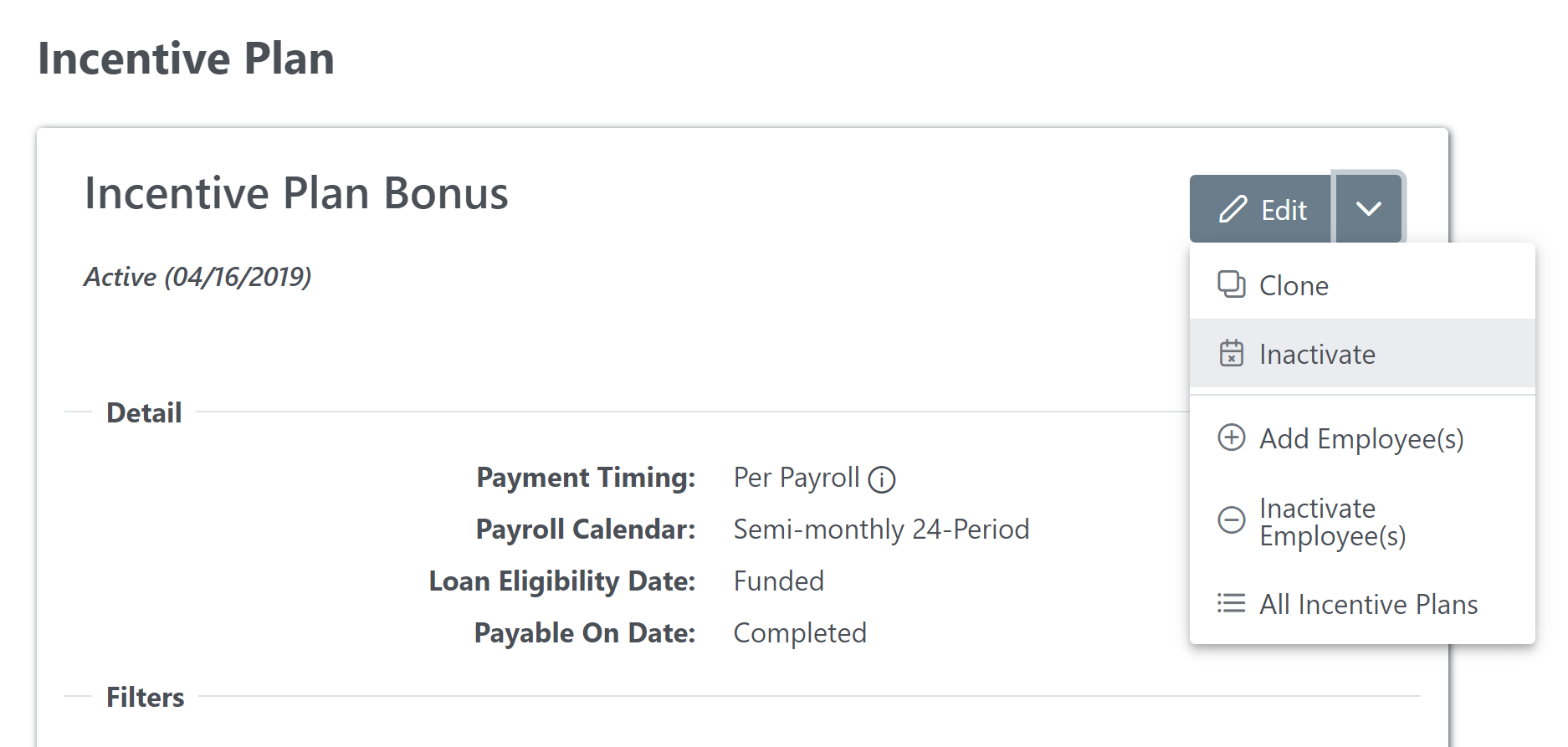
Click the down arrow next to the Edit button.
-
In the dropdown menu, click Inactivate.
-
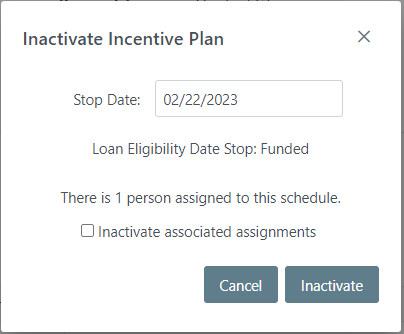
In the window that appears, enter the following:
-
Stop Date: Last day the incentive plan will be selectable.
-
Loan Eligibility Date Stop: Loan eligibility milestone associated with the plan's Stop date. A loan will only be considered for this plan if it reaches this milestone prior to the Stop date.
-
Inactivate associated assignments: Mark this option to inactivate all associated assignments. The number of current assignments is listed above this check box.
-
Automatic Incentive Plan Inactivation
When incentive plans are no longer assigned to any employees, nCino Incentive Compensation will automatically inactivate the incentive plans
overnight when all of the following criteria are met:
-
Incentive plan is Active.
-
Incentive plan was created > 120 days ago.
-
Incentive plan's start date is > 120 days ago.
-
No active are assigned OR employees are assigned but assignments haven't been created or updated in > 120 days.
Incentive Plan Assignment Inactivation
Employee's individual incentive plan assignments can also be inactivated. Inactivating the incentive plan assignment affects the following:
-
The inactive date on the employee's assignment will be set. This is visible in the employee's Comp Plan tab on their Employee Details page.
-
These dates DO affect whether or not the employee is paid based on the plan. A loan that reaches the Payable On Date milestone after the inactivation date will not be considered for payment on that plan.
How to Inactivate Incentive Plan Assignments
From the Comp Plan tab on the Employee Details page:
-
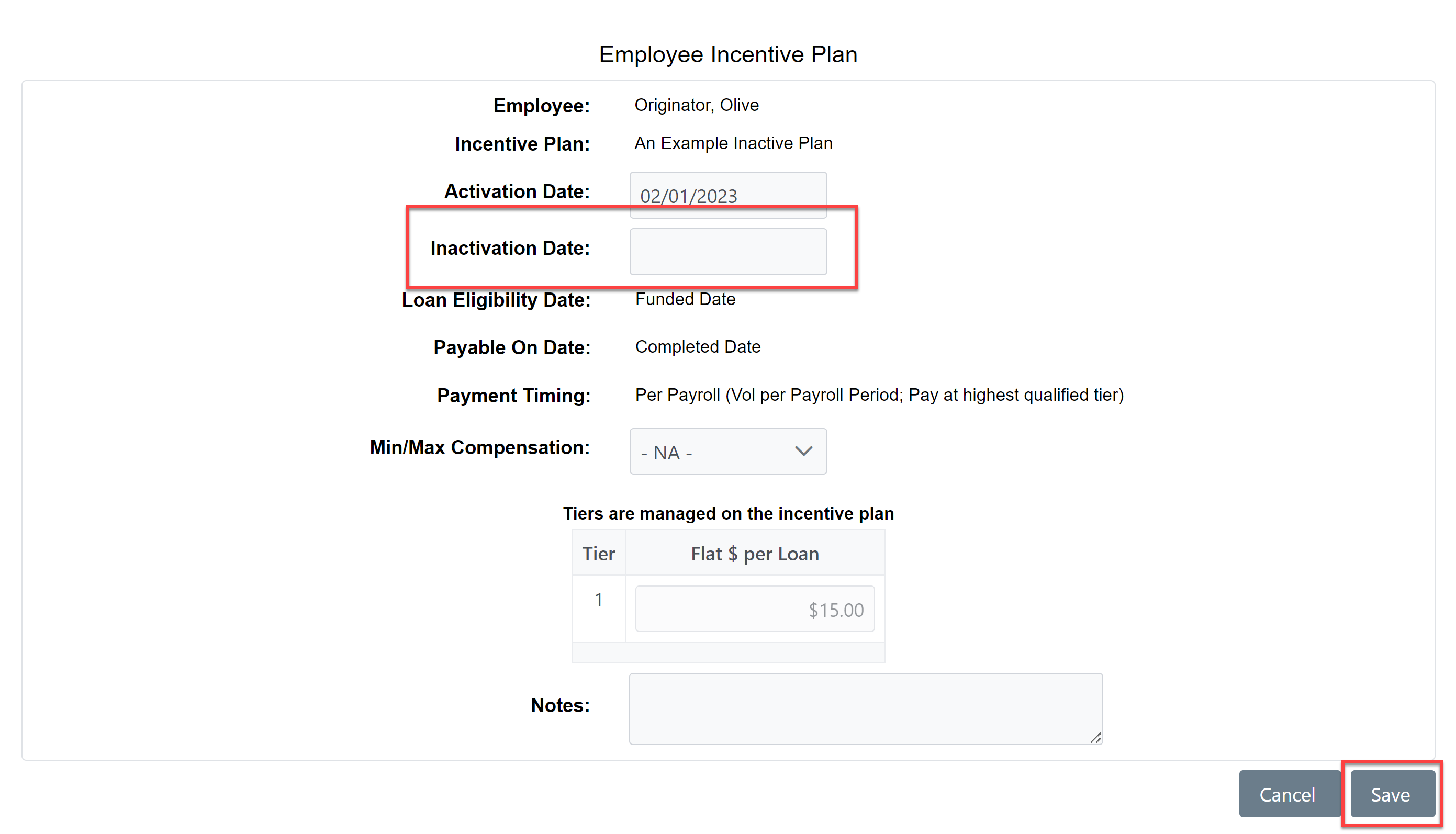
Click the pencil icon (
 ) next to the incentive plan assignment.
-
Enter the Inactivation Date, then click Save.
For information on inactivating incentive plan assignments for multiple employees at once, see Use the Inactivate Multiple Assignments Tool.
See also: