Compensation Verification Summary Report
The Compensation Verification Summary report shows the breakdown of compensation verification per branch. This is especially useful for spotting branches that have many inquiries (also known as "disputes"), something that could signify an issue with pay for employees of that branch.
Minimum Compensation Access Level Required: Executive
Accessing the Report
To access this report,
- From the nCino Incentive Compensation menu, click “Report ▼ .
- Click “All“
- Click “Payroll“
- Click the “Compensation Verification Summary report
Reading the Report
This report includes the following filters / display options:
-
Region, Branch, and Employee Filtering Tool: Used to filter the information on the report. For information on using this tool, refer to How do I filter reports?.
-
Payroll Period Selector: Used to select the payroll period shown on the report. For information on using this tool, refer to How do I use the date selectors?.
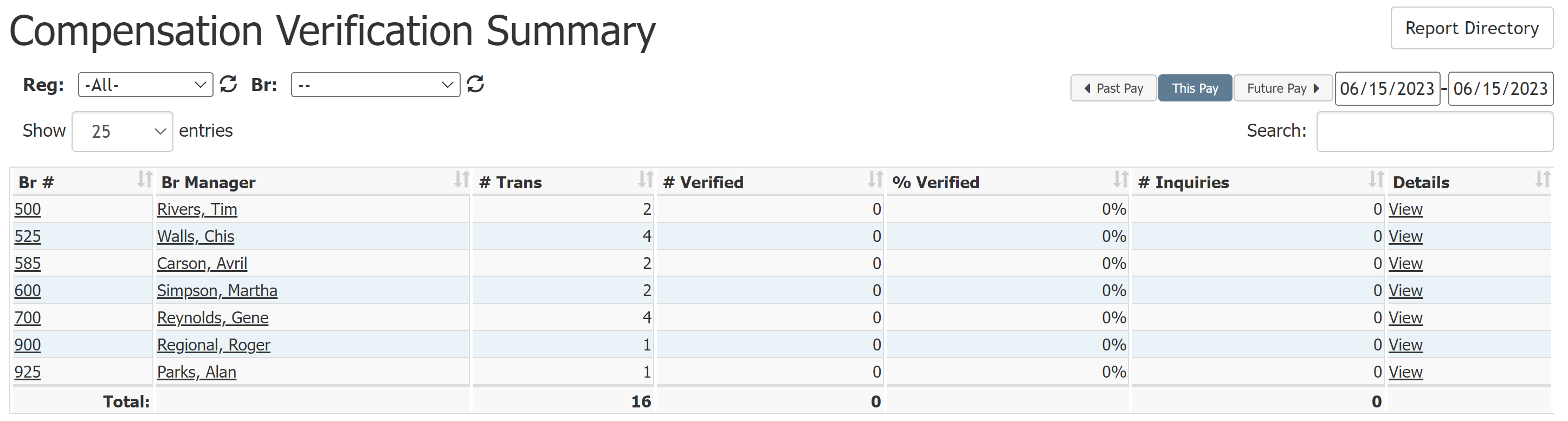
This report includes the following columns:
- Br #: Branch number for the branch represented in this row
- Br Manager: Branch manager of this branch
- # Trans: Number of transactions in this branch during the chosen time period
- # Verified: Number of transactions verified during the chosen time period
- % Verified: Percent of all transactions verified during the chosen time period
- # Inquiries: Number of transactions inquired about during the chosen time period
- Details: Link to a list of all verifications for that branch during the chosen time period
Exporting the Report
To export this page, click the export icon.

This export includes the following column(s) not present in the online version:
- Br Mgr Emp #: Employee number of the branch manager
See also: