Employee Access Level and Hierarchy Report
The Employee Access Level and Hierarchy Report provides an overview of the hierarchy of all employees in the company.
Minimum Compensation Access Level Required: Sub-Branch
Accessing the Report
To access this report,
- From the nCino Incentive Compensation menu, click “Report ▼ .
- In that dropdown, click “All“.
- Click the “Management category header.
- Click the “Employee Access Level and Hierarchy report.
Reading the Report
This report includes the following filters / display options:
-
Region, Branch, and Employee Filtering Tool: Used to filter the information on the report. For information on using this tool, refer to How do I filter reports?.
-
Employee Status: Used to filter the report based on the Active status of the employees.
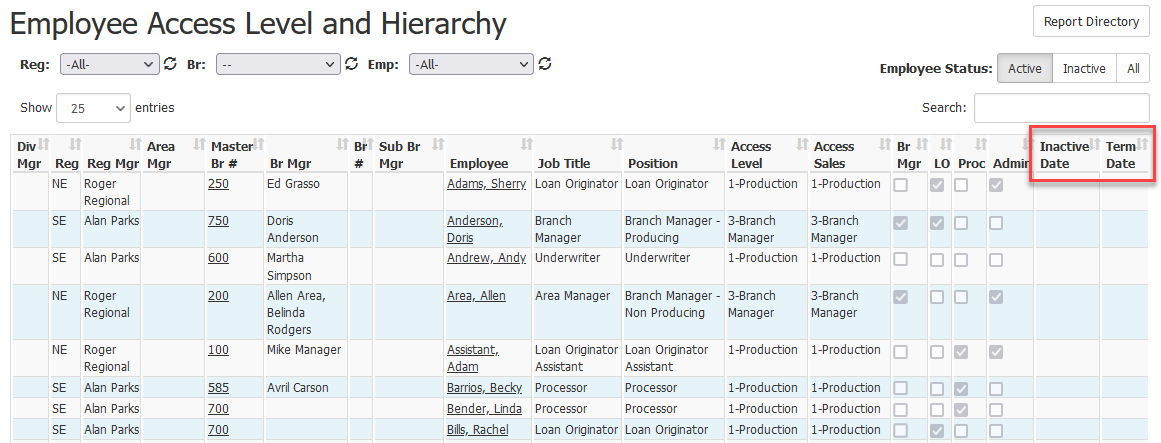
This report includes the following columns:
- Div Mgr: Division Manager of the employee.
- Reg: Region the employee is in.
- Reg Mgr: Full name of the region’s manager.
- Area Mgr: Full name of the Area manager.
- Master Br #: Branch number of the employee’s master branch. Click to view its Branch Details page.
- Br Mgr: Full name of the branch manager of the employee’s branch
- Br #: Branch number of the employee’s branch. Click to view its Branch Details page.
- Sub Br Mgr: Full name of the sub branch manager for the employee
- Employee: Full name of the employee. Click to view the employee’s details page.
- Job Title: Employee’s job title
- Position: Employee’s position
- Access Level: Employee’s compensation access level
- Access Sales: Employee’s sales access level
- Br Mgr: Whether or not the employee is a branch manager.
- LO: Whether or not the employee has the Loan Originator position.
- Proc: Whether or not the employee has the Processor position.
- Admin: Whether or not the employee has the “Admin box checked on their profile.
- Inactive Date: Date the employee was inactivated in nCino Incentive Compensation, if present
- Term Date: Employee’s last day of employment with the company, if present
Exporting the Report
To export this page, click the export icon.

This export includes the same columns that are in the online version.
Note: The columns that indicate whether the user is one of the following use "TRUE" or "FALSE" in the export.
- Br Mgr
- LO
- Proc
- Admin
- Active
- Allow Login
See also: