Manual Adjustment Tool Overview
The Manual Adjustment tool enables Executive Access Level users to manually create payroll adjustments to post on a chosen payroll. This article details the options available in the tool.
Accessing the Tool
To access this tool:
-
From the nCino Incentive Compensation menu, click "Payroll ▼".
-
Click "+ New Adjustment".
Creating Manual Adjustments
The Manual Adjustment tool can be used to create a variety of individual adjustments.
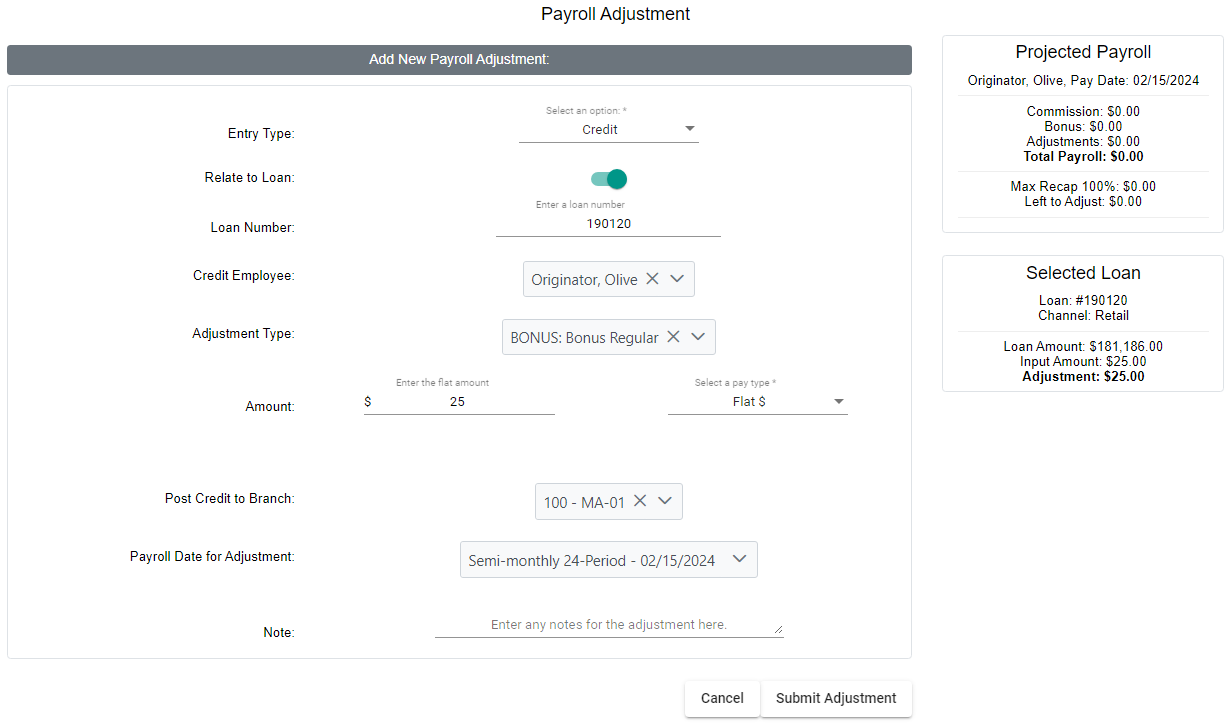
The Manual Adjustment tool has the following fields:
-
Entry Type: Transaction(s) this adjustment will create.
-
Options: Debit, Credit, Debit/Credit (see Debit/Credit Adjustments below)
-
-
Relate to Loan: Toggle if this adjustment will relate to a specific loan. If enabled, the "Loan Number" field will appear.
-
Loan Number: Appears if "Relate to Loan" is enabled. Loan number this adjustment is associated with.
-
[Debit / Credit] Employee: Employee receiving the adjustment. Name changes based on the Entry Type. If using Debit/Credit, the first section will be "Debit Employee".
-
Adjustment Type: Adjustment type this will post as. For more information, see Adjustment Types.
-
Amount: Amount of pay for the adjustment.
-
Amount Value: Value for the adjustment amount.
-
Pay Type: Units for the adjustment. Determines how pay is calculated.
-
Options: Flat $, BPS
-
-
-
Post [Debit / Credit] to Branch: Branch where the adjustment will be posted. Name changes based on the Entry Type. If using Debit/Credit, this first section will be "Post Debit to Branch".
-
Payroll Date for Adjustment: Date the adjustment will be posted.
-
If a past date is selected, the system behaves as though the adjustment has already paid. Backdated adjustments will not be included on any payroll transaction files.
-
-
Note: Note for record-keeping. Optional and has no effect on system behavior.
When done editing the adjustment, click the Save Adjustment button at the bottom.
Debit/Credit Adjustments
Selecting the "Debit/Credit" Entry Type allows you to create double-sided adjustments that debit one employee and credit the employee at the same time. When this is selected, the tool above is used for the debit transaction and an additional section is created for the debit transaction
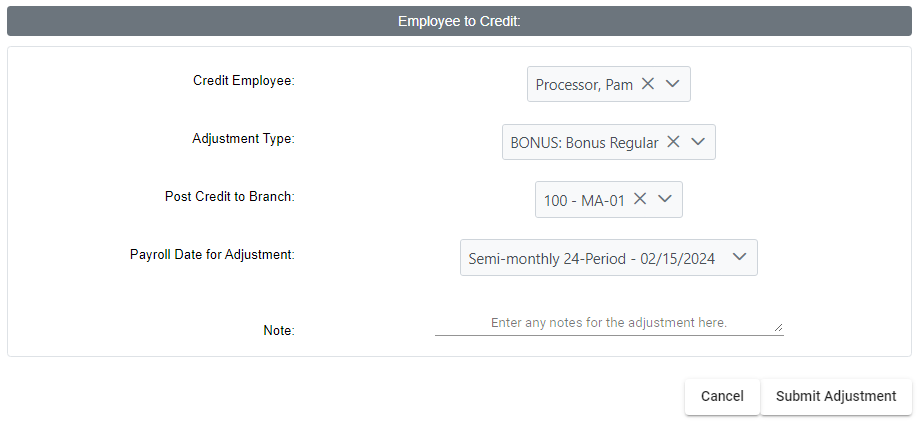
The additional section has the following fields:
-
Credit Employee: Employee receiving the credit transaction of the adjustment.
-
Adjustment Type: Adjustment type the credit will post as.
-
Post Credit to Branch: Branch where the credit transaction will be posted.
-
Payroll Date for Adjustment: Payroll date the credit transaction will be posted.
-
Note: Note for record-keeping that will save to the credit transaction.
See Also: