Marketing Account Balance Details Report
The Marketing Account Balance Details Report lists all transactions that have an impact on the marketing balance for a particular payroll period.
NOTE: This report is available for clients using the Marketing Accounts feature. If you are interested in using this feature, contact https://incentivehelp.ncino.com/hc/en-us.
Minimum Compensation Access Level Required: Own Production.
Accessing the Report
To access this report,
- From the nCino Incentive Compensation menu, click "Report ▼" .
- Click "All".
- Click "Account Balances".
- Click the "Marketing Account Balance Details" report.
Or
-
From the nCino Incentive Compensation menu, click "Payroll".
-
Click "Comp Snapshot".
-
On the Comp Snapshot screen, click the "Marketing Balance" header link on the right side.
Reading the Report
This report includes the following filters / display options:
-
Region, Branch, and Employee Filtering Tool: Used to filter the information on the report. For information on using this tool, refer to How do I filter reports?.
-
Payroll Period Selector: Used to select the payroll period shown on the report. For information on using this tool, refer to How do I use the date selectors?.
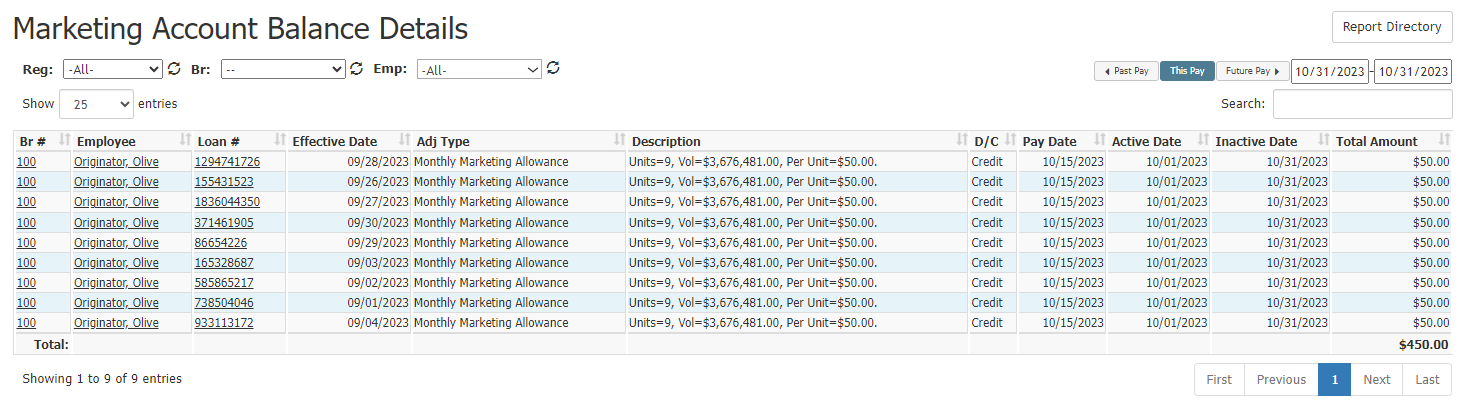
This report includes the following columns:
-
Br #: Employee's branch number. Click to view branch details.
-
Employee: Employee's name. Click to view employee details.
-
Loan #: Loan number for the loan related to the transaction. If blank, there is no loan associated with the transaction.
-
Effective Date: If there is an associated loan, this is the loan completed date. If this is a manual adjustment, this is the transaction entry date. Otherwise blank.
-
Adj Type: Transaction adjustment type.
-
Description: Text description of the transaction.
-
D/C: Whether the transaction is debit (D) or credit (C).
-
Pay Date: Date the marketing transaction is paid.
-
Active Date: Date the marketing amount is first available to be used.
-
Inactive Date: Date the marketing amount is no longer available to be used.
-
Total Amount: Total amount of the transaction.
Exporting the Report
To export this page, click the export icon.

This report includes all columns available in the online report.
See Also: