Marketing Account Transactions Report
The Marketing Account Transactions report lists all marketing transactions for a given payroll period.
Accessing the Report
To access this report:
-
From the nCino Incentive Compensation menu, click "Report ▼".
-
Click "All".
-
Click "Account Balances".
-
Click the "Marketing Account Transactions" report.
Reading the Report
This report includes the following filters / display options:
-
Region, Branch, and Employee Filtering Tool: Used to filter the information on the report. For information on using this tool, refer to How do I filter reports?.
-
Payroll Period Selector: Used to select the payroll period shown on the report. For information on using this tool, refer to How do I use the date selectors?.
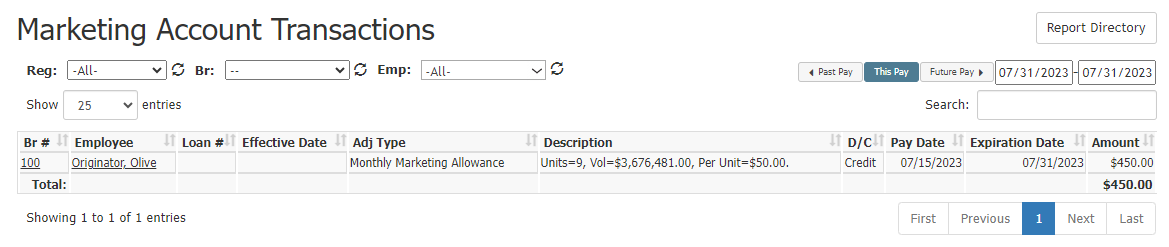
This report includes the following columns:
-
Br #: Employee's branch number. Click to view branch details.
-
Employee: Employee's name. Click to view employee details.
-
Loan #: Loan number for related loan. Blank if no loan is tied to the transaction.
-
Effective Date: The loan completed date. In the case of a manual adjustment, the transaction entry date. Otherwise blank.
-
Adj Type: Transaction adjustment type.
-
Description: Text description of the transaction.
-
D/C: Indicates if the transaction is Debit or Credit.
-
Pay Date: Pay date for the transaction.
-
Expiration Date: Transaction expiration date, if any.
-
Amount: Amount of the transaction in dollars.
Exporting the Report
To export this page, click the export icon.

This report includes all columns available in the online report, and the following added column:
-
Emp #: Employee number for the employee receiving the transaction.
See Also: