Payroll Transaction Details Report
The Payroll Transaction Details report lists all payroll transactions for the selected pay date. All pay-related transactions created by draws, manual adjustments, or from compensation plans will appear on this report.
Minimum Compensation Access Level Required: Own Production
NOTE: This report can show transactions worth $0 only if the Company Parameter is enabled in nCino Incentive Compensation. If you are interested in enabling this option, please contact https://incentivehelp.ncino.com/hc/en-us.
Access the Report
To access this report:
- From the nCino Incentive Compensation menu, click Report ▼.
- Click Payroll Transactions.
Read the Report
This report includes the following filters / display options:
-
Region, Branch, and Employee Filtering Tool: Used to filter the information on the report. For information on using this tool, refer to How do I filter reports?.
-
Payroll Period Selector: Used to select the payroll period shown on the report. For information on using this tool, refer to How do I use the date selectors?.
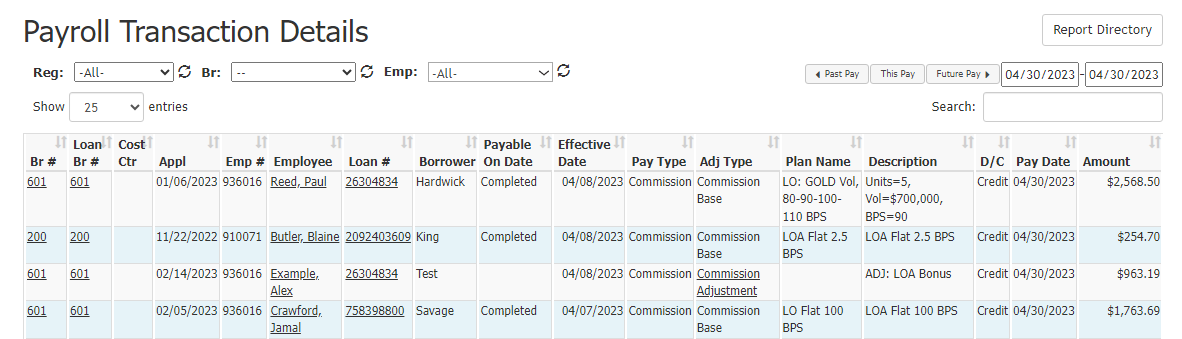
This report includes the following columns:
- Br #: Branch the transaction is posted to. Click to view branch details.
- Loan Br #: Branch the loan is assigned to. Click to view branch details.
- Cost Ctr: Cost center the loan’s branch is assigned to.
- Appl: Loan's application date.
- Emp#: Employee number of the employee receiving the transaction.
- Employee: Name of the employee receiving the transaction. Click to view employee details.
- Borrower: Name of borrower on the loan, if transaction is associated with a loan.
- Payable On Date: Milestone trigger designated on the incentive plan that nCino Incentive Compensation uses to identify when a loan is compensation payable. For manual adjustments or draws, this field will be blank.
- Effective Date: For transactions tied to a loan, this is the date the loan is compensation payable. For manual adjustments and draw transactions, this is the date the adjustment or draw was posted.
- Pay Type: The transaction’s payment type (for example, bonus or commission).
- Adj Type: The transaction’s adjustment type. Adjustment types vary by company but include Commission Adjustment, Commission Tier Bump, Bonus Regular, or Commission Base. If this is a manual adjustment, users can click this to view adjustment details.
- Plan Name: Name of the plan that created this transaction.
- Description: Notes from the plan or adjustment that provide additional detail on the transaction. This can be what's in the "Notes" section, or be automatically generated to describe the tier reached.
- D/C: Specifies whether the transaction is a debit or a credit to the employee.
- Pay Date: For reference and reporting purposes only, this is the date the transaction is to be paid. The actual pay date is set per the payroll and deposit transaction system.
- Amount: Dollar amount of the transaction.
NOTE: Incentive plans that are designated to save transactions as Lump Sum or Branch Lump Sum will show as one transaction without an associated loan number. To view the transactions by the associated loan number, refer to the Incentive Plan Pay Transactions report.
Export the Report
To export this page, click the export icon.

This export includes all columns from the online version of the report and the following additional columns:
-
Reg #: Region number the loan is posted to.
-
Loan Cost Ctr: Identical to "Cost Ctr" in online report.
-
Loan Amt: Volume of the loan.
-
Bps: Transaction amount in BPS.
-
GL Code Credit: Credit code used in general ledger export.
-
GL Code Debit: Debit code used in general ledger export.
-
Pay Code Credit: Credit code used in payroll export.
-
Pay Code Debit: Debit code used in payroll export.
-
Payroll Co Code: Company code used in payroll export.
-
Loan Branch Name: Name of the branch the loan is assigned to.
See also: