Pending Upload Draw Amt Audit Report
The Pending Upload Draw Amount Audit report is a tool for auditing draws created that use the pending hours option in the auto draw.
Minimum Compensation Access Level Required: Executive
Accessing the Report
To access this report,
- From the nCino Incentive Compensation menu, click "Report ▼".
- Click "All".
- Click "Payroll".
- Click the "Pending Upload Draw Amt Audit" report.
Reading the Report
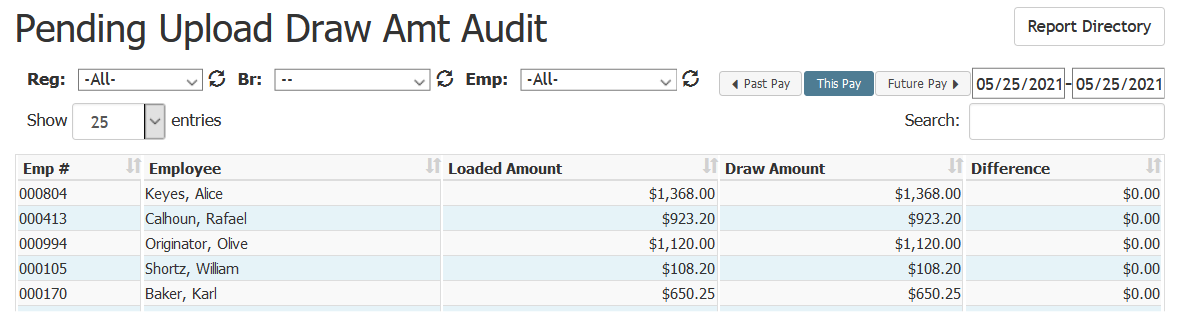
This report includes the following columns:
- Emp #: Employee number of the employee.
- Employee: Full name of the employee.
- Loaded Amount: Draw amount on the uploaded file.
- Draw Amount: Actual draw amount in nCino Incentive Compensation.
- Difference: Difference between the draw amount and the loaded amount.
Exporting the Report
To export this page, click the export icon at the top right.
This export includes the following columns:
- EmpLfNameWithdrawal: Identical to online field “Disburse From
- PayrollPayDateWithdrawal: Identical to online field “Payroll
- RecipientCount: Identical to online field “# Recipients
- HasPendingApproval: Similar to online field “Has Requests Pending Approval, but uses True/False instead of Yes/No
- TotalDisburse: Identical to online field “Total
- EmpWithdrawalId: Unique ID used to identify the employee’s withdrawal
- PayrollWithdrawalId: Unique ID used to identify the specific payroll
