Understand Employee Relationships
Employees in nCino Incentive Compensation can be linked using nCino Incentive Compensation relationships. These relationships can then be used to build a variety of incentive plans. This article details the feature and how it can be set up.
Relationships Overview
Relationships are a tool in nCino Incentive Compensation that helps describe the structure of employees within a company. For example, this can include employees who support, or report to others.
Relationships are set at a per-employee basis, and can be used when building Incentive Plans. Many relationships include a "reciprocal relationship", a matching relationship assigned to the employee on the "other end" of the original relationship. For example, the reciprocal of "Reports to" is "Reports to Me", and the reciprocal of "Supported By" is "Supports".
Each relationship consists of the following:
-
Relationship Type: Short phrase describing the kind of relationship.
-
Name: The other employee in the relationship.
-
Start Date: Date the relationship began.
-
Stop Date (Optional): Date the relationship ends.
Setting Up Relationship Visibility
Prior to creating any relationships in nCino Incentive Compensation, administrators should set the visibility level employees have for their relationships. This can be set using the Relationship Management tool, which can be accessed under the gear icon ( ) -> System Admin -> Company Profile -> Relationship Management.
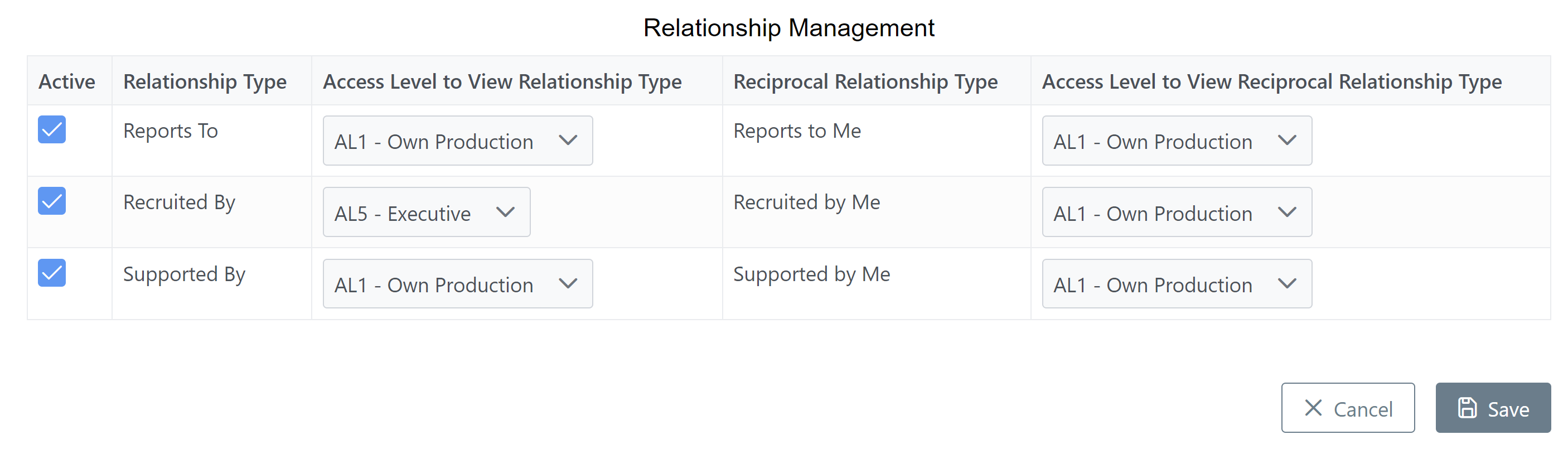
The "Active" column check marks determine which relationships are active for the company. Additionally, admins can set the Access Level required for employees to view the relationship and reciprocal relationship types.
Setting Up Relationships on Employee Details
An employee's relationships can be edited from the "Relationships" tab of their Employee Details page.
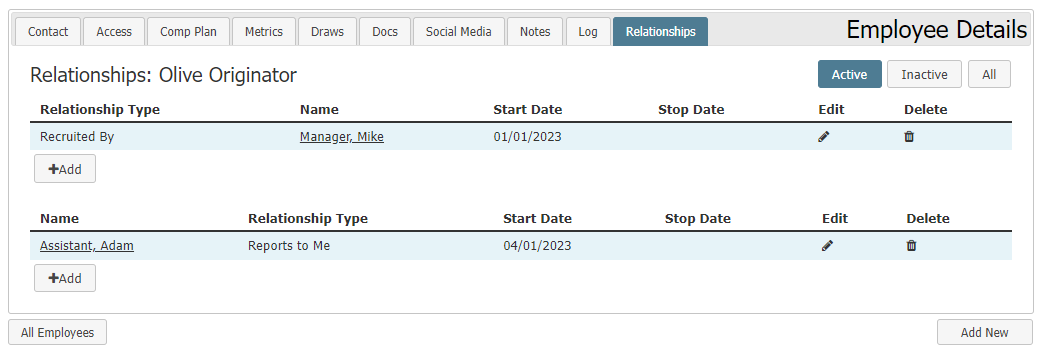
Above and to the right of the relationships tables are buttons that can be used to select whether "Active", "Inactive", or "All" relationships are shown.
The top section lists the employee's relationships, and the bottom lists reciprocal relationships the employee is a part of. New relationships can be added by clicking the "+ Add" button, and existing relationships and reciprocal relationships can be edited or deleted by clicking the pencil ( ) or trash can (
 ) icons.
Using Relationships in Incentive Plans

When building incentive plans, relationships can be used as filters in the "Volume Generated By" and "Exclude loans that meet any criteria" filter sections. The filter is called "Relationship + Assignment", and specifies both a relationship with the user assigned the incentive plan, and a loan assignment that the other person in the relationship must have.
You can also specify whether or not indirect relationships are considered. A "direct relationship" is a relationship between two employees, and an "indirect relationship" is a chain of two or more direct relationships that connects two employees. A common type of indirect relationship is "indirect reports". One example is the relationship between an employee and their manager's boss. This means that employee directly reports to their manager, and indirectly reports to their manager's boss.
See Also: