Incentive Plan Pay Timing Options Report
The Incentive Plan Pay Timing Options report lists all available pay timing options and the relevant dates for those options during the selected pay period.
Minimum Compensation Access Level Required: Executive
Accessing the Report
To access this report,
-
From the nCino Incentive Compensation menu, click "Report ▼".
-
Click "All".
-
Click the "Payroll" header.
-
Click the "Incentive Plan Pay Timing Options" report.
Reading the Report
This report includes the following filters / display options:
-
Region, Branch, and Employee Filtering Tool: Used to filter the information on the report. For information on using this tool, refer to How do I filter reports?.
-
Payroll Period Selector: Used to select the payroll period shown on the report. For information on using this tool, refer to How do I use the date selectors?.
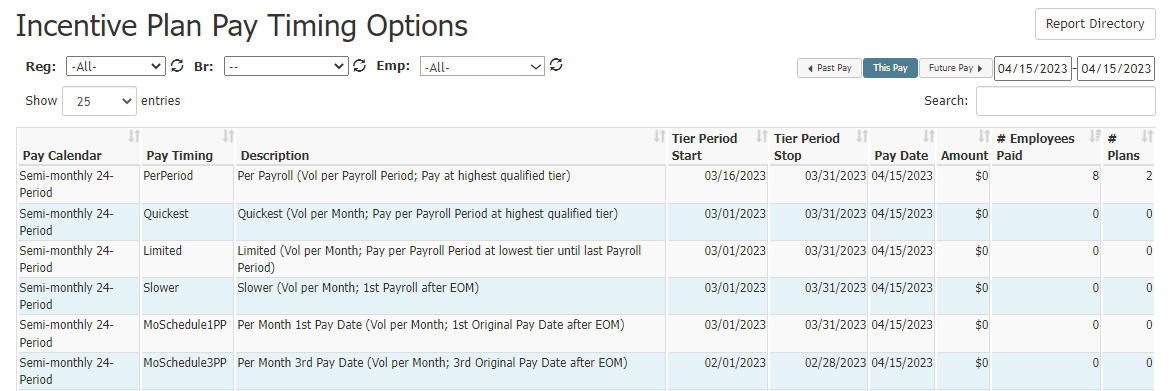
This report includes this following columns:
-
Pay Calendar: Calendar this pay timing option applies to.
-
Pay Timing: Short name of the pay timing.
-
Description: Full name of the timing (eligible loan period, payroll the compensation will be paid on). For more information on specific pay timings, see Understand Payment Timings.
-
Tier Period Start: Start date of period for tier determination.
-
Tier Period Stop: End date of period for tier determination.
-
Pay Date: Pay date for plans using this timing.
-
Amount: Total amount paying for the applicable timing and pay date.
-
# Employees Paid: Total number of employees with a plan that uses this timing.
-
# Plans: Total number of plans that use this timing.
Exporting the Report
This export includes all columns on the online version of the report.
See Also: