Payroll Transactions With Incentive Plan Details Report
The Payroll Transactions with Incentive Plan Details report presents an itemized view of every loan-level transaction in a payroll period.
Minimum Compensation Access Level Required: Own Production
Access the Report
To access this report:
- From the nCino Incentive Compensation menu, click Report ▼.
- Click All.
- Click Payroll.
- Click the Payroll Transactions with Incentive Plan Details report.
Read the Report
This report includes the following filters / display options:
-
Region, Branch, and Employee Filtering Tool: Used to filter the information on the report. For information on using this tool, refer to How do I filter reports?.
-
Payroll Period Selector: Used to select the payroll period shown on the report. For information on using this tool, refer to How do I use the date selectors?.
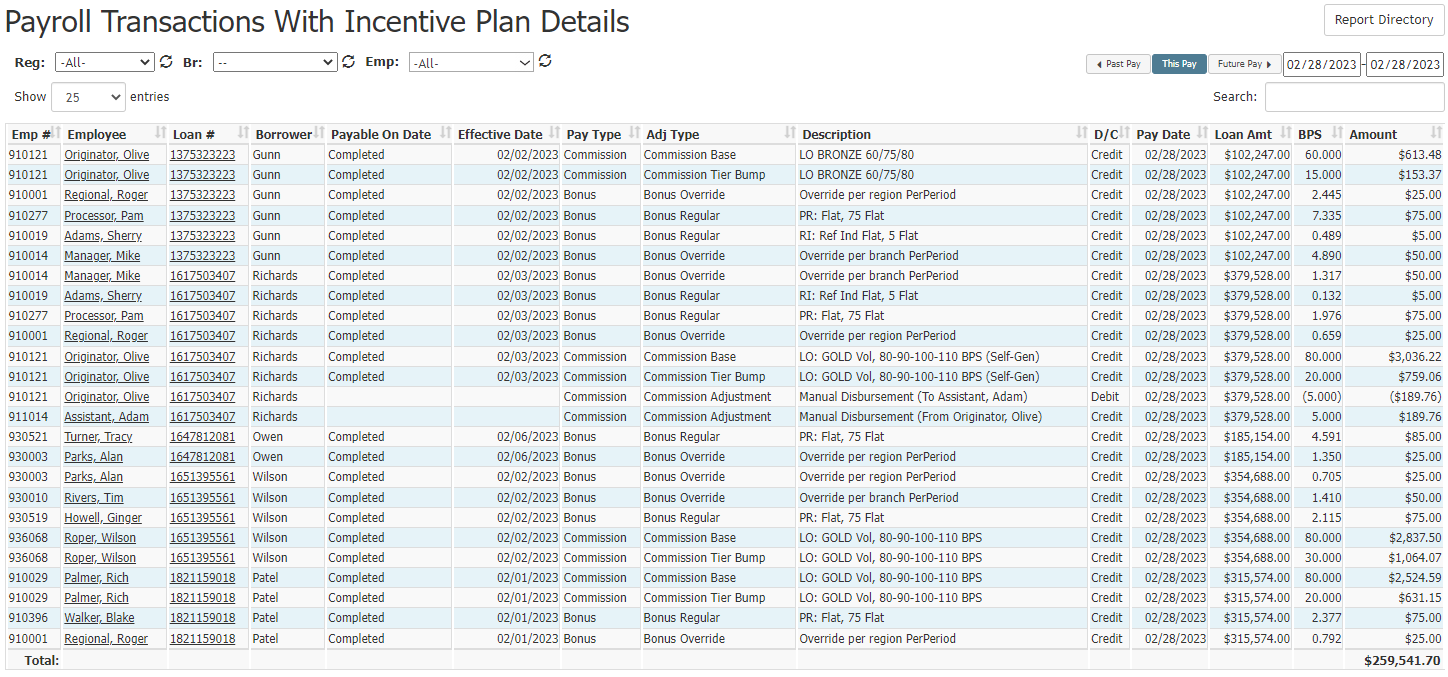
- Emp #: Employee Number.
- Employee: Name of the employee assigned to the transaction. Click to go to that employee’s details page.
- Loan #: Loan number. Click to go to that loan’s details page.
- Borrower: Borrower’s last name.
- Payable On Date: Milestone that indicates the loan is compensation payable.
- Effective Date: Date the Payable on Date trigger occurred.
- Pay Type: Type of pay associated with the transaction.
- Adj Type: Adjustment type associated with the transaction.
- Description: Description from the incentive plan.
- D/C: Whether the transaction is debit or credit.
- Pay Date: Actual deposit date for the transaction.
- Loan Amt: Loan Amount.
- BPS: Basis Points.
- Amount: Transaction amount paid or deducted.
Export the Report
To export this page, click the export icon.

This export includes the following column(s) not present in the online version.
- GL Code Credit: General Ledger code for Credit Transaction.
- GL Code Debit: General Ledger code for Debit Transaction.
- Pay Code Credit: Payroll export code for Credit Transaction.
- Pay Code Debit: Payroll export code for Debit Transaction.
- Br #: Employee’s home branch number.
- Loan Br #: Loan’s assigned branch number.
- Cost Ctr: Cost center number associated with the employee's home branch. Used in the General Ledger export.
- Loan Cost Ctr: Cost center number associated with the loan. Used in the General Ledger export.
- LOB: Short name of loan branch.
- Loan Branch Name: Full name of loan branch.
-
Loan Date: Same as Effective Date in the online version.
See also: