Build Draws
This article details the options available when an admin creates or edits a draw. This includes a detailed breakdown of individual settings and possible values for each, as well as examples of how draws can be used.
Overview
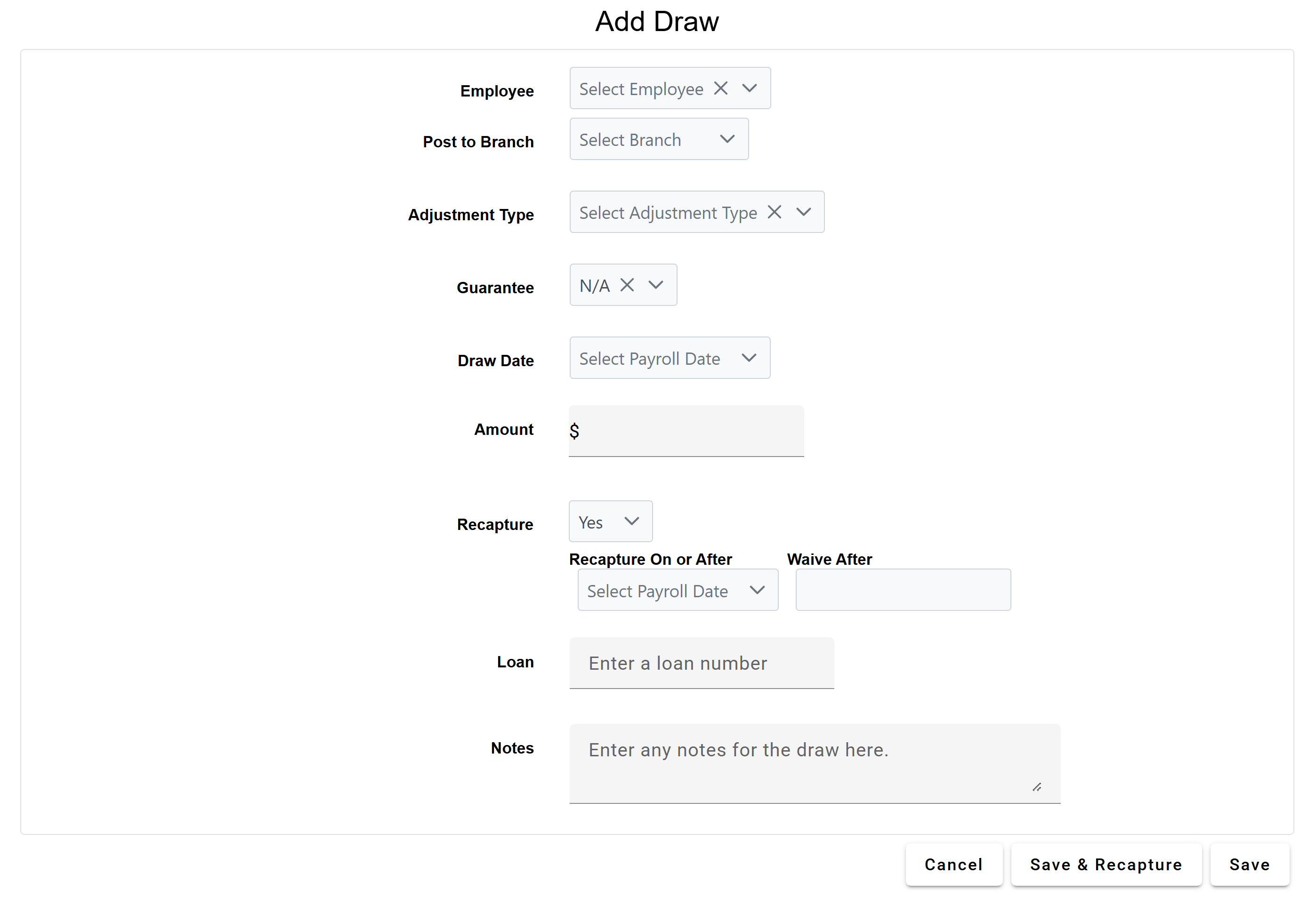
A draw is a record of transaction data, along with details about when and how that transaction occurred. Draws are typically not used for base commission, but for one-off, recapturable, or guaranteed pay.
The system calculates draws and applies them to the current payroll's compensation once an admin uses the Process Unpaid Draws button, or the system automatically processes unpaid draws. Additionally, admins can choose to "Save & Recapture" draws as soon as they are entered.
A user's draw balance is a list of the user's debts that result from draws. Draw balance amounts are either recaptured from compensation or waived.
Admins can manually create a draw, upload them in bulk (see Bulk Upload Draw Transactions), create a draw from auto draws. The system can also create draws to correct for an employee having net negative compensation for a period.
Admins can create new draws by clicking Payroll > + New Draw.
Draw Builder Parameters
This section details the parameters on the draw builder and how to use them.
-
Employee: User who receives the draw transaction
-
Post to Branch: Branch that the draw transaction posts to
-
Adjustment Type: Adjustment type the draw transaction posts as. This does not affect draw calculations. For more information, refer to Adjustment Types.
-
Guarantee: Indicates if the draw is a guarantee, and what type of guarantee it is. A draw entry must either be a guarantee, have recapture information, or both. For more information on these options, refer to Guarantee Options.
-
Draw Date: Pay date that the draw will post to
-
Amount: Dollar amount for the draw. If a Guarantee is selected, this becomes "Guaranteed Amount".
-
Recapture: Indicates if the draw is recapturable. A draw entry must have recapture information if it is not a guarantee. Recapturable draws must have a Recapture On or After date.
-
Recapture On or After: Visible if the draw is recapturable. Initial date the system attempts to recapture the draw balance from this draw. If it is unable to recapture all of the draw balance for this draw, any remainders are carried forward to the next pay period.
-
Waive After: After this date, the draw amount is waived from the draw balance. It is removed and the system no longer attempts to recapture it.
-
-
Loan: Optional loan number associated with the draw
-
Notes: Text fields used to describe the draw. Does not affect draw calculations.
Guarantee Options
This section details the options available for the Guarantee option and how it works.
-
N/A: Draw is not a guarantee.
-
Guaranteed Minimum: Draw posts a credit to the employee if their compensation is less than the entered amount. Ensures that the employee's compensation is always greater than or equal to the entered amount. Balances created by this draw cannot be recaptured by other draws.
-
If the "Allow Net Pay Below Guaranteed Minimum" Company Parameter is set to True, transactions excluded from minimum pay calculations can cause the employee's net pay to be below this minimum.
-
-
Monthly Guarantee: Only visible if the "Guarantee Recaptured in Same Period" Company Parameter is enabled. On each payroll period of the month, the draw pays a guarantee equal to half the entered amount that other draws can recapture starting on the same date this draw is posted.
-
Monthly Guaranteed Minimum: Only available for companies using a 24-pay period calendar. This draw is a guaranteed minimum per month. On the first payroll period of the month, if the employee's pay is less than half the entered amount, the system creates a transaction to bring them up to half the entered amount. On the second payroll period of the month, if the employee's pay for the whole month is less than the entered amount, the system creates a transaction to bring them up to the entered amount.
-
If the "Allow Net Pay Below Guaranteed Minimum" Company Parameter is set to True, transactions excluded from minimum pay calculations can cause the employee's net pay to be below this minimum.
-
-
Recapturable Credit: The draw is an advance that the system will recapture based on the Recapture On or After date entered.
-
Guarantee: Only visible if the "Guarantee Recaptured in Same Period" Company Parameter is enabled. The draw pays a guarantee that other draws can recapture starting on the same date this draw is posted.
Examples
Example: Recoverable Draw
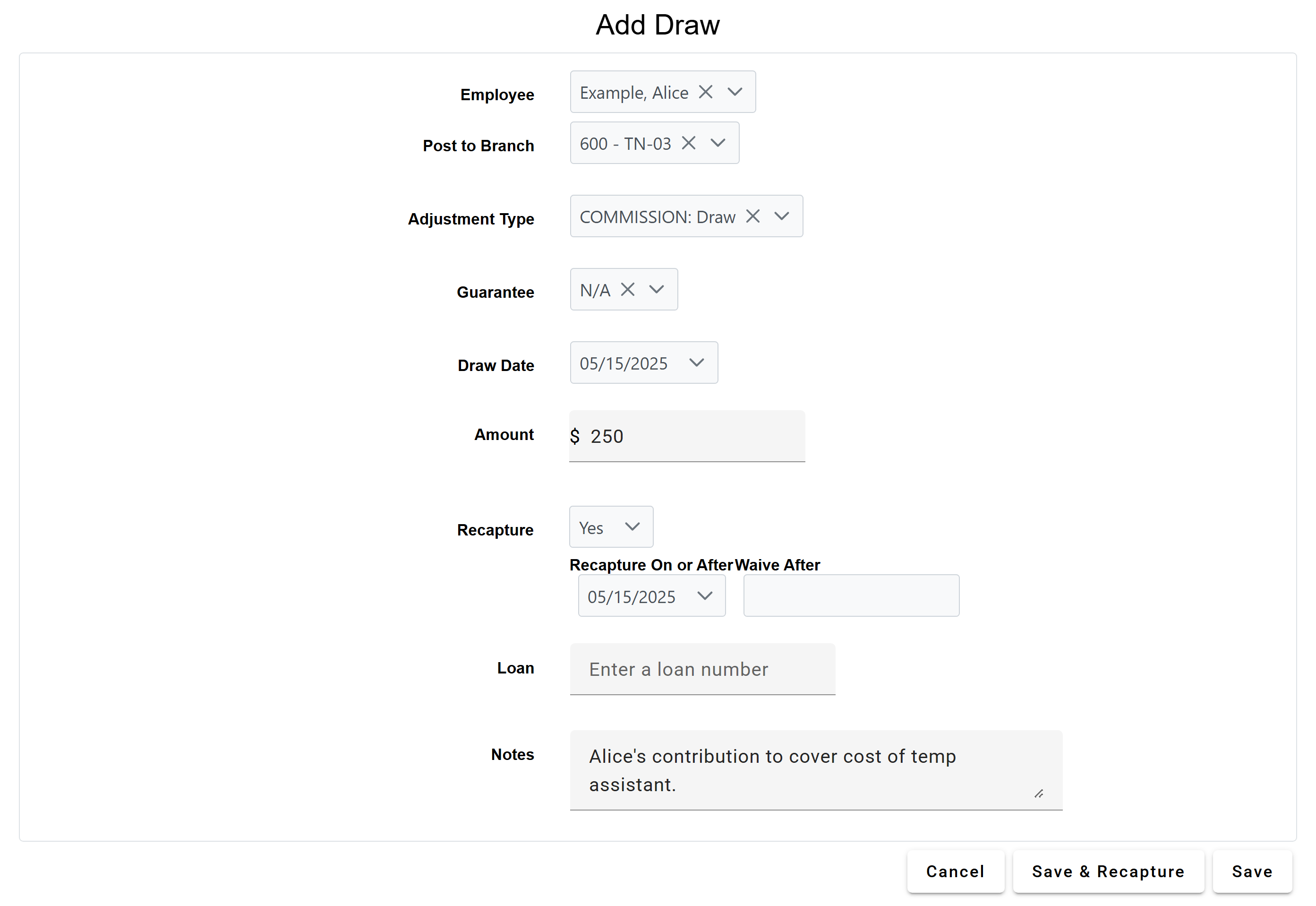
Alice's company has hired a temporary assistant to help during a busy period. Because of this, all employees are expected to contribute $250 to help cover the cost of the assistant. This is done in the form of a draw.
A draw set up to cover this could use the following options:
- Adjustment Type: COMMISSION: Draw
- Guarantee: N/A
- Draw Date: 05/15/2025
- Amount: 250
- Recapture: Yes
- Recapture On or After: 05/15/2025
Example: Non-Recoverable Guaranteed Minimum
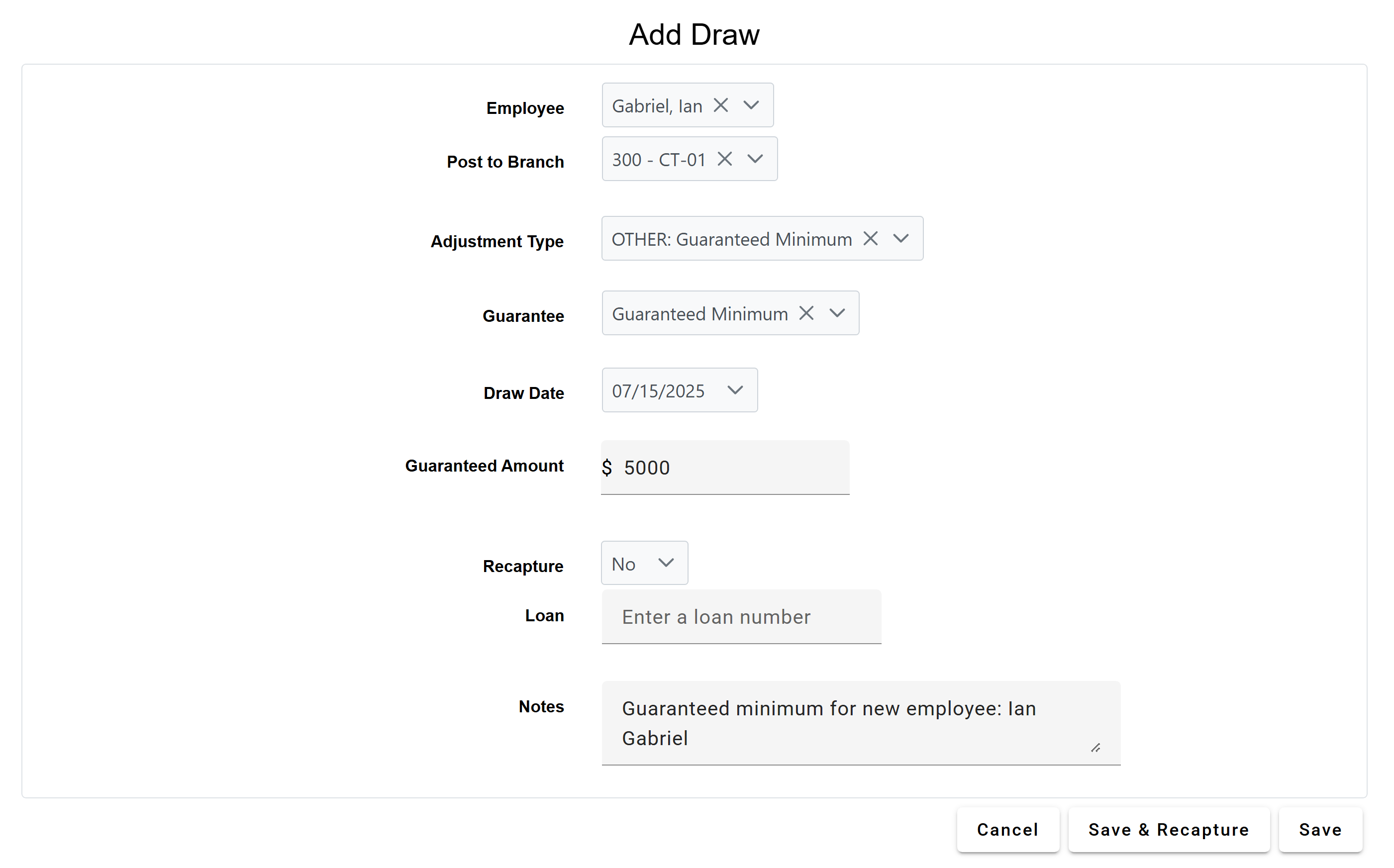
Ian has just started working as a processor at his company. Because Ian is new to the company, he likely takes some time to get used to his role. The company creates a non-recoverable guaranteed minimum to help cover his pay during this initial period.
A draw set up to cover this could use the following options:
- Adjustment Type: OTHER: Guaranteed Minimum
- Guarantee: Guaranteed Minimum
- Draw Date: 07/15/2025
- Amount: 5000
- Recapture: No
See also: