Note: Schedules and Allocations were retired in March 2025. For more information, refer to Schedule and Allocation Retirement Next Steps.
Employee Compensation Schedule Tier Details Report
The Employee Compensation Schedule Tier Details report provides admins with access to a variety of compensation schedule information to aid in the transition to Incentive Plans.
Minimum Compensation Access Level Required: Executive
Access the Report
To access this report from the nCino Incentive Compensation menu, click:
-
Report ▼
-
All
-
Compensation Plans header
-
Employee Compensation Schedule Tier Details
Read the Report
This report includes the following filters and display options:
-
Region, Branch, and Employee Filtering Tool: Used to filter the information on the report. For information on using this tool, refer to How do I filter reports?.
-
Date Selector: Used to select the date range for the report. For more information on using this tool, refer to How do I use the date selectors?.
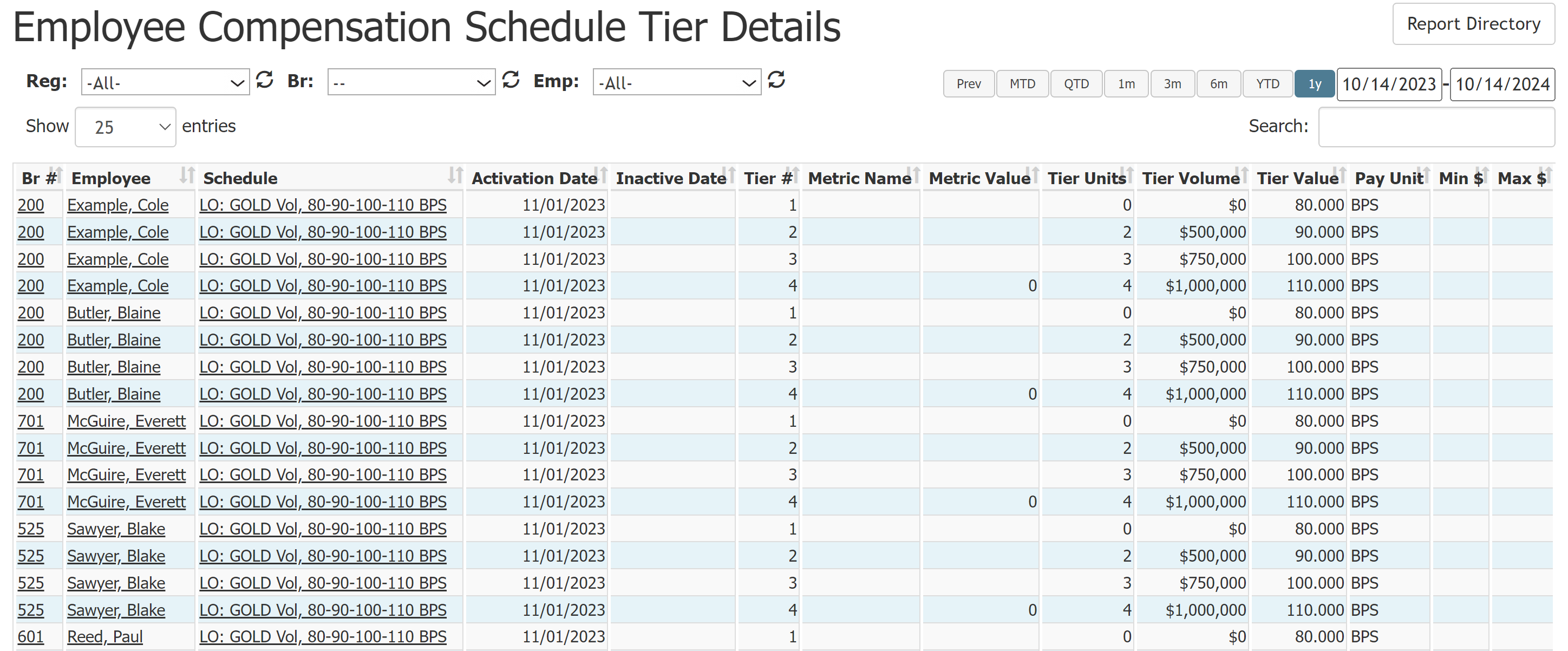
This report includes the following columns:
-
Br #: Employee Branch number. Click to view branch details.
-
Employee: Employee name. Click to view employee details.
-
Schedule: Schedule name. Click to view schedule details.
-
Activation Date: Date the employee's assignment to the schedule was activated.
-
Inactive Date: Date the employee's assignment to the schedule was inactivated.
-
Tier #: Tier number. Tier numbers start at 1 and count up for each additional tier (e.g. Tier 1, Tier 2, Tier 3...).
-
Metric Name: Metric used for the tier.
-
Metric Value: Metric value the loan must reach to qualify for the tier.
-
Tier Units: Number of units that must qualify for the plan for it to pay based on this tier.
-
Tier Volume: Volume that must qualify for the plan for it to pay based on this tier.
-
Tier Value: Amount paid for the tier.
-
Pay Unit: Units for the amount paid. Either BPS or Flat.
-
Min $: Minimum dollar amount paid for the tier.
-
Max $: Maximum dollar amount paid for the tier.
Export the Report
To export this page, click the export icon.

The export includes all data in the online version and the following:
-
Region: Region name.
-
Emp #: Employee number.
-
Employee Plan ID: Internal ID for the employee's schedule assignment. This number is visible in the URL for the Employee Compensation Schedule page.
-
Plan ID: Internal ID for the schedule. This number is visible in the URL for the Compensation Schedule page.
-
Metric Type: Metric grid assigned on the plan.
-
Tier Type: Tier type used on the schedule. Possibilities include: Flat, Units, Vol, Units OR Vol, Units AND Vol.
-
Volume Offset: Amount of volume offset per tier. For more information, refer to Understand Tier Offsets.
See Also: